
No access to dataset in Looker Studio
The "No access to dataset" error in Looker Studio appears when a report reads BigQuery on behalf of the owner and the viewer has no permissions. To fix it, open "Manage data", click "Edit" next to the source, open "Credentials", choose "Credentials of a user with read access" and click "Update". Repeat for each source.
Why “No access to dataset” appears
Looker Studio shows the “No access to dataset” error when a report gets BigQuery data on behalf of the viewer and the viewer’s Google account has no read permissions. This is the most common error when working on reports together. It goes away if you switch the data source to the credentials of the user who is viewing the report.
Condition: the viewer’s Google account must already be given access to the storage by Bimp technical support; see BigQuery and Looker Studio: connection and first report.
How to fix access to a data source
- Click the chart or table with the error. In the right panel, in the “Data source” section, click Manage data.
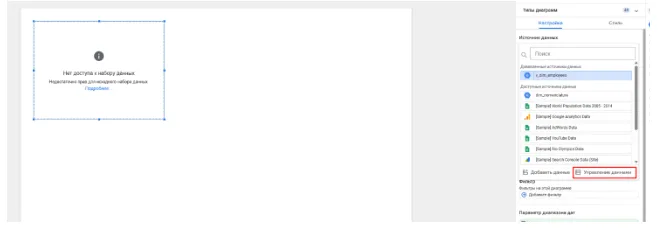
- In the list of sources, find the one you need (for example, “v_dim_employees”) and click Edit to the right of it.

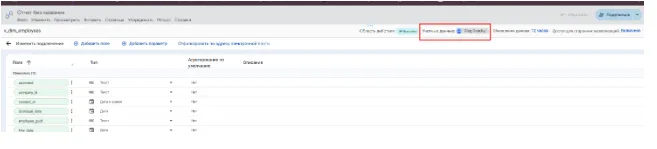
- On the page with the table’s field list, above the list find the “Credentials” item (the report owner’s name is shown next to it) and click it.
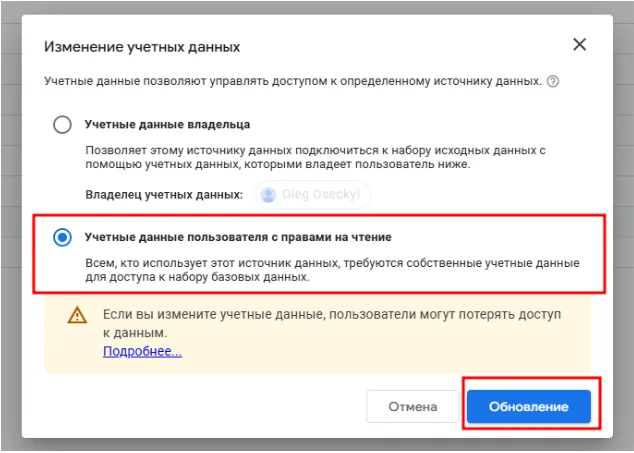
- In the “Change credentials” window, choose the bottom option, Credentials of a user with read access, and click the blue Update button.
- Close the source settings with the “Done” button or the back arrow and refresh the page in your browser.
After that, data appears on the charts instead of the error.
FAQ
Why does Looker Studio say "No access to dataset"?
Looker Studio tries to get data on behalf of the viewer, who has no BigQuery permissions. You need to switch the source credentials to "Credentials of a user with read access".
Do I need to fix access for every table?
Yes. Do the procedure for each data source used in the report.
The user still does not see data after changing the credentials. What should I check?
Make sure this user's Google account has been passed to Bimp technical support and has been given access to the storage. See "BigQuery and Looker Studio: connection and first report".