
Bimp webhooks: setup and event formats
On this page
A webhook is an HTTP request that Bimp sends to your URL when stock changes, a product is created or changed, or a customer order status changes. You add a webhook in "Company settings → Webhooks": specify a name, URL and type, and for stock and statuses also warehouses or statuses.
What a webhook is in Bimp
A webhook is an automatic HTTP request from Bimp to your address (endpoint) at the moment of an event. Your service receives the request and performs actions, for example updates stock on the website.
Bimp has three types of webhooks:
| Type in the interface | When it is sent | What else you select |
|---|---|---|
| “Stock balances” | stock changed (sale, receipt, write-off, transfer, etc.) | warehouses |
| “Products” | a product was created or changed | none |
| “Customer order statuses” | a customer order status changed | statuses |
Webhooks complement the REST API: the initial data export is done with API requests (see Getting started with the API), and subsequent changes arrive as webhooks.
How to set up a webhook
To add a webhook, open the company settings, go to the Webhooks tab and create a record.
-
Open Company settings → Webhooks.
-
Click Add.
-
In the “Add webhook” window, fill in the fields:
- “Name”: any name;
- “URL”: the address of your endpoint that requests will be sent to, for example
https://mysite.com/webhook; - “Type”: “Products”, “Stock balances” or “Customer order statuses” (required).
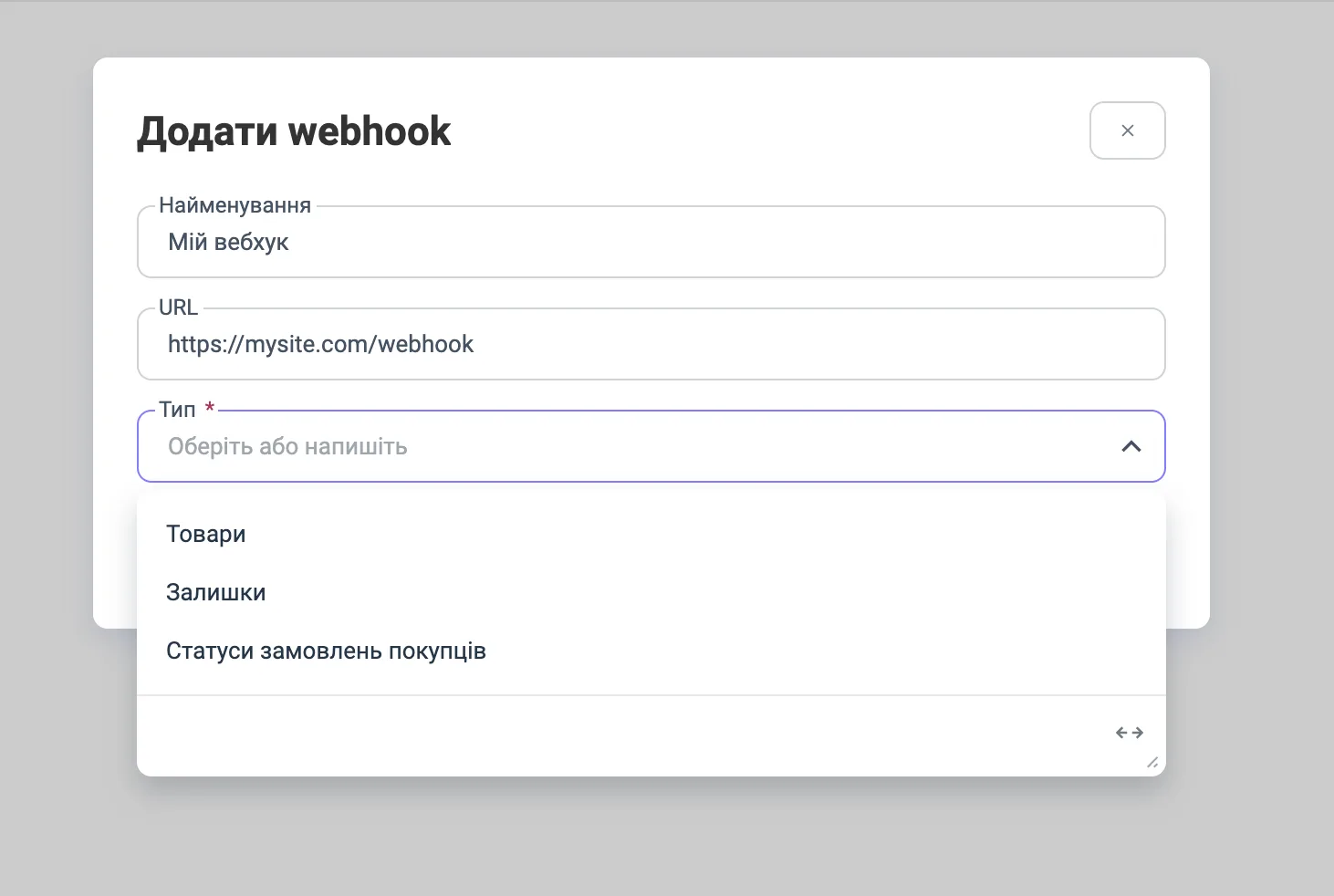
-
For the “Stock balances” type, in the “Warehouse” field check the warehouses to send events for.
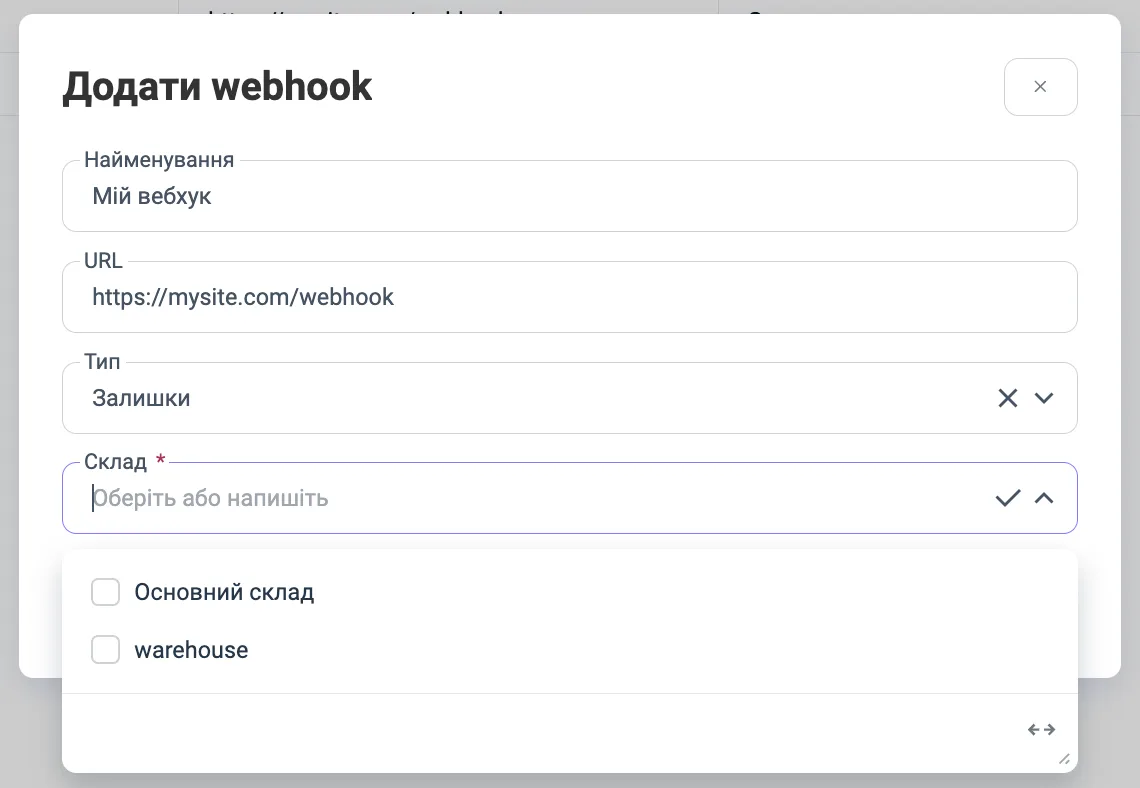
-
For the “Customer order statuses” type, in the “Status” field check the statuses that should trigger an event when an order moves to them (for example, “New”, “Paid”, “Shipped”, “Canceled”; the list depends on your company’s statuses).
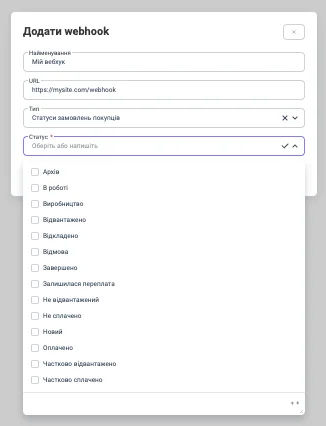
-
Save the webhook. It appears in the list on the Webhooks tab with the columns “Name”, “URL”, “Type”, “Warehouse”, “Status”. Webhooks differ by the “Type” column.
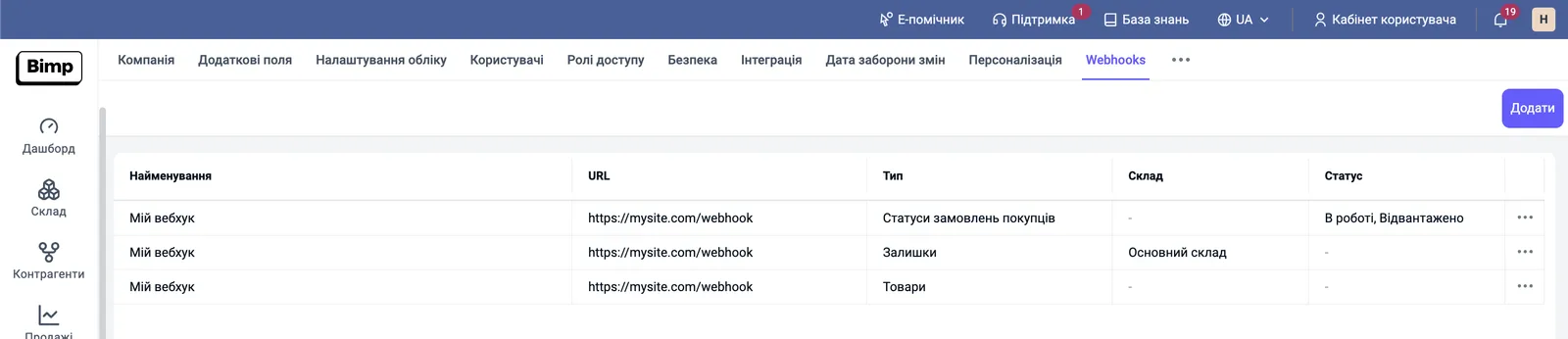
To edit or delete a webhook, use the three-dot menu at the end of its row.
What the endpoint should look like
An endpoint is a public HTTPS URL of your service that accepts POST with a JSON body. The description below is based on the event formats; response requirements are not documented.
- Accept the request, parse the JSON and respond quickly; move heavy processing to a queue.
- Expect repeated and out-of-order events: identify the object by
uuid/id, and determine freshness by thetimestampfield (where present). - Do not rely on an event as the only source: periodically reconcile data with the API.
The “Stock balances” webhook
The “Stock balances” webhook is sent when product stock changes: on sales, receipts, write-offs and transfers. It fits when you need current stock on the website without waiting 10-30 minutes for the next scheduled run.
Example event body:
{
  "id": "product-id",
  "barcode": "product_barcode",
  "sku": "product_sku",
  "name": "Product Name",
  "total_physical": -1,
  "total_reserved": 1,
  "total_available": -2,
  "stock_details": [
    {
      "storage_id": "Warehouse-Id",
      "storage_name": "Storage Name",
      "physical": -1,
      "reserved": 1,
      "available": -2
    },
    {
      "storage_id": "Storage-Id",
      "storage_name": "Основний склад",
      "physical": 0,
      "reserved": 0,
      "available": 0
    }
  ],
  "timestamp": "2026-01-01T00:00:00.000Z"
}| Field | What it means |
|---|---|
id | product identifier in Bimp |
barcode, sku, name | product barcode, SKU and name |
total_physical | physical stock across all warehouses |
total_reserved | reserved quantity |
total_available | available quantity (physical stock minus reserve) |
stock_details | breakdown by warehouse: storage_id, storage_name, physical, reserved, available |
timestamp | event time, ISO 8601 UTC |
Available stock equals physical stock minus reserve, and can be negative (in the example: -1 physical, 1 reserved, -2 available).
The “Products” webhook
The “Products” webhook is sent when a product is created or changed in Bimp. You need it to synchronize the product directory (names, article numbers, SKUs, description, dimensions) with an external system without delay.
Example for a product without modifications:
{
  "product": {
    "uuid": "product-id",
    "name": "Product Name",
    "article": "product-article",
    "sku": "product-sku",
    "description": "product description",
    "picture": "product-picture.com",
    "isModification": false,
    "measurements": {
      "weight": 1,
      "length": 10,
      "width": 20,
      "height": 30
    }
  },
  "timestamp": "2026-01-01T00:00:00.000Z"
}
For a product modification, isModification equals true, and product gets a parent block with the parent product data (the same set of fields, without isModification):
{
  "product": {
    "uuid": "product-id",
    "name": "Product Name",
    "article": "product-article",
    "sku": "product-sku",
    "description": "product description",
    "picture": "product-picture.com",
    "isModification": true,
    "measurements": { "weight": 1, "length": 10, "width": 20, "height": 30 },
    "parent": {
      "uuid": "parent-product-id",
      "name": "Parent Name",
      "article": "parent-article",
      "sku": "parent-sku",
      "description": "parent description",
      "picture": "parent-picture.com",
      "measurements": { "weight": 2, "length": 20, "width": 30, "height": 40 }
    }
  },
  "timestamp": "2026-01-01T00:00:00.000Z"
}| Field | What it means |
|---|---|
product.uuid, name, article, sku, description | product UUID, name, article number, SKU and description |
product.picture | link to the photo |
product.isModification | true if this is a modification of another product |
product.measurements | weight, length, width, height |
product.parent | parent product; present only for modifications |
timestamp | event time, ISO 8601 UTC |
The “Customer order statuses” webhook
The “Customer order statuses” webhook is sent when a customer order status changes to one of those selected in the webhook settings, for example “Paid”, “Shipped”, “Canceled”. It is useful when later processes depend on the status: delivery, reserve, fiscalization. For statuses, see Order statuses.
The event body contains the whole order:
{
  "order_id": "order-id",
  "comment": "order comment",
  "buyer": { "uuid": "buyer-id", "name": "Buyer Name" },
  "date": "2026-01-01T00:00:00",
  "name": "Buyer's order № 1 from 01.01.2026",
  "organization": { "uuid": "organization-id", "name": "Organization Name" },
  "quantityOrdered": 1,
  "quantityShipped": 1,
  "status": { "uuid": "status-id", "name": "Status Name" },
  "sumPayed": 0,
  "sumShipped": 0,
  "TTN": "",
  "docNumber": "1",
  "paymentEntity": { "uuid": "payment-id", "name": "Основна каса" },
  "project": { "uuid": "project-id", "name": "Project Name" },
  "contract": { "uuid": "contract-id", "name": "Contract Name" },
  "lineOfBusiness": { "uuid": "line-of-business-id", "name": "Line Of Business Name" },
  "warehouse": { "uuid": "warehouse-id", "name": "Warehouse Name" },
  "VATaccounted": false,
  "priceList": { "uuid": "Price-List-id", "name": "Price List Name" },
  "VATamount": 0,
  "products": [
    {
      "nomenclature": { "uuid": "nomenclature-id", "name": "Nomenclature Name" },
      "count": 1,
      "VAT": { "uuid": "VAT-id", "name": "VAT Name" },
      "VATamount": 0,
      "cost": 291.1,
      "amount": 291.1,
      "comment": "product comment",
      "discount": 0,
      "discountPercentage": 0,
      "shiped": 1,
      "warehouse": { "uuid": "warehouse-id", "name": "Warehouse Name" },
      "reserve": 1,
      "modification": null,
      "machinery": { "uuid": "machinery-id", "name": "Machinery Name" }
    }
  ]
}
Top-level fields:
| Field | What it means |
|---|---|
order_id, docNumber, name, date, comment | order identifier, number, name, date and comment |
status | the new status (uuid, name) |
buyer, organization, contract, project, lineOfBusiness, warehouse, priceList, paymentEntity | related objects with uuid and name: customer, organization, contract, project, line of business, warehouse, price list, cash desk or payment account |
quantityOrdered, quantityShipped | ordered and shipped quantity |
sumPayed, sumShipped | paid amount and shipped amount |
TTN | waybill number (empty string if none) |
VATaccounted, VATamount | VAT accounting flag and VAT amount |
products | order lines |
Line fields in products: nomenclature, count, VAT, VATamount, cost (price), amount (total), comment, discount, discountPercentage, shiped (shipped), warehouse, reserve (reserve), modification, machinery (equipment).
Common problems
The webhook does not arrive. Causes: the URL is not reachable from the external network, no warehouses or statuses are selected, or the event does not match the selected ones. Solution: check the URL and make sure the “Warehouse” or “Status” columns in the webhook list show the values you need.
The webhook arrives, but the data is outdated. Cause: events may arrive out of order. Solution: compare timestamp with the one already stored and ignore older events.
FAQ
Which events do Bimp webhooks support?
Three types: "Stock balances" (stock changes), "Products" (a product is created or changed) and "Customer order statuses" (a document status changes).
Why is a webhook better than periodically requesting stock?
A webhook arrives immediately after the change, so you do not have to wait 10-30 minutes for the next scheduled run. For the initial full export, still use the API.
How do I limit a stock webhook to specific warehouses?
When you select the "Stock balances" type, a required "Warehouse" field appears: check the warehouses whose changes should be sent. For the "Customer order statuses" type, you select statuses in the same way.
Can I edit or delete a webhook?
Yes. In the list on the Webhooks tab, you can edit or delete a webhook via the three-dot menu at the end of the row.