
Warehouse defect list: spare parts for repair and plan vs actual issue
On this page
A Warehouse defect list is a document that records the list of spare parts for a repair under a Work order and shows the plan vs actual issue from the warehouse. Create it based on a Work order, add products with the "Add" button and specify the service and the warehouse the product will be written off from.
What the defect list is for
The “Warehouse defect list” document records the list of components or spare parts that need to be replaced or repaired within a specific Work order. It gives the storekeeper a plan (“what to issue”) and lets you track how the repair is supplied with spare parts, from the order to the actual issue.
How to create a Warehouse defect list
A defect list is created based on a Work order:
- In Service and repair → Work orders, choose the document you need and click Create based on → Warehouse defect list. You can also open the “Warehouse defect list” tab and click Create.
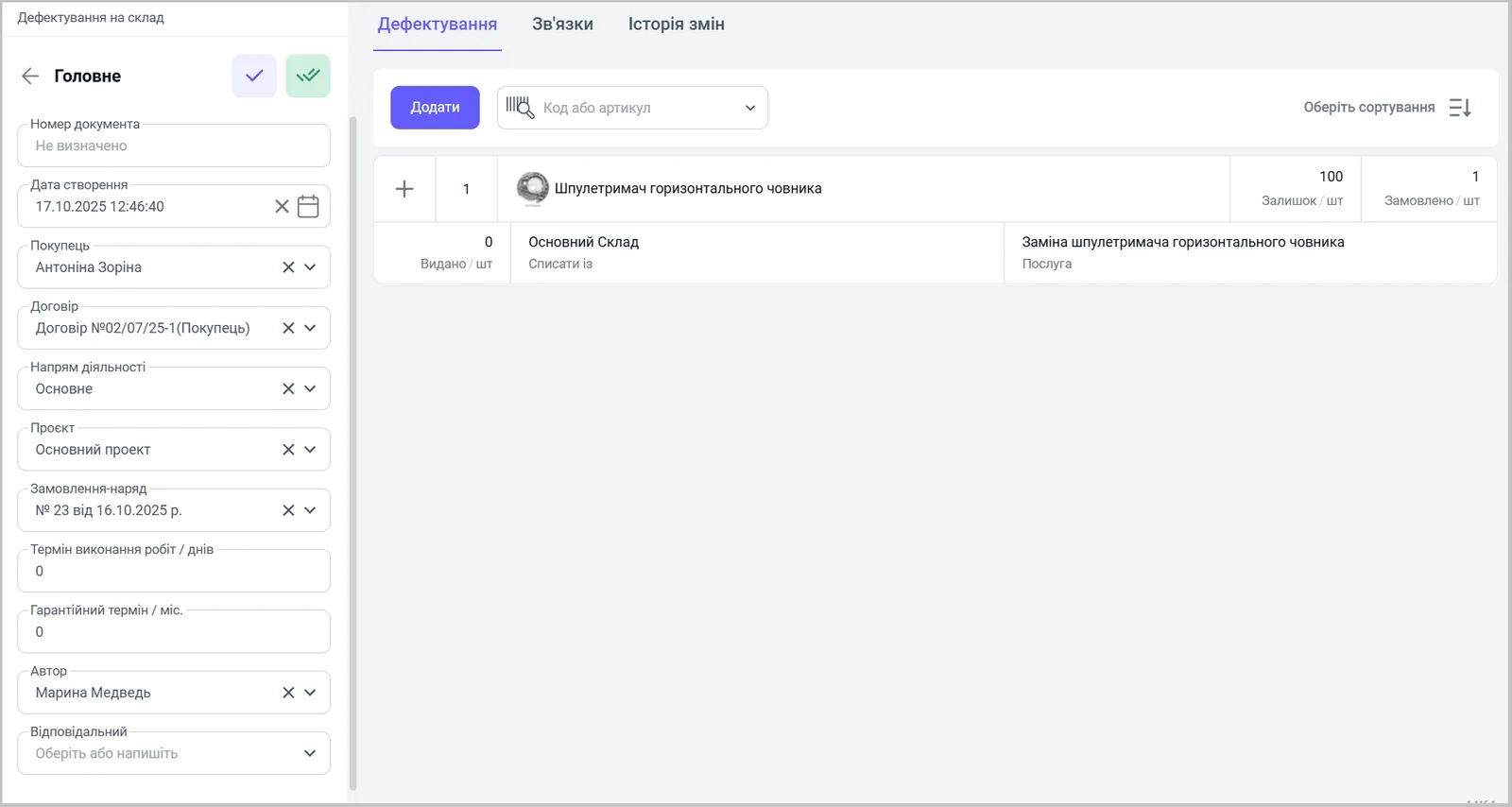
- In the “Main” block, fill in the fields: “Document number” and “Creation date” (set automatically), “Customer” (required), “Contract”, “Line of business”, “Project”.
- In the “Work order” field, specify the document on which the defect list is based.
- Specify the “Work completion time / days”, “Warranty period / months”, “Author” and “Responsible”.
- Save the document.
How to fill in the list of spare parts
On the “Defect list” tab, click Add and choose a product by name, modification, SKU or barcode. For each row, Bimp shows and accepts the following data:
| Column | What it means |
|---|---|
| “Stock” | the product’s available stock in the warehouse |
| “Ordered” | the quantity of the product needed for the repair |
| “Issued” | the actual quantity moved to the “Work execution” warehouse for the service and Work order |
| “Write off from” | the warehouse the product will be written off from |
| “Service” | the Work order service that the spare part is needed for |
What to do after the defect list
When the storekeeper issues the spare parts, create a “Stock transfer (to cost price)” document based on the defect list: the table is filled with the products from the defect list. The materials go to the cost price of the order — see Cost price of a service. If spare parts are short, create a “Supplier order (defect list)” based on the Work order — see Supplier order.
FAQ
What do the columns "Stock", "Ordered" and "Issued" mean in the defect list?
"Stock" is how much of the product is in the warehouse, "Ordered" is how much is needed for the repair, "Issued" is how much has actually been handed over to the "Work execution" warehouse for the service and Work order.
Does a defect list write off spare parts?
No, it is a planning document. The actual issue and write-off to cost price are documented with the "Stock transfer (to cost price)" document, which is created based on the defect list.