
Customer lead sources: a directory of channels
A lead source is a directory of channels customers come from: advertising, website, social media, referral. To add a source, open "Directories → Lead source", click "Create", enter a name and save. The selected source is specified in the counterparty card.
What a lead source is
A lead source is a channel through which a company gets customers: social media advertising, organic Google search, a referral, an exhibition, an e-mail campaign. By default, a company has three sources: Facebook, Instagram and Website.
How to add a lead source
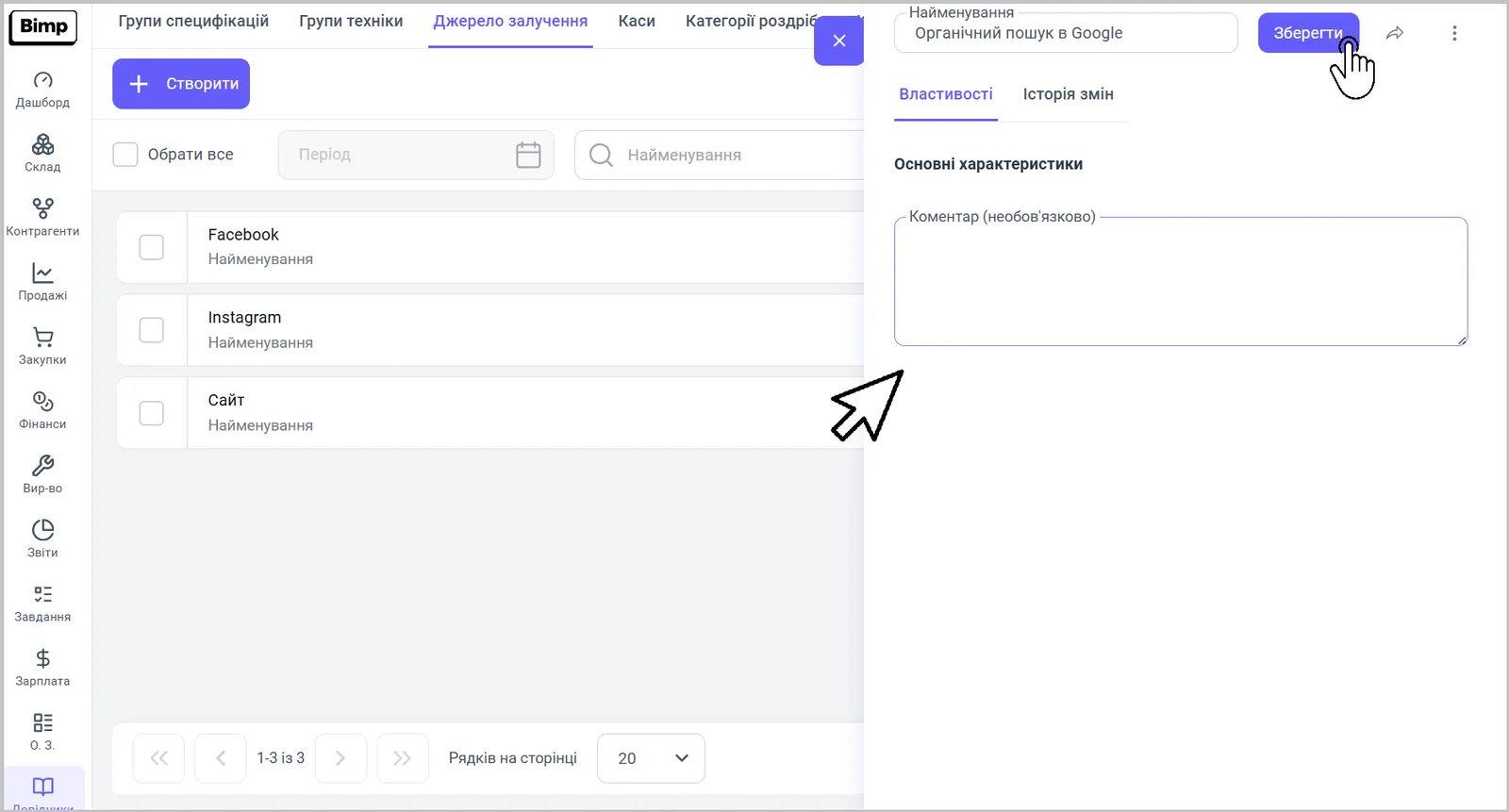
Create a new source in the “Lead source” directory.
- Open Directories and go to the “Lead source” tab.
- Click Create; the source card opens.
- In the top row of the card, enter the “Name”, for example “Organic Google search”.
- If needed, fill in the “Comment” in the “Basic characteristics” block.
- Click Save.
Where a lead source is used
Select the source in the counterparty card, in the “Main” section, in the “Lead source” field; see Counterparty card.
FAQ
Which lead sources does Bimp have by default?
A new company already has three sources: Facebook, Instagram and Website. Others are added manually.
Where do I specify a customer's lead source?
In the counterparty card, in the "Main" section, the "Lead source" field.