
Bimp directories: what they are and which ones exist
On this page
Directories in Bimp are structured lists of permanent data (counterparties, products, accounts, currencies, organizations, items) that documents take their values from. Open them in the "Directories" section of the left menu; the tabs above the list switch between directories. The more accurately directories are filled in, the less manual work and the fewer errors in documents and reports.
What directories are
Directories are structured lists of permanent data used by Bimp documents and reports: counterparties, products and services, accounts, currencies, items, price lists and others. When you create a document, the values of its fields (customer, warehouse, organization) are chosen from directories. Correctly filled directories keep the system working properly and make automation easier. For the general picture of modules and interface, read the Bimp overview.
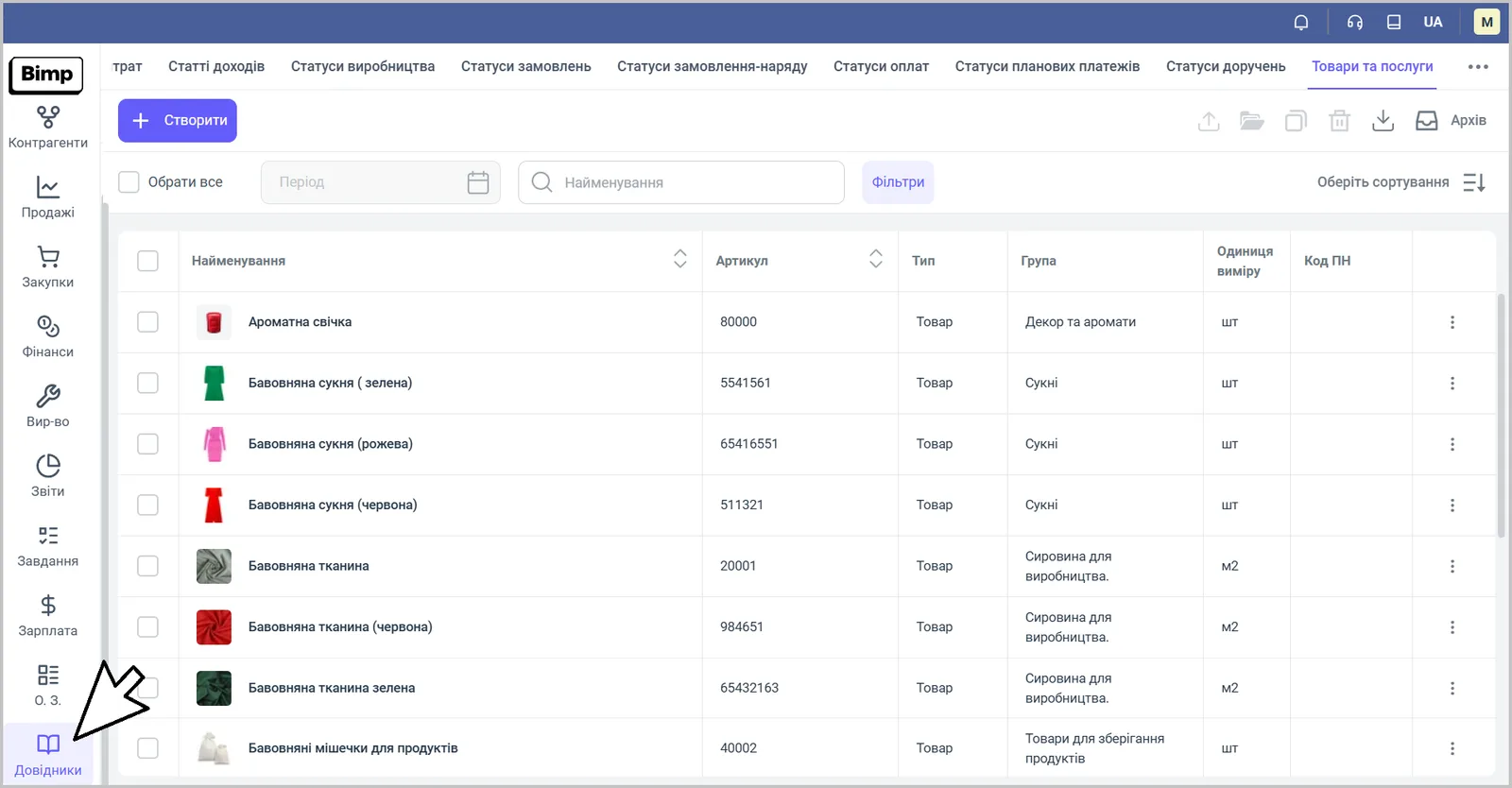
Open directories with the Directories button in the lower part of the left menu. The tabs in the top panel switch between directories; each one has a list with search by name and a Create button. The record card opens to the right of the list.
Which directories Bimp has
The main directories and what they are for.
| Directory | What it stores | Article |
|---|---|---|
| Counterparties and individuals | Customers, suppliers, partners | Counterparty card |
| Products and services | Products with their characteristics | Products and services |
| Banks/Bank accounts | The company’s payment details: bank accounts, cards (for example, of a sole proprietor (FOP)) | Bank accounts and cash desks |
| Cash desks | The company’s cash desks: main, auxiliary, in different currencies | Bank accounts and cash desks |
| Currencies/Rates | The company’s currencies and their rates | Currencies and rates |
| Organizations | The company’s legal entities and sole proprietors (FOP) | Organizations |
| Lines of business | Accounting breakdown by business format | Projects and lines of business |
| Projects | Initiatives, products and services within a line of business | Projects and lines of business |
| Income items, expense items | Classification of payments for reports | Income and expense items |
| Product groups, specification groups, equipment groups | A hierarchy for navigation, search and reports | Product groups |
| Lead source | Channels customers come from | Customer lead sources |
| Storage locations | Warehouses, racks, shelves, shipping and receiving zones | Storage locations |
| Accrual types | Types of payments and deductions from salary: bonuses, fines, taxes | Accrual and deduction types |
| Customer price lists | Price lists for sales documents | Price lists |
| Commission agent price lists | Price lists for selling a supplier’s goods under the dropshipping scheme | Dropshipping |
| Supplier price lists | Supplier prices for the goods you purchase | Supplier products |
| Power of attorney names | Standard names of powers of attorney issued by the company | no separate article |
| PRRO | Fiscal receipts and settlement operations without a physical cash register | no separate article |
In addition, the directories include system lists of statuses (orders, payments, production, planned payments, powers of attorney), as well as “Regions”, “Warehouses” and “Specifications”.
What is created automatically
After a company is created, the directories already contain starting records that you can change:
- the currencies UAH, USD, EUR;
- the “Main cash desk”;
- an organization named after your company;
- the “Main project”;
- the line of business “Main”.
In what order to fill in directories
Fill in directories from basic to dependent: organizations, accounts and cash desks, currencies and rates, lines of business and projects, income and expense items, then products and counterparties. The full Bimp setup order is in the launch checklist.
FAQ
Where are directories in Bimp?
In the lower part of the left menu, in the "Directories" section. The tabs in the top panel switch between directories (Currencies/Rates, Cash desks, Projects, Expense items, Products and services, and others).
What should I do if the value I need is missing from a dropdown list in a document?
Add the value to the corresponding directory (for example, a counterparty, warehouse or account) and return to the document. Some fields let you create a record right from the list with the Create button.
Which directories are created automatically?
The currencies UAH, USD and EUR, the "Main cash desk", an organization named after your company, the "Main project" and the line of business "Main".