
Cost allocation: how to move indirect costs to the cost price
On this page
The Cost allocation document moves accumulated indirect costs (workshop rent, electricity, foremen's pay) to the cost price of products, services provided or goods sold. Create it in "Warehouse → Cost allocation", fill in the "Products" and "Costs" tabs, click "Allocate" and choose the basis.
What cost allocation is for
The Cost allocation document moves accumulated indirect costs to the cost price of specific goods, produced goods or services provided. Indirect (overhead) costs cannot be assigned to a unit of goods at the moment they arise: they relate to the work of the workshop or the company as a whole.
Examples of indirect costs: workshop rent and utilities, pay of the production manager and foremen, lubricants, cleaning supplies and work clothes, site security, waste removal.
Example. A company makes chairs and tables. In a month it paid 20,000 UAH for workshop rent and 5,000 UAH for electricity, 25,000 UAH in total. They need to be allocated between 100 chairs and 20 tables in proportion to output. After the Cost allocation is posted, Bimp adds a share of the costs to the cost price of each item.
Before you start
Costs must be accumulated in the cost price: with “Other expenses” or “Goods receipt” documents that have the “To cost price” or “Management accounting” switch on — see Cost accumulation. Expense items are set up in the reference list — see Income and expense items.
How to create a Cost allocation document
- Open Warehouse → Cost allocation and click Create.
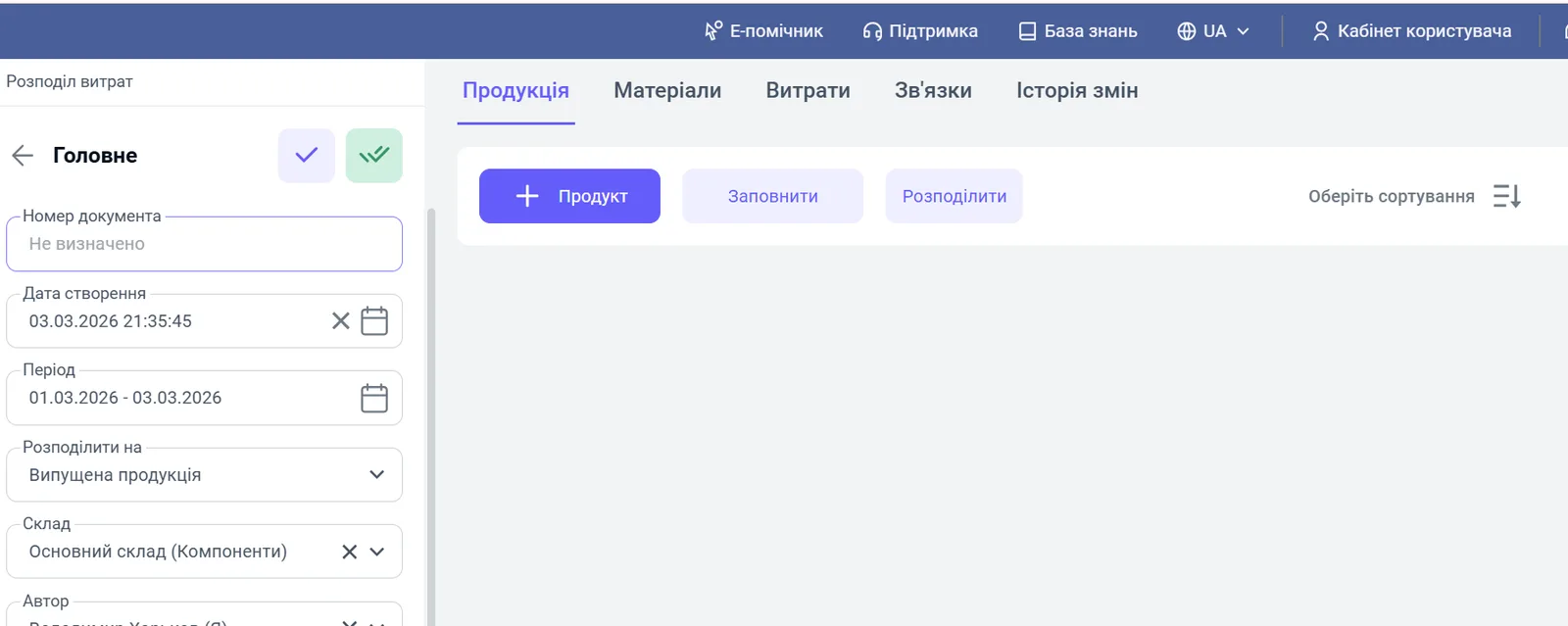
- In the “Main” block, fill in the fields:
- “Creation date”: the document date;
- “Period”: the period the costs are allocated for;
- “Allocate to”: what you allocate to: “Produced goods”, “Services provided” or “Goods sold”;
- “Warehouse”: the warehouse where the products are (needed for automatic filling);
- “Author” and “Responsible”: the employees who create and carry out the allocation.
How to select the products to allocate to
On the “Products” tab, click Fill: Bimp loads goods or services according to the document settings; keep those that the costs should be assigned to. To add them manually, click Product.
How to select the costs to allocate
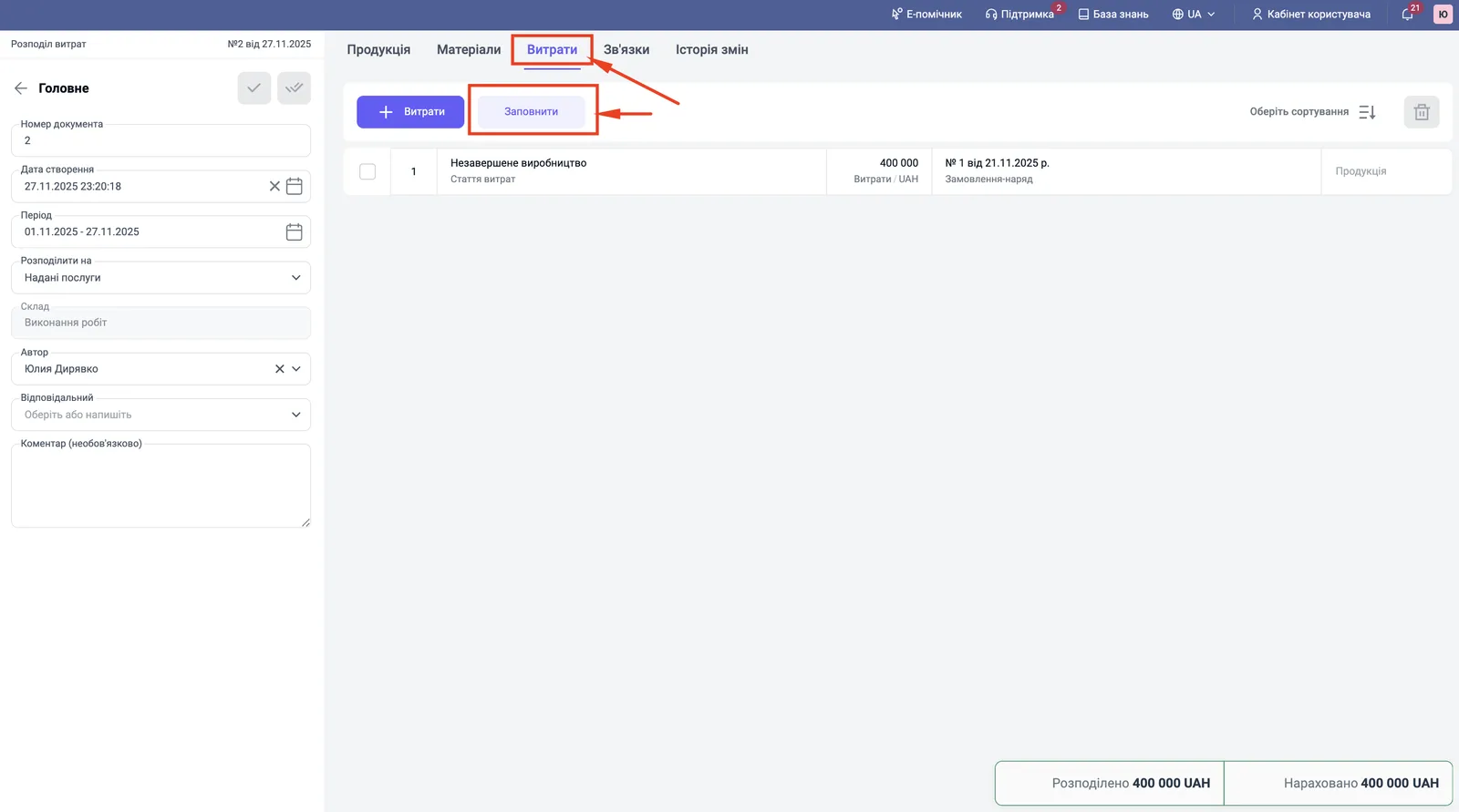
- Go to the “Costs” tab and click Fill: Bimp loads the unallocated costs assigned to the cost price. Keep the ones you need. The Costs button adds a cost manually.
- If needed, on the “Materials” tab add the materials that must be allocated to the products.
You can allocate one service across several goods receipts or several services to one goods receipt.
How to calculate and post the allocation
- Go back to the “Products” tab and click Allocate.
- Choose the allocation basis:
- By amount: more expensive goods get a larger share of costs (suitable for logistics);
- By quantity: costs are divided equally across each unit (suitable for packaging).
- Bimp fills in the “Costs amount” column for each item.
- Check that the allocated amount matches the amount on the “Costs” tab. The “Allocated” and “Accrued” values are shown at the bottom of the window.
- Click Save and close.
What happens after posting
After posting, the accumulated amounts move to the cost price of the selected products: Bimp writes them off from the accumulation accounts (for example, “Work in progress”) to the cost price of produced goods, services provided or goods sold. The result is visible in the “Accumulated cost” and “Gross profit” reports — see Accumulated cost. For an example with service work, see Service cost.
FAQ
Which costs are considered indirect?
Costs that cannot be assigned to a specific unit of goods right away: workshop rent, electricity, pay of the workshop's administrative staff, general-purpose consumables, security, waste removal.
What is the difference between allocation "By amount" and "By quantity"?
"By amount": more expensive goods get a larger share of costs (suitable for logistics). "By quantity": costs are divided equally across each unit (suitable for packaging).
Why is the Cost allocation document not posted?
The total amount allocated to products must match the amount of costs. If the amounts differ, Bimp shows an error on posting.
Which costs appear on the "Costs" tab?
The "Fill" button loads unallocated costs that are already assigned to the cost price (accumulated by documents with the "To cost price" switch or by a service receipt).