
Accumulated cost report: accumulated and allocated expenses
On this page
The Accumulated cost report shows, by expense item, how many expenses were accumulated during the period, how much of them was allocated to the [cost price](kb:costing/cost-price-guide) of products or services, and how much remains unallocated (including work in progress). To generate it, open "Reports → Accumulated cost" and click "Generate report".
What the Accumulated cost report is for
The Accumulated cost report shows which expenses were accumulated during the period, how much of them has already been allocated to the cost price of products or services, and how much is still waiting for allocation. Production and service companies need it when the cost price consists not only of materials but also of rent, depreciation, and piecework pay.
The report helps you:
- Calculate the actual cost price of each batch or service.
- Control work in progress (WIP): resources are already invested, but the products are not yet released.
- Justify prices: know the lower limit of cost at the margin you need.
General report features are described in the article Reports in Bimp.
Before you start
An expense appears in the report only if its item belongs to the “Cost price” expense group. How to create expense items and groups is described in the article Income and expense items and expense groups. To allocate indirect expenses (rent, gas, electricity), you use the “Cost allocation” document: see Allocating indirect expenses to cost price. To learn about accumulating expenses for an order, read the article Cost accumulation.
How to generate the report
To see accumulated expenses, open the report, set the period, and click the generate button.
- Open Reports → Accumulated cost.
- Open the left Filters panel and select the period in the calendar, for example 01.01.2026 – 21.07.2026.
- If needed, set the filters “Products”, “Work order” / “Invoice order”, “Project”, “Expense item”.
- Select “Group by” and “Detail by”.
- If needed, turn on the Show third level: Documents switch.
- Click Generate report.
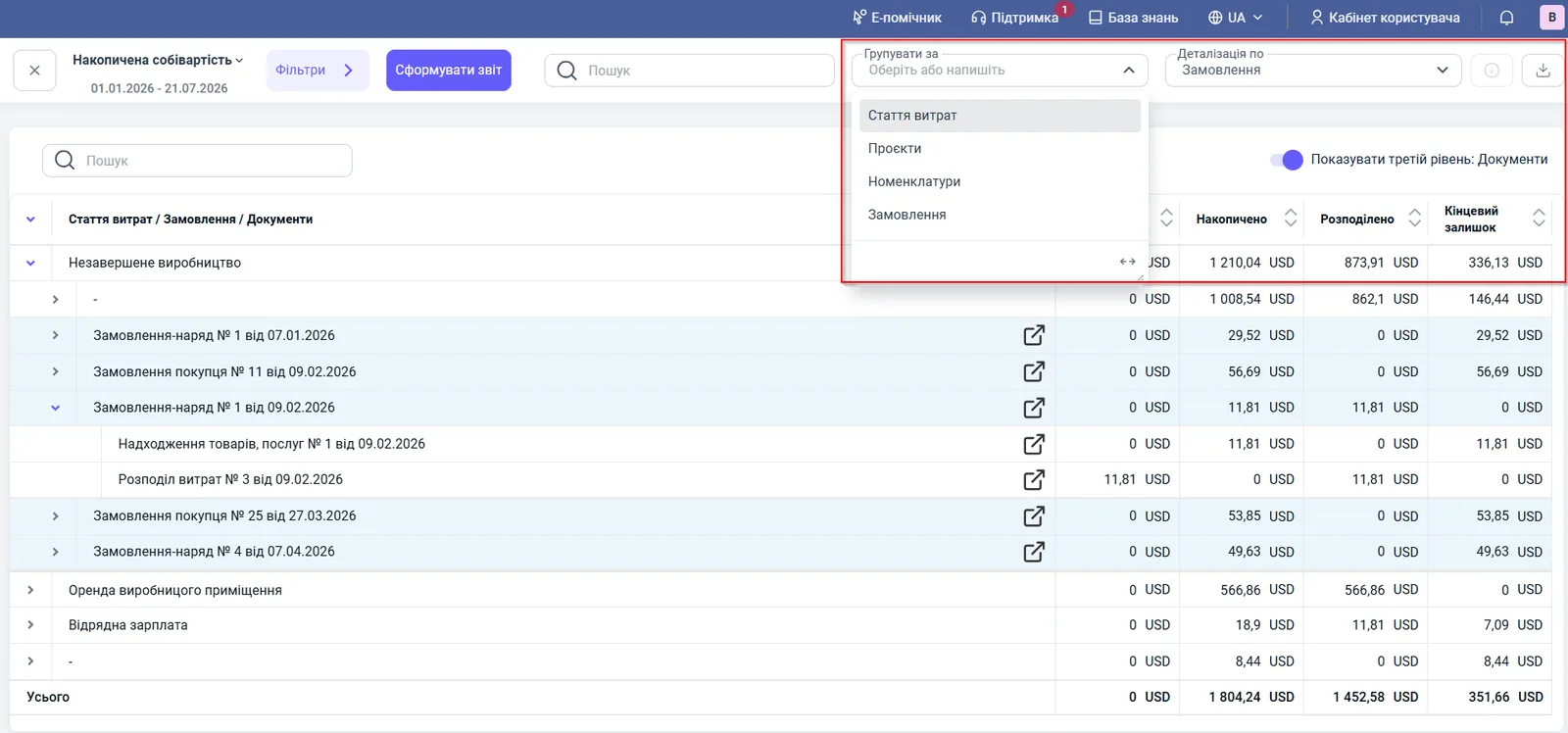
Report figures
| Column | What it means |
|---|---|
| “Opening balance” | unallocated expenses from previous periods |
| “Accumulated” | expenses assigned to this item during the period |
| “Allocated” | the amount already included in the cost price of products or services by order |
| “Closing balance” | accumulated expenses still waiting for allocation, or WIP |
For each row, this relation holds: “Closing balance” = “Opening balance” + “Accumulated” - “Allocated”.
Filters and grouping
| Parameter | Value |
|---|---|
| “Products” filter | expenses for a specific product |
| “Work order” / “Invoice order” filter | accumulated expenses for an order |
| “Project” filter | expenses for the project only |
| “Expense item” filter | expenses for each item separately |
| “Group by” | expense item, projects, products, orders |
| “Detail by” | orders (in the example), project, products, expense item |
| “Show third level: Documents” switch | shows the certificates, work orders, receipts, and allocations by which the amounts were accrued or allocated |
How to read the figures: an example
For the period 01.01.2026 – 21.07.2026, in the report grouped by expense items:
| Expense item | Accumulated | Allocated | Closing balance |
|---|---|---|---|
| Work in progress | 1,210.04 USD | 873.91 USD | 336.13 USD |
| Production premises rent | 566.86 USD | 566.86 USD | 0.00 USD |
| Piecework pay | 18.90 USD | 11.81 USD | 7.09 USD |
| Total | 1,804.24 USD | 1,452.58 USD | 351.66 USD |
The rent is fully allocated: all 566.86 USD went into the cost price of the manufactured products. Under the “Work in progress” item, 336.13 USD is not yet allocated: these are work orders in progress, for example “Work order No. 1 dated 07.01.2026” with a balance of 29.52 USD. If you expand “Work order No. 1 dated 09.02.2026”, you see: 11.81 USD accumulated through “Goods receipt No. 1”, 11.81 USD allocated by the document “Cost allocation No. 3 dated 09.02.2026”, closing balance 0.
Why the figures do not match
The expense is missing from the report. Check that the expense item belongs to the “Cost price” group. The report ignores expenses from other groups.
The closing balance is not zero although the order is completed. The expenses are not yet allocated: post the “Cost allocation” document. See Allocating indirect expenses to cost price.
More is allocated than was accumulated during the period. Allocation can cover expenses from previous periods: the difference is covered by the “Opening balance”.
The cost price of a product in the “Cost of produced goods” report is different. This report shows expenses by items and orders, while Cost of produced goods shows the value of products by specifications; the amounts match only after expenses are allocated.
FAQ
Why did an expense not appear in the Accumulated cost report?
Only expenses whose item belongs to the "Cost price" expense group appear in the report. Check the settings of the expense item.
How do I allocate rent and utilities to products?
Use the "Cost allocation" document: it allocates accumulated indirect expenses to goods or services. After you post it, the amount appears in the "Allocated" column.
What does the closing balance in the report mean?
It is accumulated expenses that are not yet allocated to the cost price: unallocated expenses or the value of work in progress.