
Cost accumulation: for a Customer order and without linking to one
On this page
Cost accumulation records costs that later go into the cost price of goods or a service. You can link them to a Customer order (by a Stock transfer to cost price, an Expense report, "Other expenses" or a service receipt) or accumulate them without linking; the result is visible in the "Accumulated cost" report.
What cost accumulation is
Cost accumulation is the recording of costs that form the cost price of goods or services until they are sold or produced. You need it to see the real costs of production or of fulfilling orders, to calculate profit correctly and to keep management accounting. The accumulated amounts then go into the cost price at the time of sale or after cost allocation.
There are two scenarios: the costs belong to a specific Customer order, or they have no direct link to an order.
Accumulation for a Customer order
To link costs to a Customer order, use one of four ways.
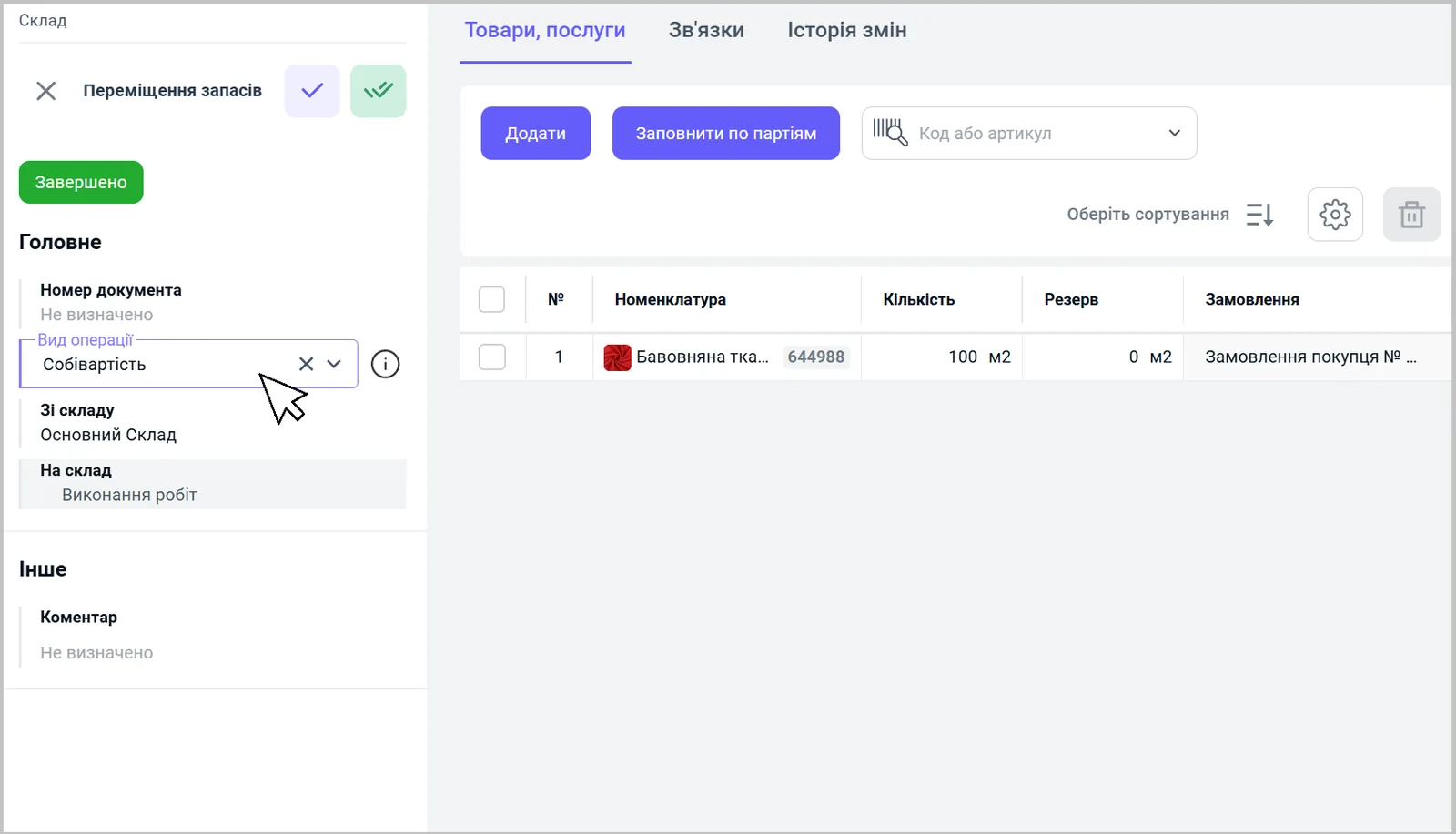
Way 1. Stock transfer.
- Based on the Customer order, create a “Stock transfer” document.
- In the “Operation type” field, select “Cost price”.
- Specify the “Expense item” and save the document.
Way 2. Expense report.
- In the “Expense report” document, in the “Main” block, turn on the “To cost price” switch.
- Select the accountable person and the base document.
- Specify the expense item, the amount and the Customer order the costs are linked to, and save. See Expense report.
Way 3. Other cash expenses.
- In the “Other expenses” document, in the “Main” block, turn on the “To cost price” switch.
- Specify the expense item, the amount and the Customer order, and save.
Way 4. Service receipt.
- Based on the Customer order, create a “Supplier order”: specify the supplier, the service, the quantity and the price.
- Based on the Supplier order, create a “Goods receipt” and save.
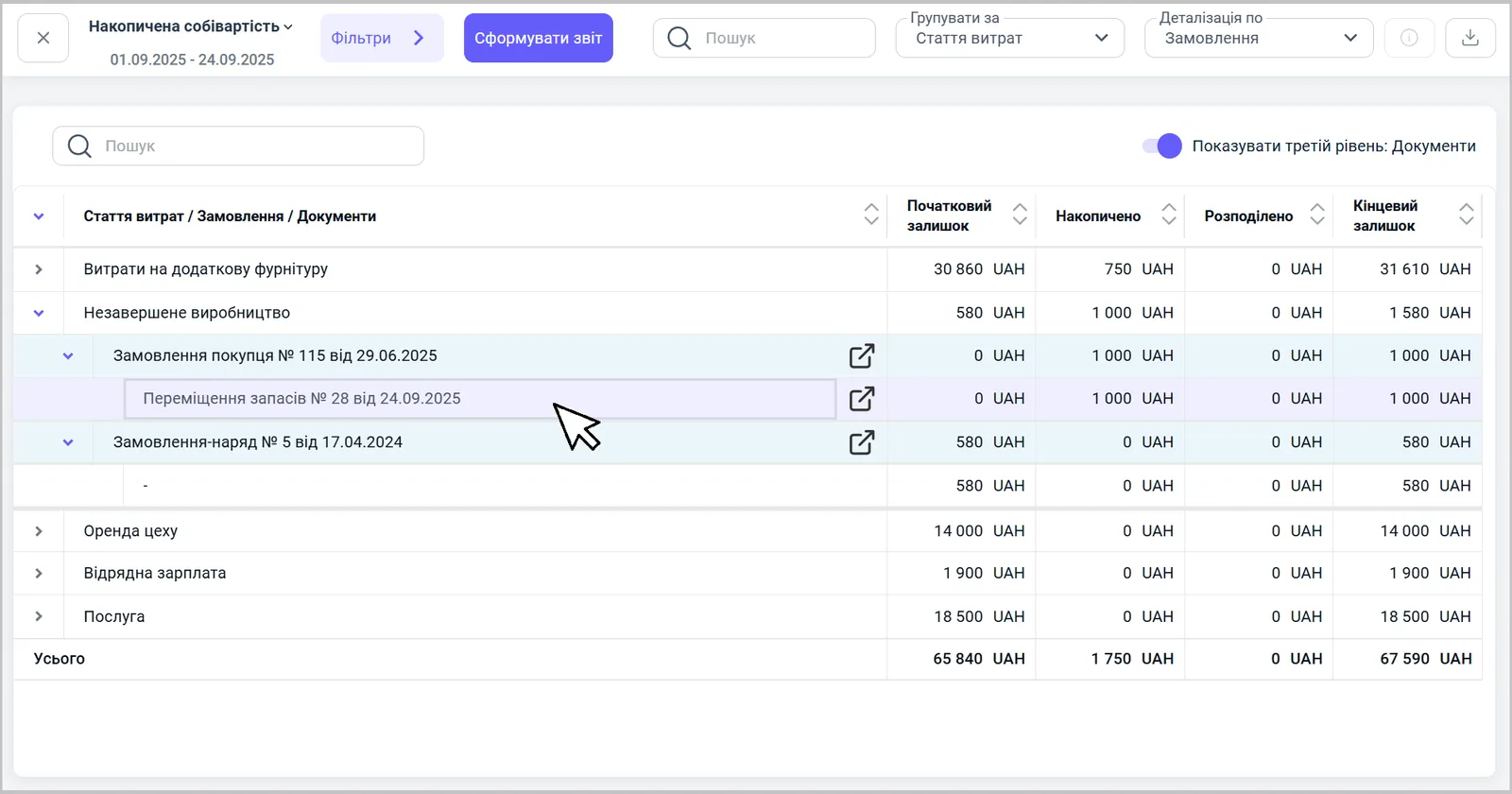
After any of these ways, the amount appears in the “Accumulated cost” report together with a link to the document that created it.
Accumulation without linking to an order
Costs that do not belong to a specific order are accumulated in two ways.
Way 1. Other expenses.
- In Finance → Other cash operations, click Create and select “Other expenses”.
- Specify the “Settlement type” and the “Bank account”.
- In the “Main” block, turn on the “To cost price” switch.
- Select an expense item that belongs to the cost price, enter the amount and save.
Way 2. Goods receipt.
- In the Purchasing section, create a “Goods receipt” document.
- Specify the supplier, the contract and the warehouse.
- Turn on the “Management accounting” switch.
- Add the service that should be assigned to the cost price, specify the quantity and the amount, and save.
The amounts from both documents appear in the “Accumulated cost” report without a link to orders. These costs are then moved to products with the “Cost allocation” document — see Allocating indirect costs.
Which way to choose
| Situation | Way |
|---|---|
| Materials from the warehouse for a specific order | a Stock transfer with the operation type “Cost price” |
| Costs of an accountable person for an order | an Expense report with “To cost price” |
| A directly paid expense for an order | “Other expenses” with “To cost price” and the order |
| A contractor’s service with a debt to them | a Supplier order and a Goods receipt |
| General costs to be allocated later | “Other expenses” or “Goods receipt” with “Management accounting”, without an order |
For an example with services, see Service cost. Regular period expenses are described in the article Period expenses.
FAQ
Where can I see accumulated costs?
In the "Accumulated cost" report. You can group it by expense item and drill down by order and documents.
Which expense item should I choose for accumulation?
An item with the "Cost price" type, for example "Work in progress". Other items write the amount off to the company's overall result instead of accumulating it in the cost price.
How do I accumulate costs without a Customer order?
Create "Other expenses" with the "To cost price" switch on, or a "Goods receipt" with the "Management accounting" switch. The amounts appear in "Accumulated cost" without a link to an order.