
Cost price without VAT: how to set up input VAT accounting
On this page
To make Bimp calculate cost price without VAT, turn off the "Cost of goods includes VAT" option in "Company settings → Accounting settings". Suppliers' VAT then goes to the "Input VAT" account instead of the cost price. If you switch mid-year, repost the documents of the past period.
What cost price without VAT gives you
If cost price is kept without VAT, the VAT you paid to suppliers does not increase the value of goods and is recorded as input VAT. Reports therefore show the real cost of products and the financial result (profit or loss), while VAT amounts are collected on separate accounts.
How to set up accounting without VAT
Accounting without VAT is turned on in the company settings:
- Open Company settings → Accounting settings.
- Find the “Cost of goods includes VAT” switch and turn it off.
- Save the changes with Save changes.
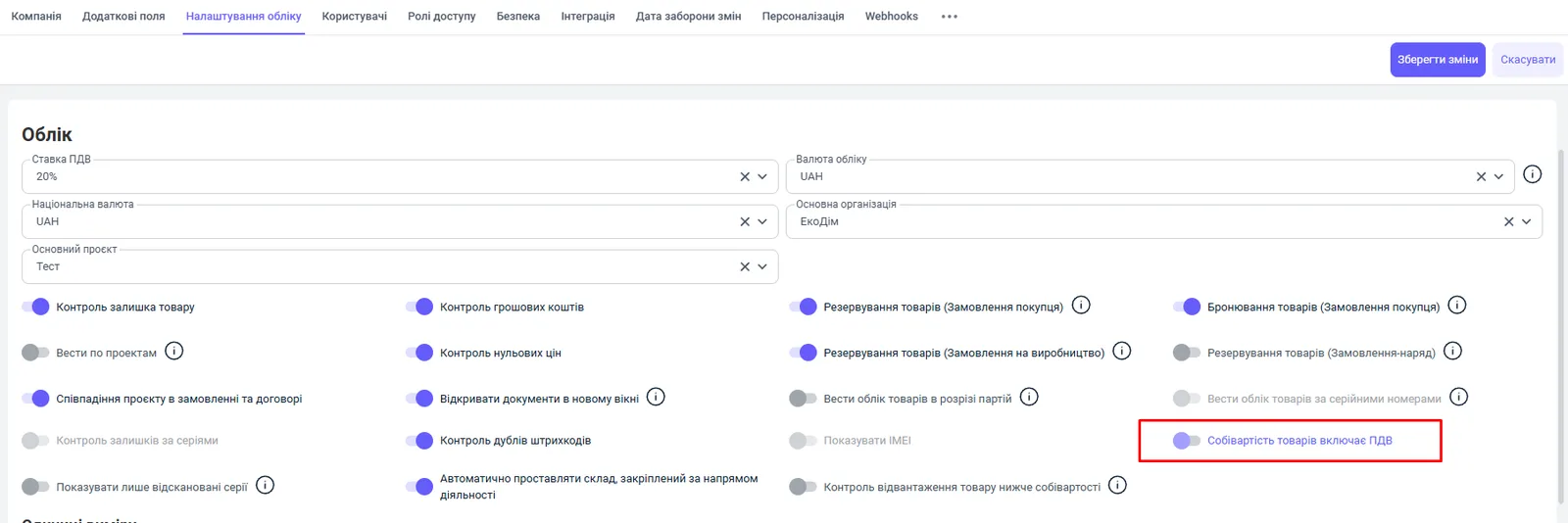
After that, Bimp uses two separate VAT accounts on its own: “Input VAT” (VAT paid on purchases) and “VAT liability” (VAT charged on sales). General accounting parameters are described in the article Accounting settings.
How documents work after the setup
Purchases form cost price without VAT, and sales write it off without VAT:
| Document | Cost price | VAT |
|---|---|---|
| Goods receipt | the cost price in the warehouse equals the amount without VAT | the VAT amount goes to “Input VAT” |
| Additional costs | the amount without VAT is added to the cost price | the VAT amount goes to “Input VAT” |
| Return to supplier | the cost price is written off from the warehouse at the amount without VAT | VAT reduces “Input VAT” (reversal) |
| Sales of goods and services | the cost price is written off at the amount without VAT | the VAT amount goes to “VAT liability” |
| Customer return | the cost price is returned to the warehouse at the amount without VAT | VAT reduces “VAT liability” (reversal) |
Which reports show amounts without VAT
Performance reports work without VAT: “Gross profit”, “Income and expenses”, cost price reports (“Stock movement”, “Cost of produced goods”), “Sales” and “Sales dynamics”. Settlement reports show full amounts including VAT: settlements with customers and suppliers, overdue debt, analysis of shipments and receipts. See Gross profit.
What to do if you switch accounting not from the start
If you turn on accounting without VAT mid-year, the “Stock” register will contain mixed cost prices: goods received before the change have a cost price with VAT, and goods received after it have one without VAT. This distorts the average cost price on sales and the reports.
To level out the accounting, repost all documents that affect stock movement and cost price, starting from the date from which you need correct accounting without VAT.
FAQ
Why did old reports not change after I turned on cost price without VAT?
The new logic applies only to documents posted after the setting was changed. To recalculate a past period, repost the stock movement and cost price documents starting from the date you need.
Which reports show amounts without VAT?
Performance reports: "Gross profit", "Income and expenses", "Stock movement", "Cost of produced goods", "Sales" and "Sales dynamics". Settlement reports show amounts including VAT.
Where does VAT go on a purchase if cost price is without VAT?
To the "Input VAT" account. VAT charged on a sale goes to the "VAT liability" account.