
Period expenses, taxes and other expenses
On this page
Period expenses are costs that are not included in the cost price of goods and are fully charged to the period of payment. You record them with the "Other expenses" document: "Finance → Other cash operations → Create → Other expenses", expense item, account or cash desk, amount and the "Allocation of other expenses" tab with a line of business and project.
What are period expenses
Period expenses are costs that are not included in the cost price of goods or products and are fully charged to the reporting period in which they were paid: marketing, rent, administrative costs, taxes. Bimp accounts for them using the cash method: an expense appears at the moment of actual payment. To record them, use the “Other expenses” document.
How to create an “Other expenses” document
- Open Finance → Other cash operations, click Create and select Other expenses.
- Fill in “Responsible”, “Creation date” (the current date by default) and “Document number” (automatic or your own).
- In the “Expense item” field, select an item, for example “Marketing expenses”. You create your own items in the reference list: see Income and expense items.
- Select the “Organization” whose account or cash desk you pay from.
- In the “Payment” block, select the “Settlement type”: Non-cash or Cash. For cash, the “Cash type” field appears: cash desk or card.
- Specify the “Current account” (or cash desk) and the “Payment amount”. The amount must exactly match the actual debit.
- Save the document.
How to split an expense by lines of business and projects
To see expenses by lines of business and projects, fill in the “Allocation of other expenses” tab.
- Click Add.
- Select “Line of business” and “Project” (they are filled in automatically by default, but you can change them).
- Specify the row amount. Add a “Comment”, for example “payment for Facebook advertising”. The “Order” field in the row is optional.
- If needed, add several rows: one payment can cover several projects or lines of business.
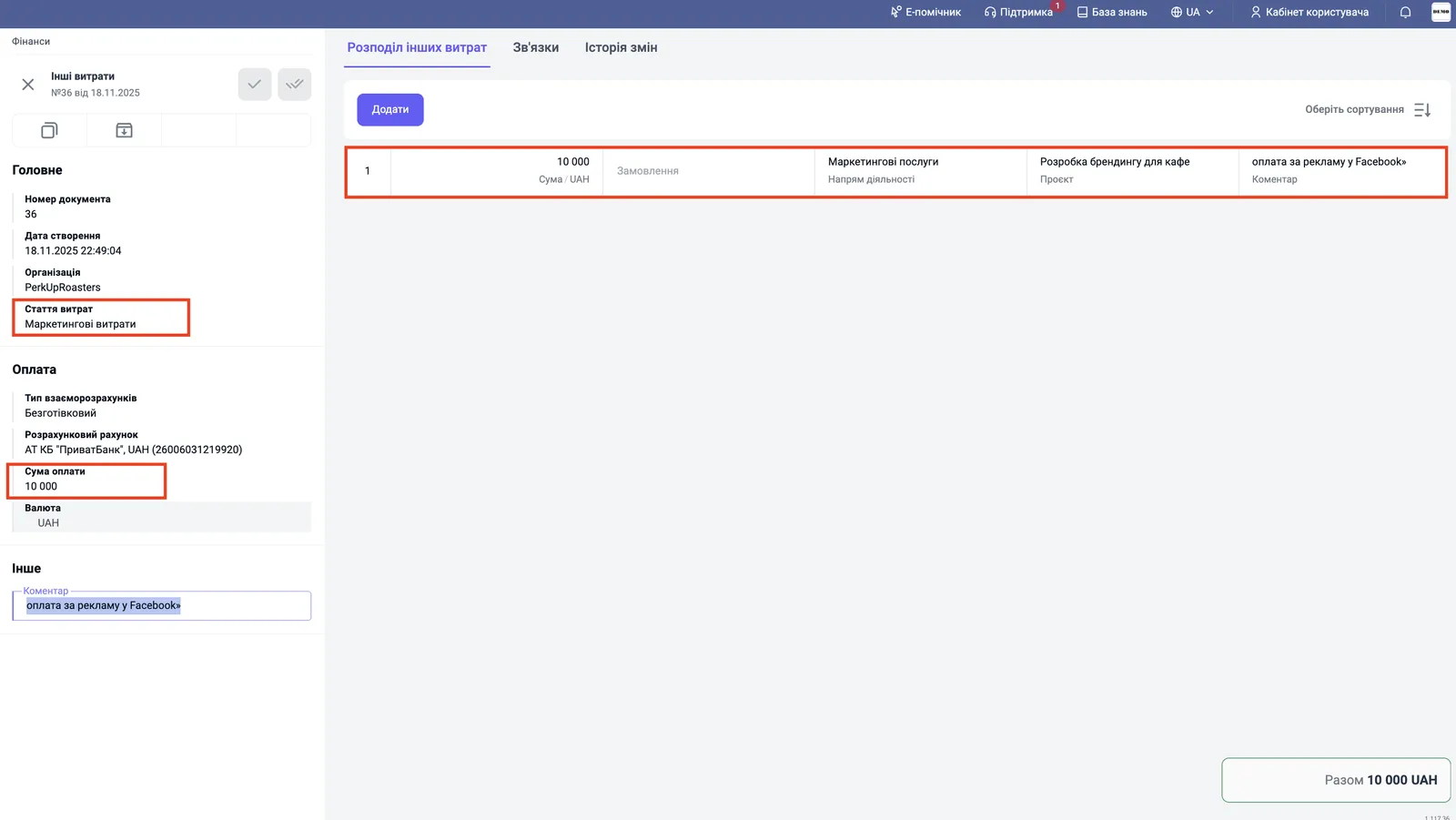
Example. A company pays 10,000 UAH for setting up targeted advertising. The manager creates “Other expenses” with the item “Marketing expenses” and in the allocation assigns the amount to the project “Branding development for a cafe” and the line of business “Marketing services”.
How to record a tax payment
You record a tax the same way as any period expense, with its own item.
- Create an item: Directories → Expense items → Create, name it “Taxes”, and save.
- Create an “Other expenses” document with the item “Taxes” and the amount that was actually debited (for example, 5,000 UAH of single tax).
- On the “Allocation of other expenses” tab, distribute the amount by lines of business and projects with the comment “tax for August 2025”.
- Save.
The tax immediately appears in reports as a period expense.
Where period expenses appear
After saving, the document appears in three reports:
| Report | What it shows |
|---|---|
| Cash flow | the debit of the amount from the selected account or cash desk |
| Expenses | the amount by group and period expense item |
| Income and expenses | the expense in the net profit calculation |
Expenses that are not period expenses
If an expense relates to a specific order and must go into the cost price, turn on the “Add to cost price” switch in the “Other expenses” document: see Cost accumulation. Payroll accruals to employees (bonuses, overtime) are processed with documents of the “Payroll” module, not with “Other expenses”: see Piecework pay.
FAQ
How do period expenses differ from cost price?
Period expenses are not included in the cost price of a specific product. They are charged in full to the period in which they were paid: marketing, rent, administrative costs, taxes.
Which method does Bimp use to account for "Other expenses"?
The cash method: an expense is recorded at the moment of actual payment, not when a certificate is signed or a liability is accrued.
Can I split one payment between several projects?
Yes. On the "Allocation of other expenses" tab, add several rows with different lines of business, projects and amounts in one document.
Where can I see period expenses in reports?
In the "Cash flow", "Expenses" and "Income and expenses" reports.
More about this in Bimp: Finance in Bimp