
How to delete or archive a document, directory record or product
On this page
There is no permanent deletion in Bimp: a document is cancelled and moved to the archive, a directory record or product is archived. Hover over a row in the list and click the archive icon. An archived record can be brought back with the "Archive" button in the top right corner of the list. A document with derived documents and a product with a stock balance cannot be archived.
Can I delete a document or a directory record
You cannot permanently delete a document or a directory record in Bimp: the archive is used instead of deletion. This keeps reporting and historical data intact.
| Object | What you do | When it will not work |
|---|---|---|
| Document | Cancel it and move it to the archive | Other documents have been created based on it |
| Directory record (product, service and other directory records) | Archive it: the record is no longer offered in new operations | The record has a stock balance in a warehouse |
An archived record does not disappear: it is visible in the archive, and you can return it to work from there.
How to cancel and archive a document
To remove a document from the active list, cancel it and move it to the archive using the icon in the list row.
- Open the document list in the section you need, for example Sales → Orders.
- Find the document and hover over its row: a panel of icons appears on the right.
- Click the Cancel and move to archive icon (the last one in the panel; the tooltip appears on hover).
- Confirm the action.

How to find and restore an archived document
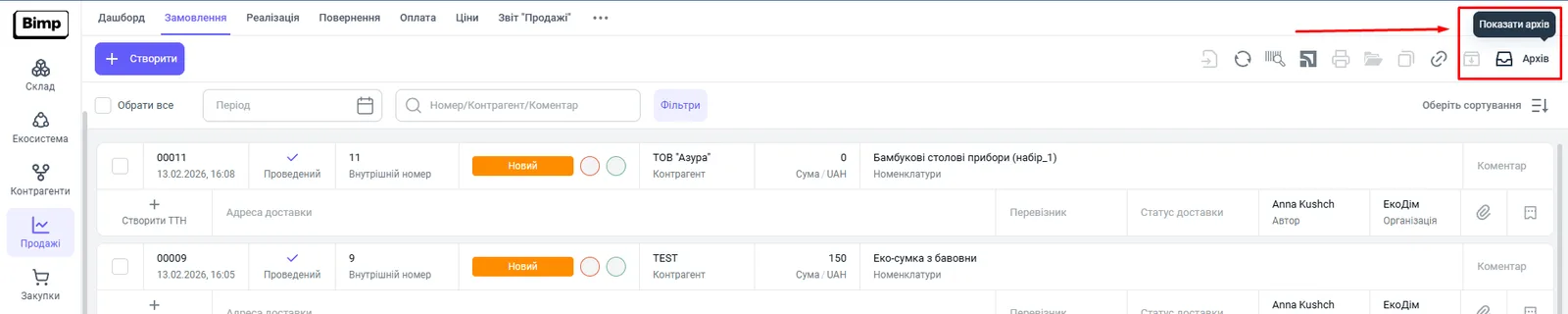
Archived documents are shown by the “Archive” button in the top right corner of the list. To return a document, restore it.
- Open the list of documents where the document was.
- Click Archive in the top right corner. The button tooltip reads “Show archive”.
- Hover over the row you need and click the Restore icon.

How to archive a directory record or product
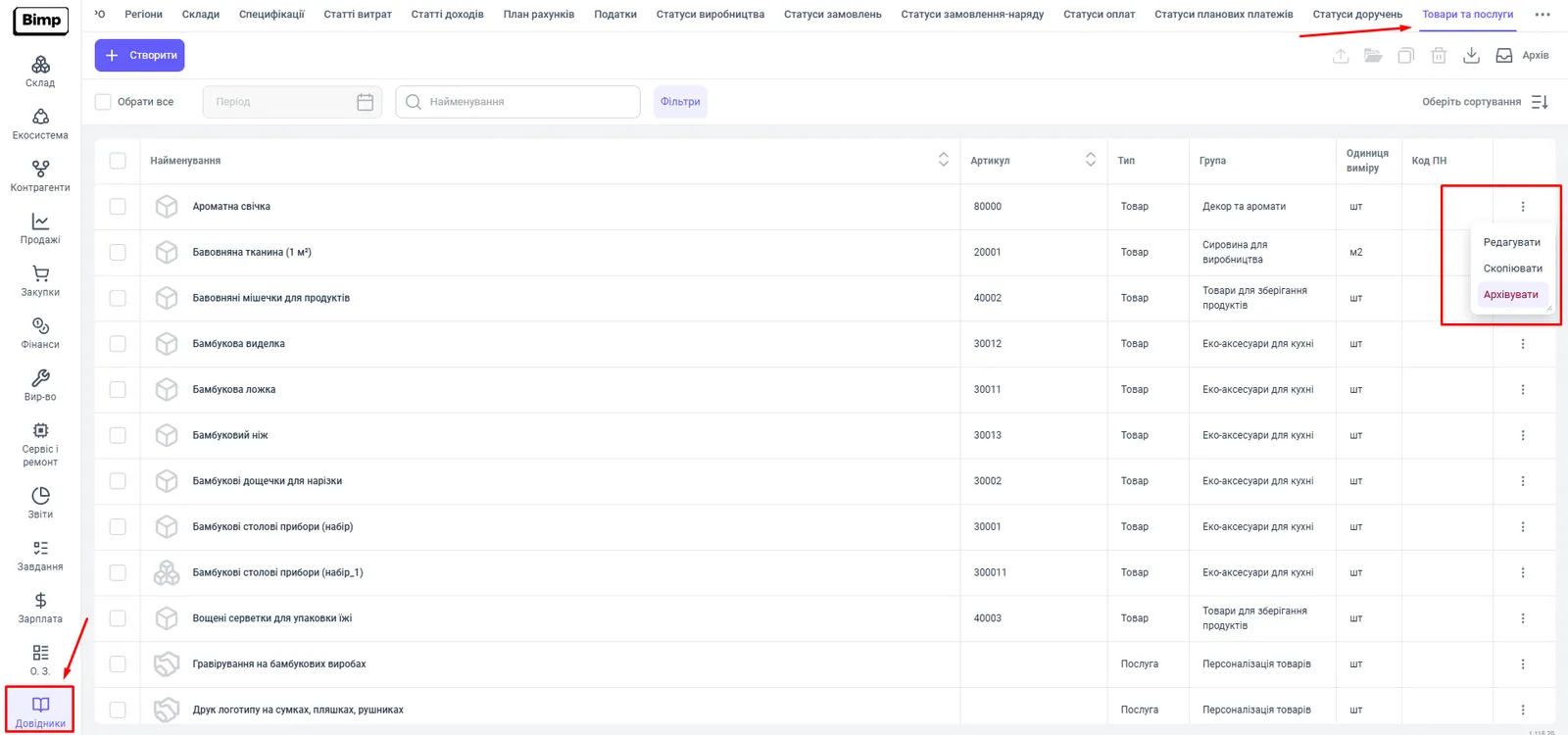
To archive a directory record, open the directory and choose “Archive” in the row menu. After archiving, the record cannot be selected in new operations, while it stays in documents that were already created.
- Open Directories and the section you need, for example the “Products and services” tab.
- In the record’s row, click the “three dots” menu.
- Choose Archive.
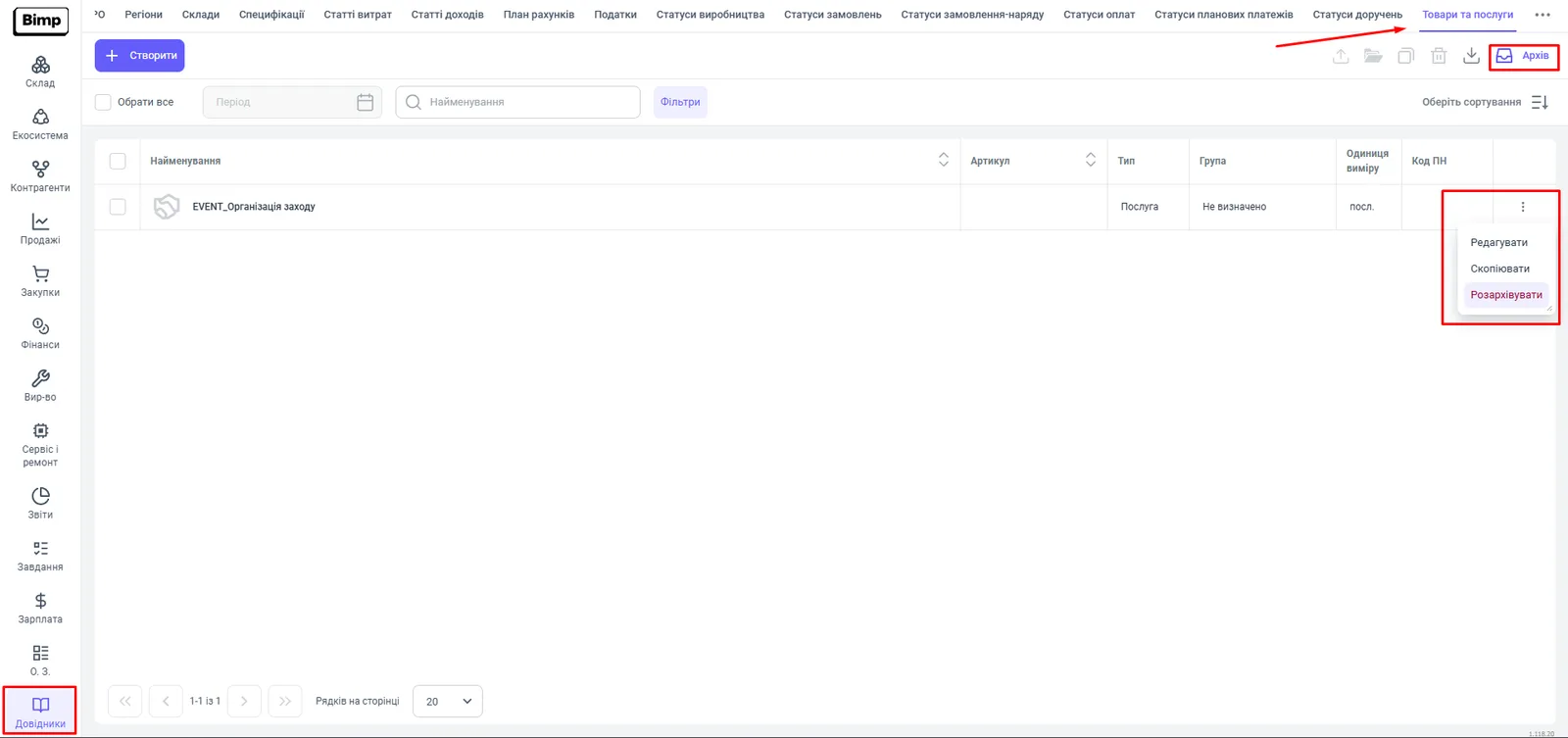
To see archived records, click Archive in the top right corner of the directory page. There, the row menu shows Unarchive instead of “Archive”.
How to archive or change a product that has stock
You cannot archive a product that has stock in a warehouse: Bimp blocks archiving while actual balances are assigned to the product. First bring the balance to zero, and then you can archive or change the product.
- Check the product balance in the product card or in the stock movement report.
- Bring the balance to zero in one of these ways:
- write the product off with a write-off document; see Write-off;
- if the balance appeared because of opening balances entered by mistake, correct or delete the corresponding entry in Finance → Opening balances entry.
- When the balance is zero, archive the product as described above.
Common problems
The cancel icon is inactive or the document is not cancelled. Cause: other documents have already been created based on it, for example a shipment or a payment. Solution: open the “Links” tab, cancel the derived documents, then cancel this one.
A directory record or product is not archived. Cause: the record has a stock balance in a warehouse. Solution: bring the balance to zero as described in the section on products with stock.
FAQ
Can I permanently delete a document in Bimp?
No. There is no full deletion, in order to keep reporting and historical data intact. A document is cancelled and moved to the archive, from where it can be restored.
Why can't a document be cancelled?
Other documents have already been created based on it, for example a shipment. First cancel or delete the derived documents; you can see them on the "Links" tab.
How do I find an archived document?
On the document list page, click "Archive" in the top right corner. In the archive list, hover over a row and click "Restore".
Why can't I archive a product?
The product has a stock balance in a warehouse. First bring the balance to zero, for example with a write-off, and then archive the product.