
Accrual types: rates, piece rates and currency for payroll
The "Accrual types" directory in Bimp is a list of rates: salaries, hourly rates and piece rates. To add a type, open "Directories → Accrual types", click "Create", enter the name, rate and currency, and save. Created types can be selected in the employee card and in accrual documents.
What “Accrual types” is
“Accrual types” is a Bimp directory that stores rates and payment types: salary, hourly pay, piece rate, bonus. You need it to describe the “price list” for employees’ work once, instead of entering the amount by hand every time.
There are two types of rates:
| Type | What it is for | Example |
|---|---|---|
| Fixed rate | pay for time: a month, an hour | “Salary accrual”: 70 UAH |
| Piece rate | pay for the number of actions completed | “Picking”: 50 UAH per order; “Packing”: 5 EUR per unit |
Example. A storekeeper gets 30,000 UAH per month, a packer gets 50 UAH for each picked order, and a freelance translator gets 10 USD per page. All three rates are entered in this directory.
How to create an accrual type
An accrual type is created in the “Directories” module.
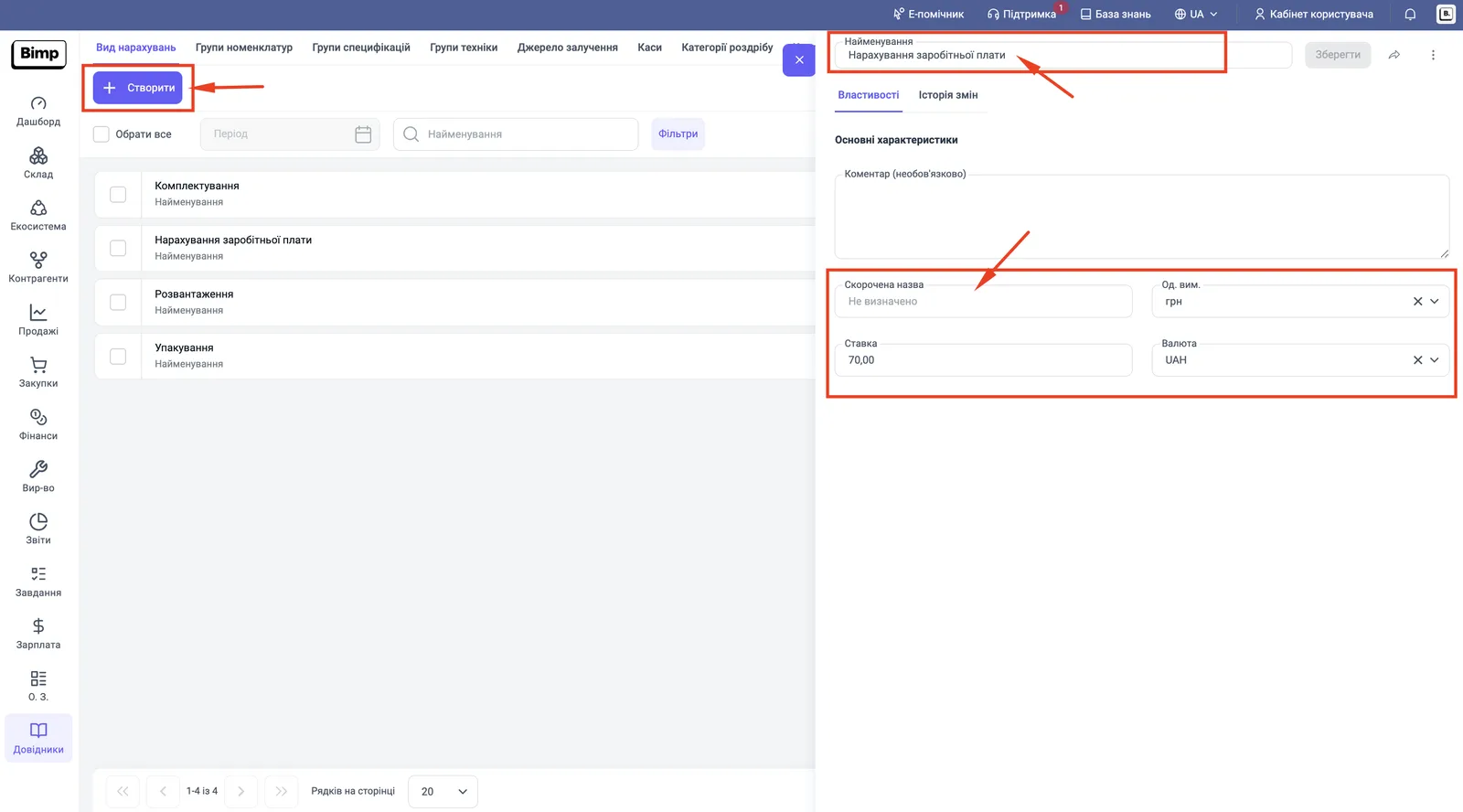
- In the left menu, open Directories and on the top tab bar select Accrual types.
- Click Create. The accrual type card opens on the right.
- In the “Name” field, enter a name that describes the payment: “Manager rate”, “Picking”, “Truck unloading”.
- In “Comment (optional)”, describe the main characteristics if needed.
- In the “Rate” field, enter the amount.
- In the “Currency” field, select the rate currency: UAH, USD, EUR.
- Click Save.
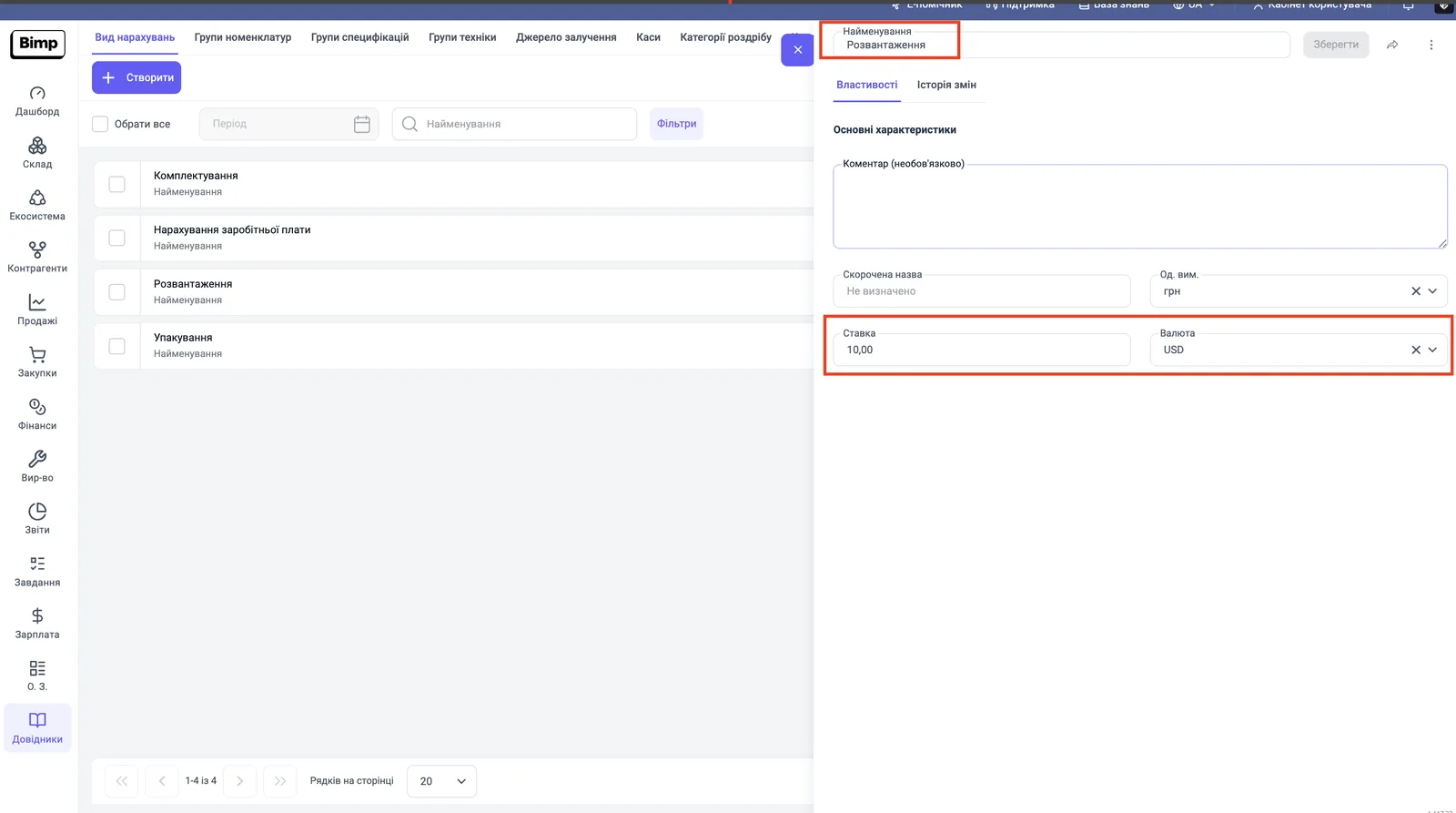
A rate can also be in a foreign currency: in the next screenshot the “Unloading” type has a rate of 10.00 USD.
Where accrual types are used
Created types become available for selection in these places:
- in the “Salary accruals” block of the employee card, where you can set a personal rate;
- in the “Accrual type” column of the Salary accrual and Piecework pay documents;
- in payout and advance documents — see Advances.
If a rate is set in the employee card, the system uses it. If not, it uses the rate from the “Accrual types” directory.
Create names for salary, bonus and premium in advance so that the accountant can quickly select them in an accrual document. Foreign currency rates are described in the article Salary in foreign currency.
FAQ
What is the difference between a fixed rate and a piece rate?
A fixed rate is pay for time: a monthly salary or an hourly rate. A piece rate is pay for results: an amount for one completed operation, for example 50 UAH per picked order.
Can I set a rate in a foreign currency?
Yes. In the "Currency" field select UAH, USD or EUR. If the rate is in a foreign currency and the accrual is in hryvnias, Bimp converts the amount at the rate on the document date.
Where are the created accrual types used?
In the employee card (the "Salary accruals" block) and in the "Salary accrual", "Piecework pay" and "Salary payout" documents.