
Salary accrual: salary and bonuses with a document
On this page
The Salary accrual document records the company's debt to employees, assigns payroll costs to the right month and item, and plans the payout in the payment calendar. To accrue salary, open "Payroll → Salary accrual", click "Create", select the expense item and the payroll month, add employees with amounts and save the document.
What the Salary accrual document does
The Salary accrual document accrues salary, a premium or a bonus to employees and at the same time records the company’s debt to them, assigns the expense to the selected item in the P&L reports and adds a planned payout to the payment calendar. Expenses fall in the month the work was done for.
Examples.
- Administrative staff: a marketer is accrued 20,000 UAH and an accountant 25,000 UAH under the “Admin staff salary” item. The amounts go to the administrative expenses of the current month, and the payout on the 5th is reserved in the payment calendar.
- Production workshop: a foreman is accrued 25,000 UAH under the “Production staff salary” item. The amount reduces the period’s profit but is not part of the cost price of a specific batch; for that, use piecework pay.
Before you start
Make sure the following are filled in:
- Employee cards in Payroll → Employees.
- The “Accrual types” directory: the types you need, for example “Salary”, “Premium”, “Bonus”.
How to create a salary accrual
-
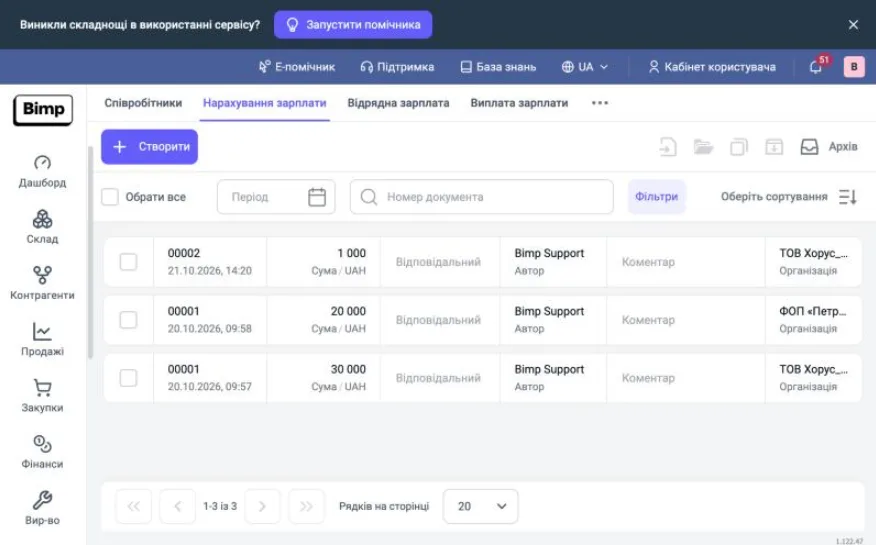
Open Payroll → Salary accrual and click Create.
-
Fill in the left “Main” panel:
Field What to enter “Creation date” the current date is filled in; change it if needed “Document number” assigned automatically after saving “Approve with” optional: the manager who approves the accrual “Expense item” required; determines the expense group in reports “Expense account” filled in automatically “Payroll month” the month the pay is accrued for “Currency” the accrual currency “Author”, “Responsible” who created the document and who is responsible for the operation “Organization” the legal entity the salary is accrued from 
-
In the “Expense item” field, select the suitable category:
- “Admin staff salary”: administrative expenses;
- “Sales staff salary”: selling expenses;
- “Production staff salary”: production overheads;
- “Staff bonuses”;
- “Security salary”.
-
Go to the “Employees” tab, click Add and fill in the row:
- “Employee”: select the employee;
- “Accrual type”: “Salary”, “Premium”, etc.;
- “Accrual”: the amount;
- “Rate” and “Amount in document currency”: calculated automatically if the payout currency differs from the accounting currency;
- “Offset advance”: select the flag if you need to offset a previously paid advance (see Advances).

-
Check the “Accrued” total at the bottom of the table.
How to account for production salary
The “Production staff salary” item goes into the “Expenses” and “Income and expenses (P&L)” reports and is written off to the period’s financial result. It does not appear in the “Accumulated cost” report and is not allocated with the “Cost allocation” document.
If payroll must be included in the cost price of produced goods, use the Piecework pay document with the “Piecework pay” item (the “Cost price” group).
How to plan the payout in the payment calendar
The payout goes into the payment calendar if you set up the “Payment” block.
- In the left panel, hover over “Payment” and open the “Deferral” field.
- Select “Add to payment calendar”.
- Select the deferral type: “No deferral”, “Partial” or “Full”.
- For “Full” and “Partial”, specify the “Payment date” and the “Payment amount”.
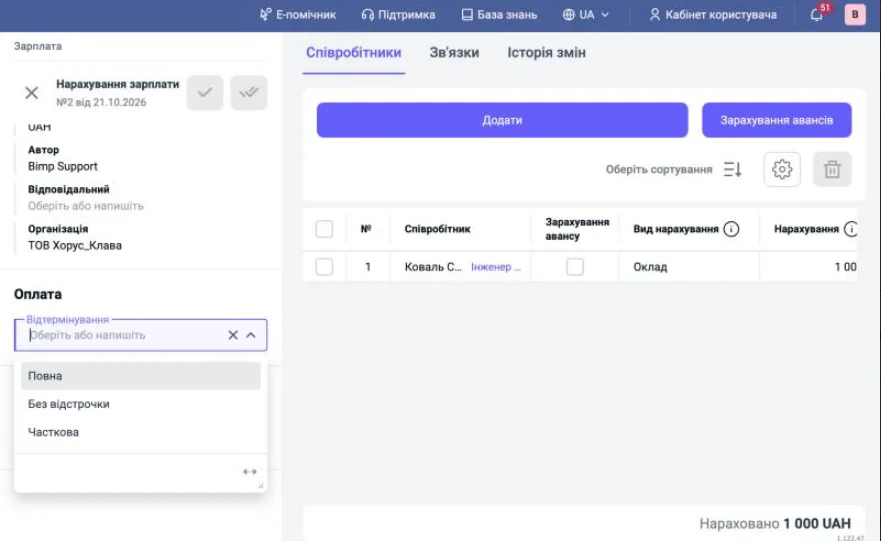
The date and amount from this block appear in the calendar as a future cash outflow. This helps avoid cash gaps.
How to save the document and pay the salary
Click Save and close. The document does not take money out: it only creates the debt to employees.
To pay the money, open the saved accrual, click Create based on and select Salary payout. For details, see Salary payout.
Where to check the result
| Report | What it shows |
|---|---|
| “Salary accrued and paid” | for each employee: accrued, paid, remaining debt |
| “Expenses” | amounts by the selected expense item |
| “Income and expenses (P&L)” | how the accrual reduced the month’s operating profit |
| “Payment calendar” (Finance) | the planned cash outflow on the specified date |
FAQ
Does the Salary accrual document take money out of the cash desk or account?
No. The accrual only records the debt to employees and adds a planned event to the payment calendar. Money is paid out by the "Salary payout" document, which is created based on the accrual.
Why does production staff salary not go into the cost price of products?
The "Production staff salary" item is written off to the period's financial result (the "Expenses" and P&L reports) and does not take part in cost allocation. To include salary in the cost price, use the "Piecework pay" document.
What happens if the document date and the payroll month differ?
Expenses may be shown incorrectly in reporting. The creation date and the "Payroll month" must fall in the same calendar month.