
Disassembly: breaking a product into components with cost price allocation
On this page
Disassembly breaks a product, kit or raw material into components: it writes off the source product and posts the resulting items, allocating cost price by the cost shares from the specification. Create a disassembly specification (the shares sum to 1), then in "Production → Disassembly" create the document manually, add the product and post it.
When you need disassembly
Disassembly is the operation of breaking one product, kit or raw material unit into several components (materials or semi-finished products). After posting, Bimp writes off the source product, posts all the resulting components to the warehouse and allocates cost price in proportion to the cost shares. Separate write-off and stock posting documents are not needed. How the two production methods relate is described in the production overview.
Typical cases:
- Woodworking. From 1 m³ of “Raw birch log” you get commercial lumber (87.3% of the value), associated small wood (11.5%) and waste (1.2%).
- Unkitting finished products. A customer refused an assembled “Gamer Pro” PC and asks to buy only the graphics card and processor: the PC is written off, and all five components return to stock as separate products with the corresponding cost price.
- Gift sets. Sets left unsold after the holidays are broken down into separate products for retail.
Before you start: the disassembly specification
- Open the card of the product you will disassemble and create a specification for it.
- Add all items that result from disassembly (materials, parts, waste).
- In the “Cost share” column, enter the allocation coefficient for each component. The sum of all shares must equal 1.
How to create a disassembly
-
Open Production → Disassembly and click Create. The document can only be created manually.
-
In the left panel fill in “Product write-off warehouse”, check the “Production date” and choose the “Responsible”. The “Document number” is assigned automatically, the “Author” is filled in by the system, the “Comment” is free text.
-
On the “Products” tab add the source product (for example, “Raw birch log”), enter the quantity and the specification (if there are several). With batch tracking, choose the batch. The row shows the “Amount”: the cost price of the written-off product.
-
Open the “Materials” tab: it is filled in from the specification. Click Create batches on the “Products” tab so that Bimp creates batches for the resulting items, and check for each component the quantity, cost share, “Post to” (the receiving warehouse) and the batch number.
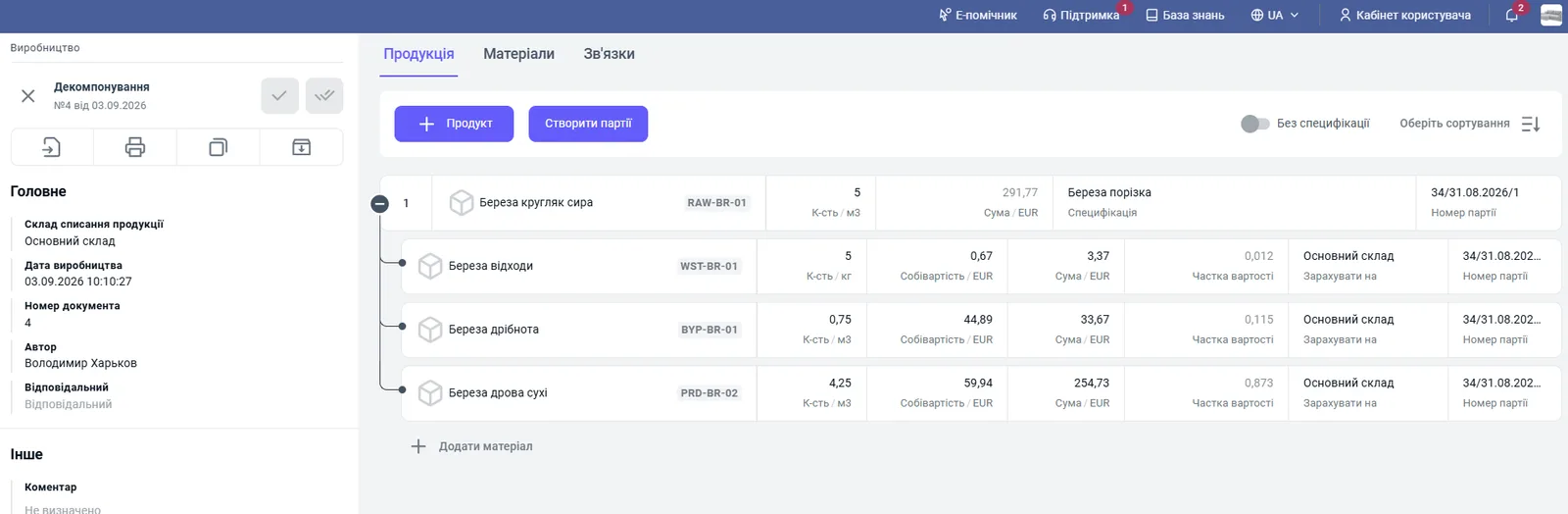
-
Post the document: the green check mark in the upper left part.
-
Check the batch movement: the source product is written off, the new components are posted. The cost price allocation is visible in the Disassembly cost report.
If the value allocation is different each time, you can set the shares directly in the document’s materials table instead of the specification.
Common problems
Cost price of components is not assigned. Bimp does not know how to allocate the value. Fill in the “Cost share” in the specification (Production → Specifications) or in the document’s materials table (Production → Disassembly) and save.
The document is not posted. The sum of cost shares is not equal to 1: fix the shares in the specification.
The reverse operation is Assembly.
FAQ
Why is cost price not assigned during disassembly?
Bimp does not know how to allocate the value of the main product among the components. Fill in the "Cost share" for each component in the specification or directly in the materials table of the "Disassembly" document.
Why is the "Disassembly" document not posted?
If the sum of cost shares in the disassembly specification is not equal to 1 (100%), the system cannot allocate cost price and blocks posting.
Can I create a disassembly based on another document?
No, the document is created only manually in "Production → Disassembly".
More about this in Bimp: Production management software