
Material consumption limits: controlling overuse in production
On this page
Consumption limits compare actual material use with the specification norms. In the specification you set a "Minimum quantity" and a "Maximum quantity"; the production order only shows deviations (informational mode), while assembly blocks saving with deviations. Only an administrator or the account owner can allow saving.
Why limits are needed
Consumption limits compare the actual quantity of a material with the specification norm. They prevent overuse, which quietly raises cost price, and underuse, which leads to an incomplete product being released. Example: according to the furniture specification, up to 10 kg of glue is allowed, and the operator entered 13 kg: Bimp shows “+3 kg” and blocks the assembly until the value is fixed or a manager approves it. The production overview gives the big picture of production documents.
Control modes
| Document | Mode | Behavior on deviation |
|---|---|---|
| Production order | Informational | Deviations are shown on the tab, the document is saved without blocking |
| Assembly | Hard | Saving is blocked until the quantity is back within limits or an administrator confirms the deviation |
How to set limits in a specification
-
Open Production → Specifications and the needed specification, go to the “Materials and components” tab.
-
In the right corner of the table header open the column settings, the “Product composition” tab, turn on the columns “Minimum quantity” and “Maximum quantity” and click Save.
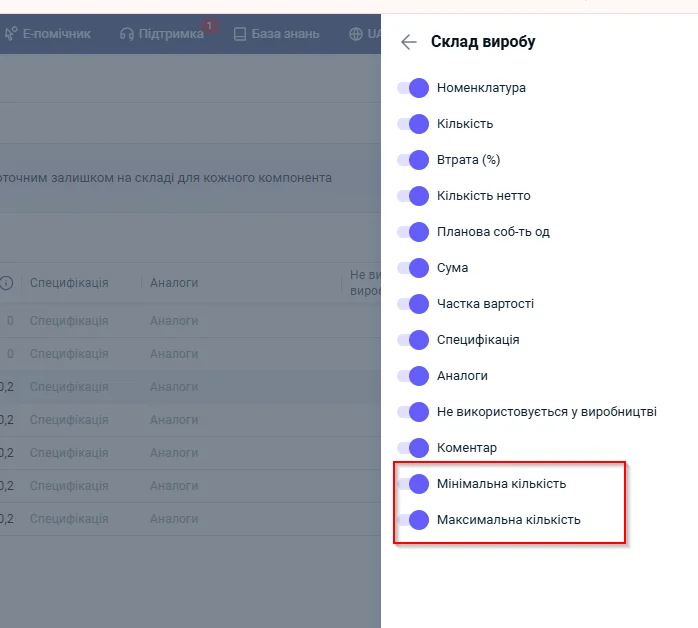
-
For each material enter the limits per the product quantity stated in the specification. Click Save.
If limits are not filled in, control is not applied to the material. You can set only a minimum or only a maximum. The “Minimum quantity” cannot exceed the “Maximum quantity”: otherwise the specification will not be saved.
How to read the “Material consumption control” tab
In a production order the tab is located after “Materials” and is filled in automatically. If there are deviations, a counter appears next to the name, for example “Material consumption control (4)”.
| Column | What it means |
|---|---|
| “Product” | The material and its modification |
| “Production” | The product in which the material is used |
| “Actual quantity” | The amount from the “Materials” tab |
| “Minimum quantity” / “Maximum quantity” | The limits recalculated for the planned output volume |
| “Deviation from norm” | The difference between the actual value and the limit |
Deviation values: 0 means within tolerance; minus (for example, -3 pcs) means underuse; plus (for example, +3 kg) means overuse; - means limits are not set.
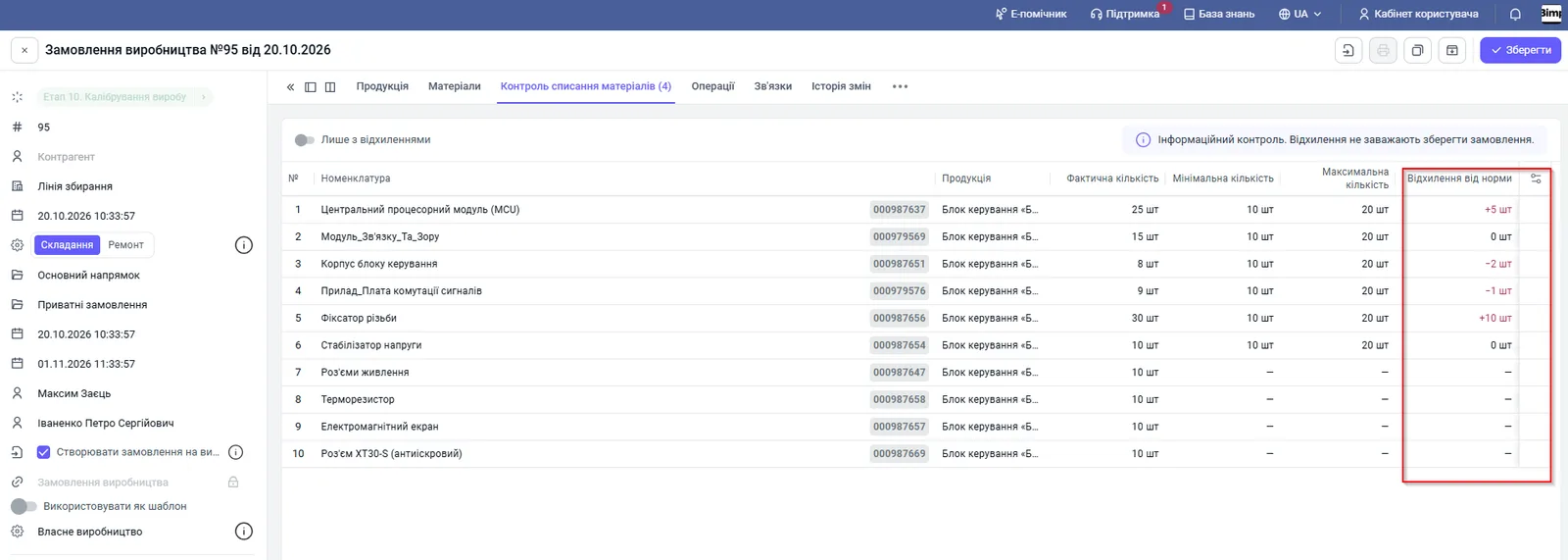
The tab data is calculated and cannot be edited. Rows of one material from different batches or warehouses are merged into one. Changing the quantity of products on the “Products” tab scales the limits automatically. The “Only with deviations” switch hides rows within the norm.
Control in assembly
In the assembly open the “Material consumption control” tab and make sure there are no values highlighted in red. If there are no deviations, there is no counter next to the tab, and the document is posted as usual. If there are, saving shows the message: “To complete the assembly, the quantity of materials must be within the norm. Check the tabs Material consumption control and Materials.”
How to fix it:
- Go to the “Materials” tab and find the rows marked “Deviation from norm” (hover to see the difference).
- Adjust the quantity so that it falls within the specification limits.
- Click Save: the mark disappears.
How to save an assembly with a deviation
If the deviation is justified (fixing scrap, a specific raw material batch), only an administrator or the account owner can confirm it. See Roles.
- The administrator clicks Save.
- In the window “Save the assembly with a deviation from the norm?” they review the list of discrepancies.
- They confirm with the Save with deviations button or click Cancel and send the document back for recalculation.
How to check who saved with deviations
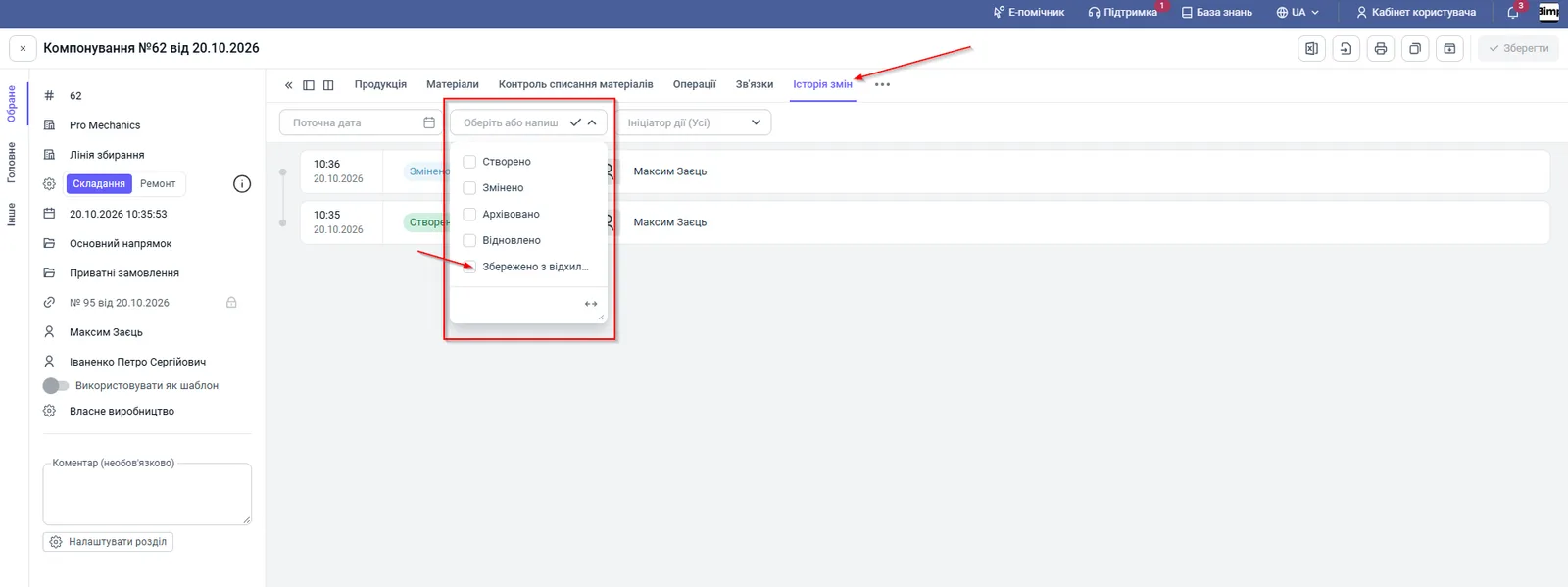
Every such save is recorded. Open the assembly, the “Change history” tab, and find the event “Saved with deviations” (date, time and author). Clicking the entry shows the list of adjusted materials. To find all cases, filter the “Action type” column by the value “Saved with deviations”.
FAQ
Why is the "Material consumption control" tab empty?
No items for production have been added to the "Products" tab yet, or no specifications are selected for them.
Why is there a dash in the limit columns?
No norm limits are set in the specification for this product, or the material was added manually outside the specification composition.
Does the system block creating a production order when there are deviations?
No. The production order works in informational mode: deviations are visible but the document can be saved. Hard blocking works only in assembly.
Who can save an assembly with a deviation from the norm?
Only a user with the "Administrator" rights or the account owner. The action is recorded in the "Change history".
More about this in Bimp: Production management software