
Cost of disassembled products report: value of parts after disassembly
On this page
The Cost of disassembled products report shows the amount for which each component was posted after the product was disassembled: the base allocation of the product's value and the total including additional costs and piecework pay. To generate it, open "Reports → Cost of disassembled products", select the period, and generate the report.
What the Cost of disassembled products report is for
The Cost of disassembled products report allocates the value of the disassembled product and the disassembly expenses among the components received. Without it, you cannot correctly assess the margin from selling individual parts.
- Service center. Faulty electronics were bought for 120.11 USD and disassembled into four modules. The report allocates the device’s value and the dismantling expenses (the technician’s pay) to each spare part.
- Repackaging. Unsold gift sets were broken up into separate goods. The components return to the balance at the correct price, taking unpacking expenses into account.
General report features are described in the article Reports in Bimp.
Which documents form the report
| Document | What it gives the report |
|---|---|
| Specification | the list of materials and components produced during disassembly, see Specifications |
| Disassembly | writes the product off the warehouse and posts the components at the calculated cost price, see Disassembly |
| Assembly | shows the expenses incurred when the product was made; the cost price of the components is calculated from them |
| Additional costs | the value of third-party services in the cost price of the parts received, see Additional costs |
| Piecework pay | internal labor costs in the cost price of the parts, see Piecework pay |
How to generate the report
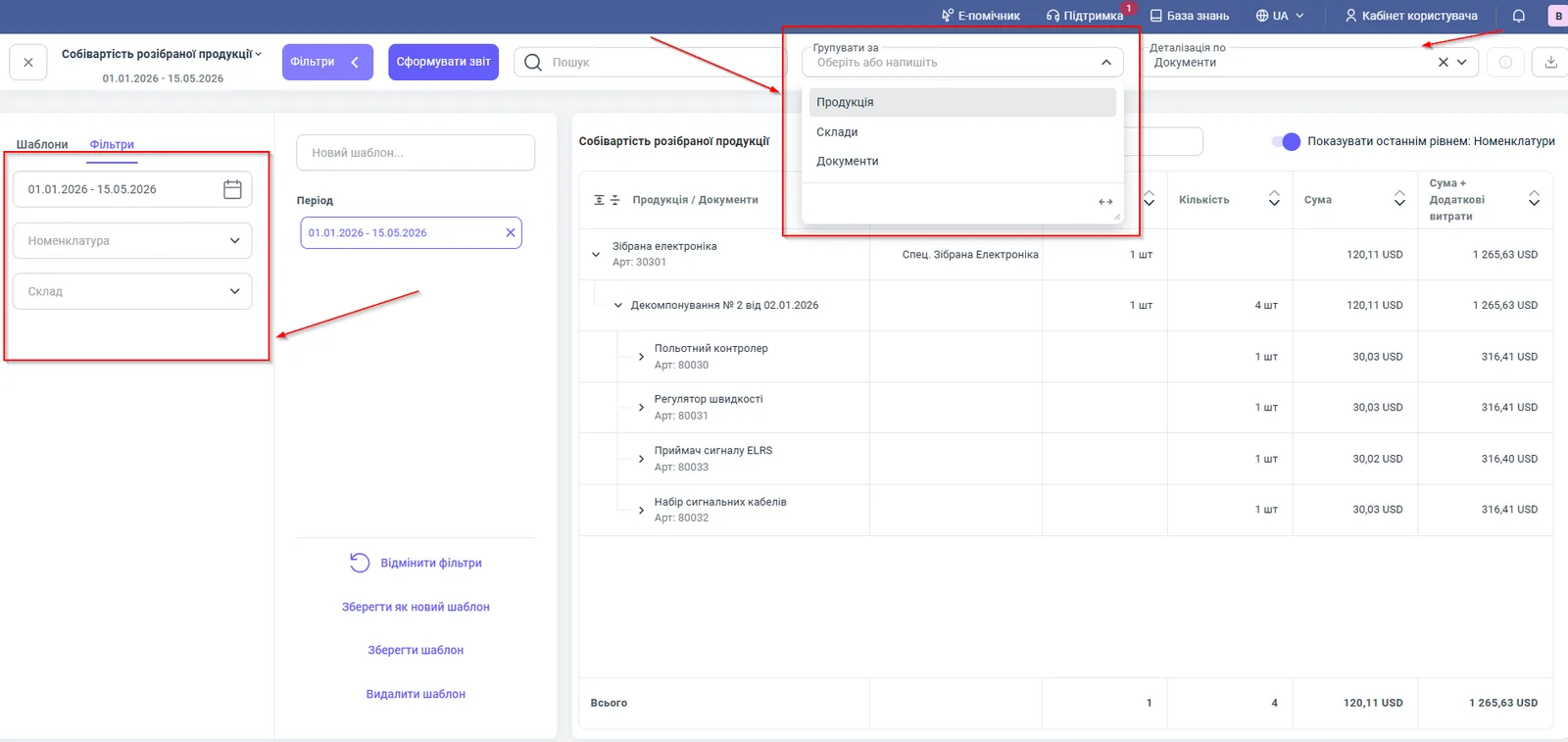
To see the cost price of components, open the report, select the period, and click the generate button.
- Open Reports → Cost of disassembled products.
- In the top left corner, select the period, for example 01.01.2026 – 15.05.2026.
- If needed, set the “Products” or “Warehouse” filters.
- Select “Group by” and “Detail by”.
- Turn on the Show as the last level: Products switch to see the components.
- Click Generate report.
Report figures
| Column | What it means |
|---|---|
| “Products” / “Documents” / “Products and services” | a tree: the disassembled product, the disassembly document, the parts received |
| “Specification” | the specification under which the disassembly was done |
| “Product quantity” | the number of products disassembled |
| “Quantity” (of materials) | the number of components received into the warehouse |
| “Amount” | the primary value of the components, the base allocation of the product’s value |
| “Amount + Additional costs” | the total cost price of the components including disassembly expenses, logistics, and the technician’s work |
Filters and grouping
| Parameter | Value |
|---|---|
| “Products” filter | a specific product or component |
| “Warehouse” filter | disassembly by warehouses |
| “Group by” | products (default), warehouses, documents |
| “Detail by” | documents or products |
| “Show as the last level: Products” switch | expands the document to the list of parts received |
How to read the figures: an example
The product “Assembled electronics” (item no. 30301), 1 pc, was disassembled with the document “Disassembly No. 2 dated 02.01.2026” into 4 components. The product’s “Amount” is 120.11 USD, split among four components at 30.03 USD each (the signal receiver gets 30.02 USD because of rounding). The “Amount + Additional costs” column shows the total cost price of a component: 316.41 USD for the flight controller, 316.41 USD for the speed controller, 316.40 USD for the signal receiver, and 316.41 USD for the cable set; 1,265.63 USD in total. The difference between “Amount” and “Amount + Additional costs” is the expenses that were allocated to the components.
Why the figures do not match
All components have the same “Amount”. This is how the base allocation of the product’s value among components works; differences appear in the “Amount + Additional costs” column after expenses are accrued.
There are no additional costs in the report. Check that the “Additional costs” and “Piecework pay” documents are posted and linked to the right disassembly.
The disassembly is not visible in the report. The report is built from posted documents for the selected period; check the period, warehouse, and products in the filters.
The cost price of the parts differs from the cost price in the “Cost of produced goods” report. That report shows the value of the product at release, while this one shows the value of components at disassembly; compare with Cost of produced goods.
FAQ
How does "Amount" differ from "Amount + Additional costs" in the disassembled products report?
"Amount" is the primary value of a component under the base allocation of the disassembled product's value. "Amount + Additional costs" is the total cost price of the component, including disassembly expenses, logistics, or the technician's work.
Which documents are needed for disassembly expenses to reach the cost price of the parts?
Posted "Additional costs" documents (third-party services) and "Piecework pay" documents (internal labor) linked to the disassembly.
How do I see the list of components received?
Turn on the "Show as the last level: Products" switch: the disassembly document expands to the components.