
Accounting settings: what each parameter means
On this page
Accounting settings open through the profile icon: Company settings, the "Accounting settings" tab. There you set the VAT rate, accounting currency, national currency, main project and organization, and the switches: stock and cash control, reservation, booking, batches, series. The accounting currency cannot be changed after documents are entered.
Where accounting settings are
Accounting settings open through the profile icon in the top right corner: Company settings → “Accounting settings” tab. Changes are saved with the Save changes button. If you need the big picture of the system, start with the overview of Bimp modules and interface. If you keep your books in 1C, also set up the Bimp exchange with 1C.
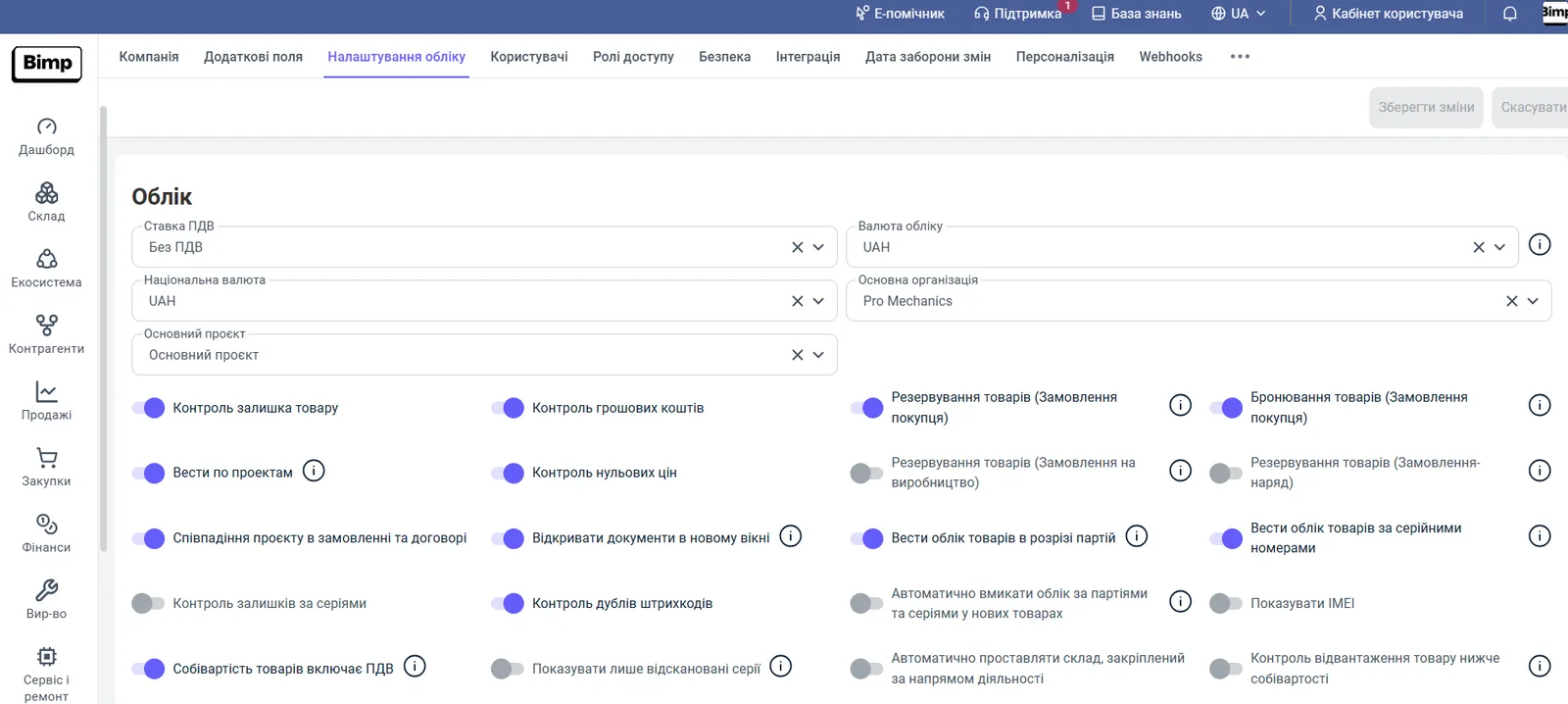
Main fields
The main fields define the currency, the VAT, and the organization on whose behalf accounting is kept.
| Field | What it means |
|---|---|
| “VAT rate” | The VAT rate in percent that the company works with. It is used to calculate VAT in printed documents and for synchronization with bookkeeping. |
| “Accounting currency” | The main currency of the company’s management accounting. After it is saved and documents are entered, it cannot be changed. |
| “National currency” | The currency of the country where the company is registered. |
| “Main project” | The project that is filled in by default. Bimp creates the project “Main project”; others are added in the directories. |
| “Main organization” | The organization that is filled into documents by default. When a company is created, Bimp creates one organization; others are added in Directories → Organizations. |
If “National currency” and “Accounting currency” are different, set current rates for the accounting currency in the “Currencies/Rates” directory; see Currencies, rates, and multi-currency accounting.
Control switches
Control switches prohibit risky operations.
Stock balance control. When the switch is on, goods can be shipped only if they are in the warehouse; selling “into the negative” is not available. When it is off, Bimp allows shipping even without the required quantity. After documents that created negative balances are posted, the switch cannot be turned on again until they are corrected: Bimp shows a list of products, and the “Goods movement” report helps find the documents and the warehouse. See Stock control.
Cash control. Prohibits posting payments that take an account or a cash desk into the negative.
Zero price control. Allows setting a zero price (0.00) for goods in a customer order.
Barcode duplicate control. Prohibits saving a product with a barcode that already exists in the system.
Reservation and booking switches
These switches define how a reserve is created in documents.
| Switch | What it does |
|---|---|
| “Goods reservation (Customer order)” | When on, a customer order sets the reserve automatically by the quantity of items. When off, the reserve is 0, but it can be changed manually. |
| “Goods booking (Customer order)” | Allows reserving goods in an order even if they are not in the warehouse. After the receipt, the manager creates a shipment based on the orders either in the order they were created or in any order, if there is enough goods for all booked items. |
| “Goods reservation (Production order)” | Automatic reservation of materials in a production order. |
| “Goods reservation (Work order)” | Automatic reservation of products in a work order. |
For details, see Goods reservation and Selling goods that are not in stock.
Switches for projects and documents
Keep records by projects. Adds a visual split of contracts by projects in counterparty cards.
Project match in order and contract. Prohibits saving a Supplier order and a Customer order if the project in the contract differs from the project in the order.
Open documents in a new window. Controls whether a document created based on the current one opens in a new window or in the current one.
Switches for batches, series, and cost price
Keep goods records by batches. Each new batch is stored separately, and a batch card with the goods movement is created for it.
Keep goods records by serial numbers. Lets you determine the location and status of each unit of goods. The accounting modes are described in Serial number accounting.
Show IMEI. Adds an IMEI field to the documents Supplier order and Customer order.
Goods cost price includes VAT. Lets you keep inventory records at cost price without VAT while preserving correct accounting of tax credit and tax liability. See Cost price without VAT.
Units of measure, number format, and payment calendar
Below the switches there are additional settings:
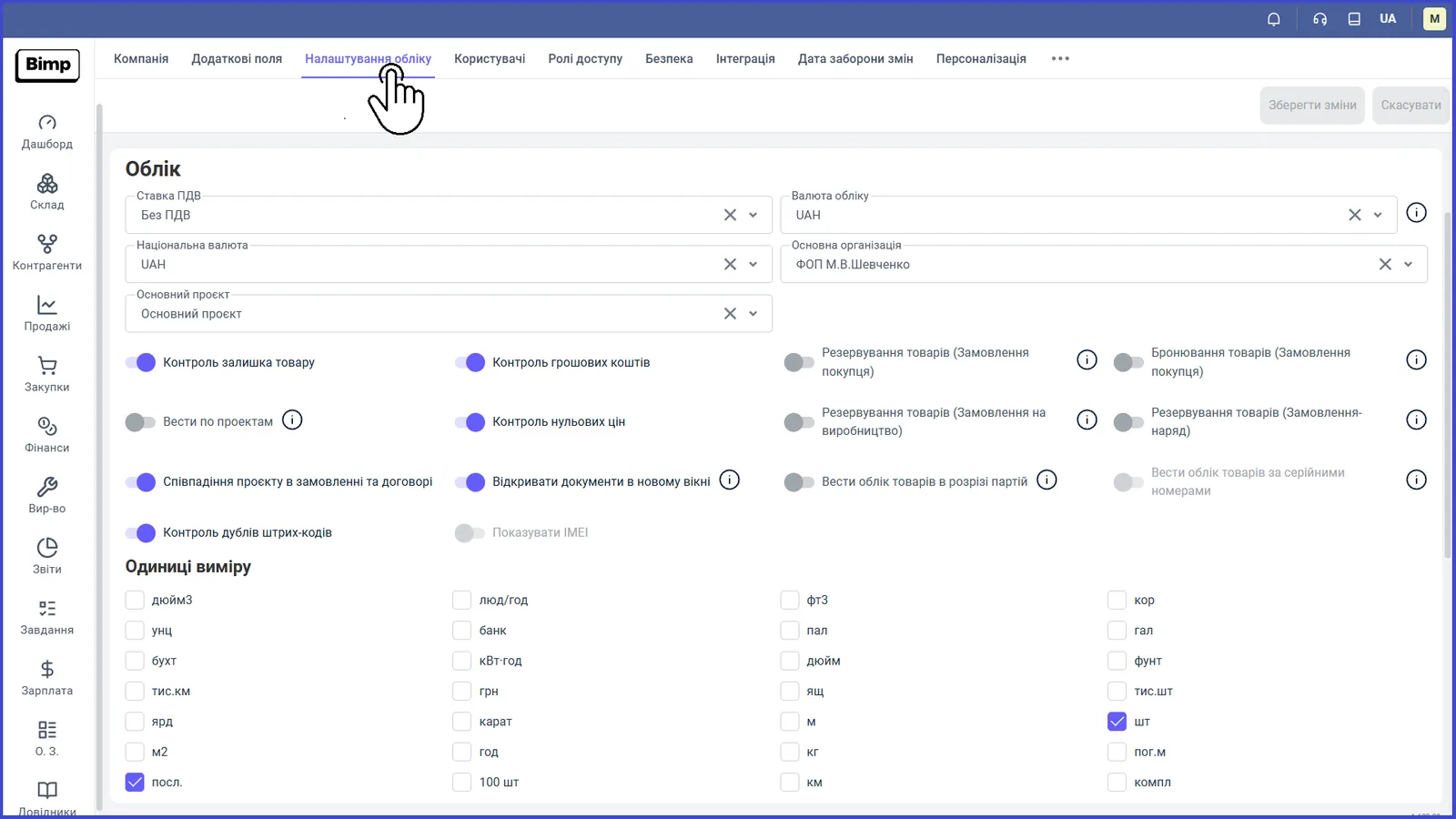
- Units of measure: select those your company needs in the “Units of measure” list. See Units of measure.
- Number format: separators for decimals and digit groups.
- Payment calendar: turns on the payment calendar, which helps match planned receipts with future expenses and avoid cash gaps. If the “Automatic payment planning” option is active, in planning documents the checkbox “Add to payment calendar” is set automatically; otherwise the user sets it. See Payment calendar.
What to set up next
After setting up accounting, create projects and lines of business, check the organizations, and add users and roles. The full order is in the launch checklist.
FAQ
Can I change the accounting currency?
No. After the settings are saved and documents are entered, the accounting currency cannot be changed, so choose it before you start working.
Why can I not turn stock control back on?
After documents that created negative balances are posted, the switch cannot be turned on until all negative balances are corrected. Bimp shows a list of such products, and the "Goods movement" report helps find the documents.
Who can change accounting settings?
Only users with the administrator role. If you do not have enough rights, contact your manager.
What is the difference between reservation and booking?
Reservation assigns goods that are in the warehouse to an order. Booking lets you reserve goods that are not yet in the warehouse; they are assigned after the receipt.