
Restricting an employee to specific warehouses
On this page
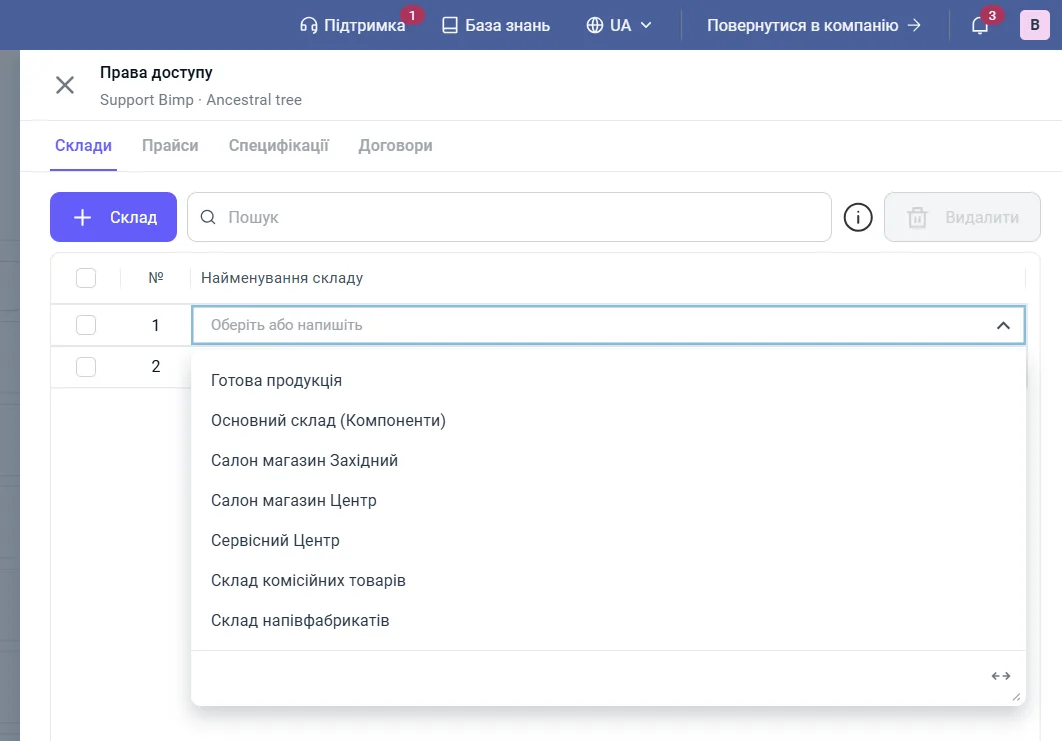
To restrict an employee to certain warehouses, open "User account → Users", click "Access settings" in the user's row, add the allowed warehouses on the "Warehouses" tab with the "+ Warehouse" button and save. While the list is empty, the user sees all warehouses; once at least one is added, they see only those.
When you need this
Access to specific warehouses is needed so that a storekeeper or manager sees balances only for their own locations and cannot accidentally write off or reserve goods in someone else’s warehouse. All posting, transfer and write-off operations are linked to the employee and the warehouse they are allowed.
Examples.
- A company has a central warehouse in Kyiv and a regional one in Dnipro. The storekeeper in Dnipro is given only “Dnipro warehouse” and does not see the balances of the capital.
- A production company has a “Raw materials warehouse” and a “Finished goods warehouse”. The workshop head gets the first, the sales manager only the second, for processing shipments.
Before you start
- The warehouses must already exist; see Warehouses and stores.
- The employee must be added as a user.
- Only an “Administrator” or the company owner can change access.
How to set up warehouse access
- Click the profile button in the top right corner and open User account.
- Go to the Users tab.
- Find the employee and the company and click Access settings in their row.
- In the “Access rights” side panel, open the Warehouses tab.
- Click + Warehouse and choose a warehouse from the list. To add several warehouses, repeat this step.
- Click Save.
How the restriction works
The restriction works on a “strict list” principle: if no warehouse is assigned to the user, they see all warehouses; as soon as at least one is added, the other warehouses are hidden. To remove the restriction, delete all warehouses from the list. Changes take effect immediately.
Review access when an employee moves to a new position or a new branch opens.
FAQ
Does an employee need to sign in again after warehouse access is changed?
No. The settings take effect immediately; after the page is refreshed, the list of available warehouses changes automatically.
Who can change employees' access to warehouses?
A user with the "Administrator" role or the company account owner.
What does an employee see if no warehouses are assigned?
If the warehouse list is empty, there are no restrictions: the employee sees all warehouses. The restriction turns on when at least one warehouse is added.