English
 Polski

Production planning software for manufacturing
Bimp is production planning software that lets you start an order once the materials are on hand, while purchasing knows what to bring in and when. Production orders, reservations, stock balances and the purchase plan share the same data, so you see a shortage before the shop floor stops.
What you can plan
Bimp's manufacturing planning software covers materials, purchasing and execution: from the customer order to stages on the shop floor.
Material reservations for customer orders or production orders
Stock balances across warehouses and material shortages
Purchase demand based on minimum balance and demand
Planned period, stages and their statuses
Operation dependencies and material write-off
How it works on a single order
A customer orders a product. A manager creates a customer order with a specification, and the production and purchase plan builds from there, with no data re-entry.
Customer order with a specification
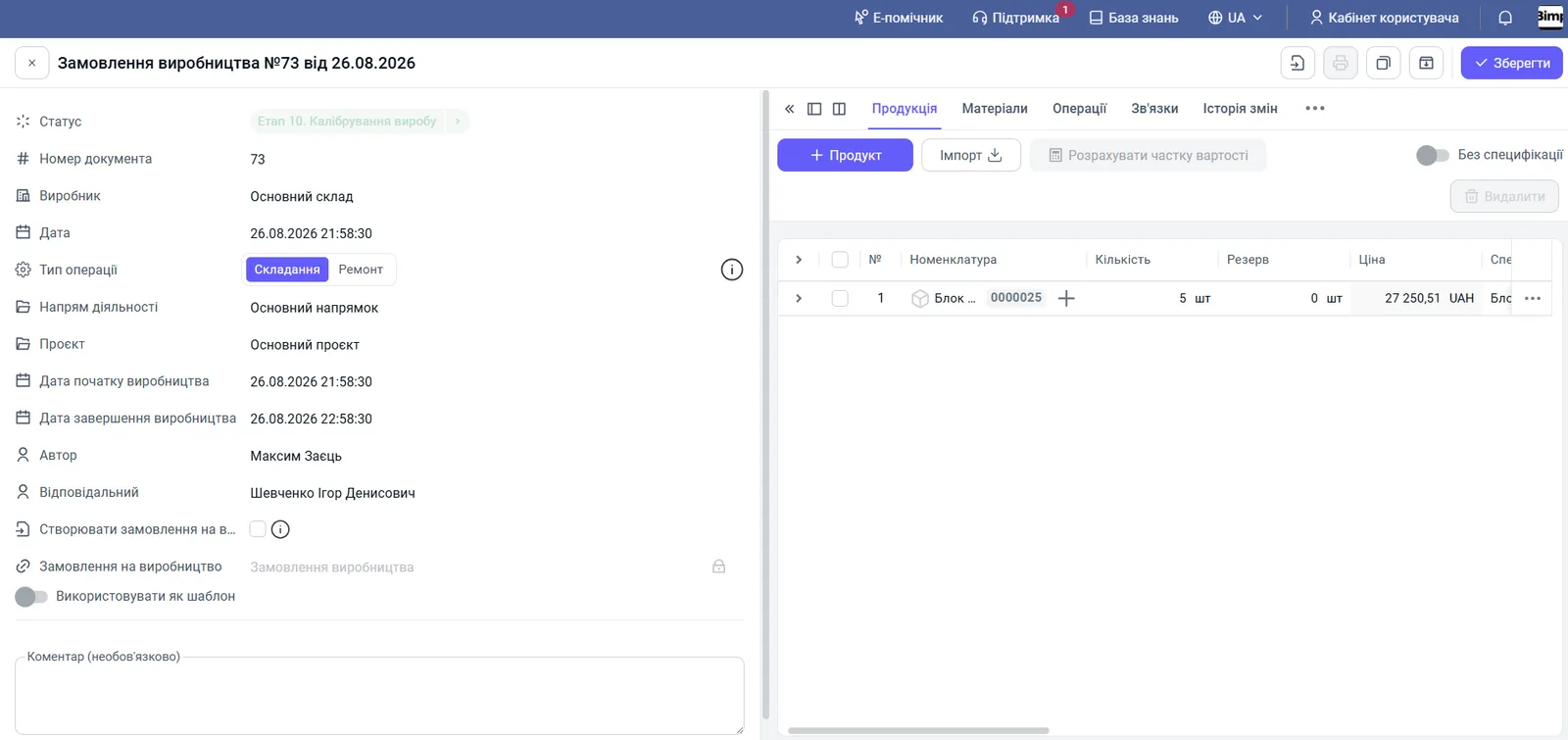
Production order: materials and operations
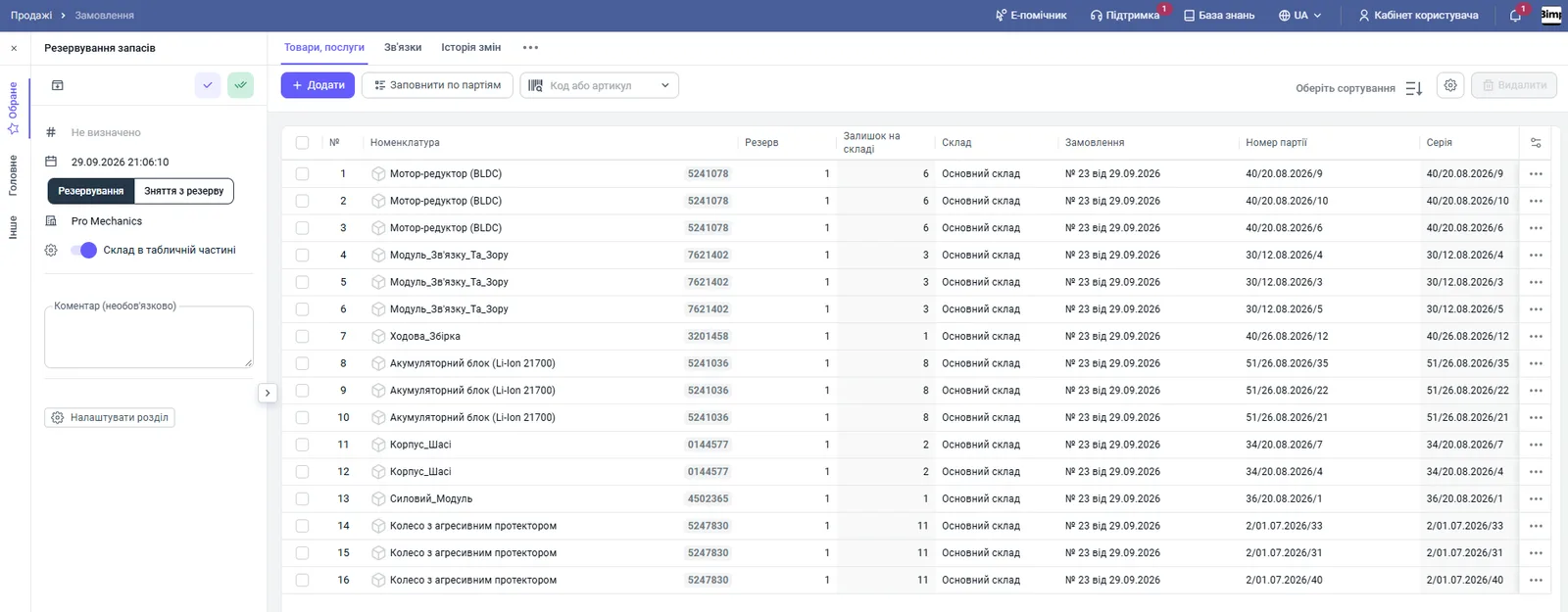
Material reservation and stock check
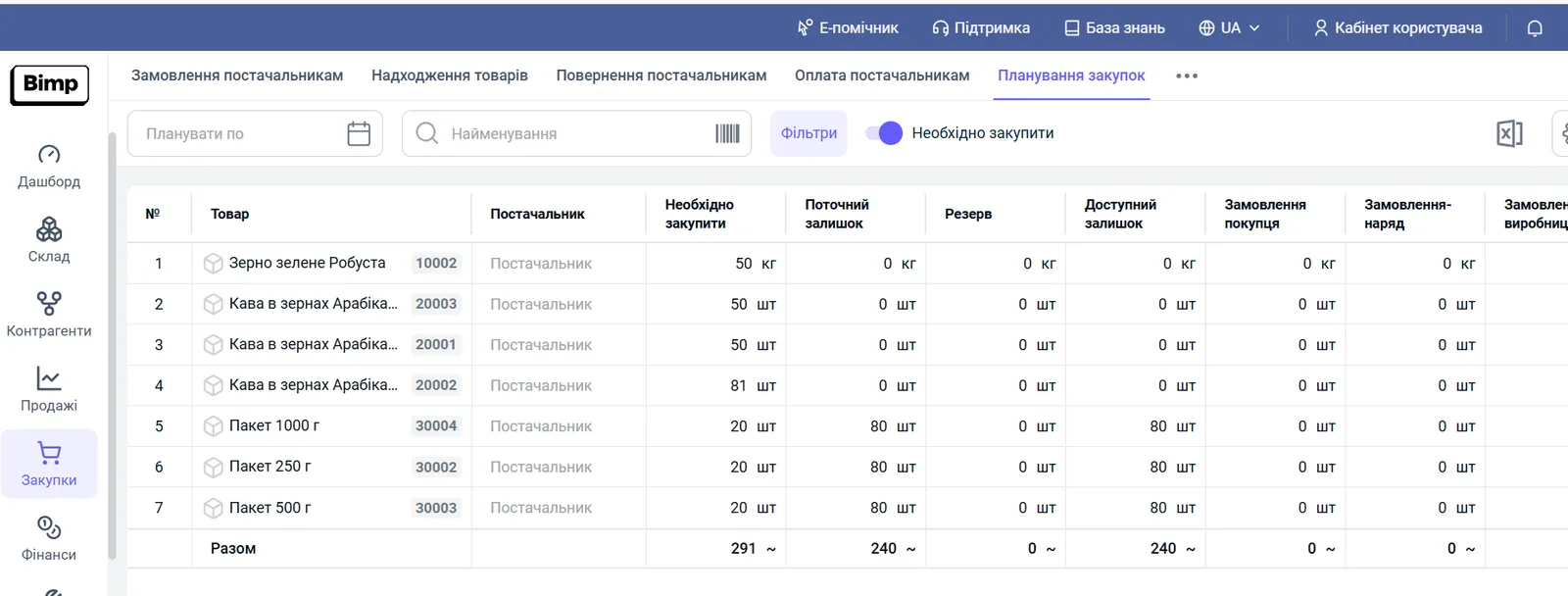
Purchasing what is missing
Production task, stage by stage
Materials are reserved for a specific order and cannot be shipped under another deal. If something is missing, you see it right away. The “Purchase planning” report rolls up purchase demand: reservations for orders, minimum balance, demand rate and goods in transit. Once the materials are in place, manufacturing runs stage by stage, with statuses and responsible employees.
What is MRP
MRP (Material Requirements Planning) works out material requirements: from the production plan it derives what you need, how much and by what date so production does not stall. The output is a list of purchases and production orders. In Bimp you reach the same result through specifications, production orders, reservations and purchase planning. More about the method in our blog article on MRP.
Material requirements
The specification defines which materials go into one product and in what quantity. The production order scales this to the required number of products, and the reservation shows what is already allocated to the order.
Purchase demand
The “Purchase planning” report subtracts stock on hand and goods in transit from minimum stock, reservations and forecast demand, and shows exactly what to order from the supplier.
Frequently asked questions
How do I plan production in Bimp?
Create a production order (on its own or from a customer order), add a product with a specification and check the materials and operations. The order sets the planned production period, and the materials can be reserved. Progress is then tracked stage by stage in production tasks.
How do I know if there are enough materials for an order?
On the “Materials” tab of the production order you see the quantity per specification, the reserve and the warehouse balance. The “Stock reservation” document shows available stock and the shortage. If a material is short, purchase it or replace it with an analogue from the specification.
How does Bimp calculate how much material to purchase?
In “Purchases → Purchase planning”, the “Need to purchase” column is calculated as: minimum balance plus reserves plus (demand rate × planning depth) minus physical balance minus expected deliveries. Minimum balance, demand rate, safety stock and delivery time are set in the product card.
Does purchase planning take production orders into account?
Yes. Reserves in this calculation include goods for customer orders, work orders and production orders. Goods already ordered from a supplier are subtracted from the demand, so you do not overbuy.
How do I turn the demand into a supplier order?
Filter the report by supplier, export it to Excel, create a supplier order and upload the file with the “Import” button. One order can cover all missing items from that supplier.
Does Bimp have MRP calculation and a Gantt chart?
Bimp calculates purchase demand from minimum balance, reservations, demand and deliveries in transit, and takes the materials for a product from its specification. The system has no separate MRP module that explodes all orders into components, no Gantt chart and no capacity planning. You plan with production orders, reservations and the purchase plan.
How do I keep the production schedule on track?
Production scheduling in Bimp works at the order level: the production order holds start and finish dates, and the production task tracks stages with statuses, responsible employees, start and finish. For downtime caused by missing materials, you can create your own status, for example “Waiting for materials”.
See planning on your own production
Book a Bimp demo: we will show how orders, material reservations and the purchase plan work, using your product as the example.
Not ready to talk? Get the PDF for your team.
More about the solution
Production planning in practice
What Bimp plans separately for production and for purchasing
Production is planned in the production order: what to make, from which materials, with which operations and in what period. Purchasing is planned in a separate report by product: minimum balance, demand, reservations and deliveries in transit give the “Need to purchase” quantity. Both work from the same stock balances, so the shop floor and the purchasing team see the same picture.
What to do when an order is short of materials
You see the shortage before work starts: material reservation shows balances and shortages. Replace the material with an analogue from the specification or buy more. If the product is already in progress and waiting for material, the production task stage gets the “Waiting for materials” status, and everyone knows why work has stopped.
Can you limit material overuse?
Yes. The specification sets a minimum and maximum quantity for each material. The production order shows the deviation, and an assembly with a deviation cannot be saved until the administrator or account owner confirms it.
Knowledge base guides
Step-by-step guides on this topic in the Bimp knowledge base: