
Netting with a counterparty
Netting closes mutual debts when a counterparty owes you and you owe them at the same time. Open "Finance → Debt adjustment → Create", select the "Netting" type, specify the customer and the supplier, add settlements on both tabs with the same amount and save. No money moves.
What is netting
Netting is an operation that offsets the debt between you and a counterparty when they owe you for goods or services and you owe them at the same time. No money is transferred, but the obligations are fulfilled and reports show the real balance.
Example. You ordered spare parts worth 10,000 UAH from the company “TechnoSvit” (you owe), and sold it office equipment worth 8,000 UAH (it owes). Netting for 8,000 UAH leaves your debt at 2,000 UAH, and the customer’s debt becomes 0.
How to net debts
- Open Finance → Debt adjustment and click Create.
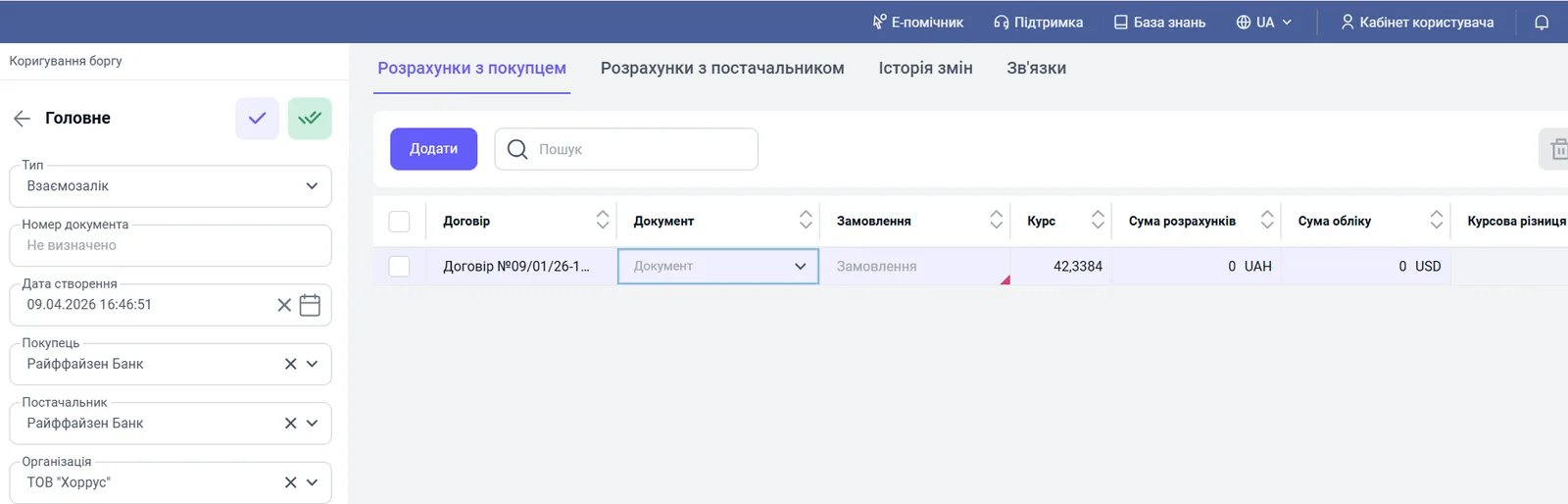
- In the “Type” field, select Netting.
- Fill in the “Customer” and “Supplier” fields (the counterparty acting in both roles) and, if needed, “Organization” and “Creation date”.
- On the “Settlements with customer” tab, click Add and select the contract, document and order or invoice under which the customer owes you. Specify the amount.
- On the “Settlements with supplier” tab, add the documents under which you owe this counterparty, and the amount.
- Make sure the netting amounts match and save the document.
What happens after saving
The debt disappears from both assets and liabilities at the same time. In the “Settlements” report, the balance for the counterparty decreases by the netting amount. In the Management balance sheet, receivables and payables decrease by the same amount, and the balance stays in equilibrium. For the report, see Settlements with counterparties. For other types of the “Debt adjustment” document, see Debt adjustments.
FAQ
When is netting used?
When a counterparty is both your customer and your supplier: they owe you for goods, and you owe them for services. Instead of exchanging payments, the debts are offset against each other.
Does money move during netting?
No. The debt disappears from receivables and payables at the same time; balances on accounts and in cash desks do not change.
Must the amounts on both tabs match?
Yes. Before saving, check that the netting amounts for the customer and for the supplier match.
More about this in Bimp: Finance in Bimp