
Settlements with Counterparties report: customer and supplier debts together
On this page
The Settlements with Counterparties report brings customer and supplier debts into one table and shows the opening balance, debt increase and decrease and closing balance for each counterparty and contract. Open "Reports → Settlements with Counterparties", enter a period and click "Generate report".
What the report is for
The Settlements with Counterparties report combines receivables and payables with all of the company’s counterparties in one table. Its main advantage is “universal” counterparties, who are both suppliers and customers for you: for them you see all contracts and the net balance for netting.
Unlike the separate reports by customers and by suppliers, here the columns have universal names: “Debt increase” and “Debt decrease”. General report mechanics are described in Reports in Bimp.
How to run it
To get the report, enter a period and generate it.
- Open Reports → Settlements with Counterparties.
- Open the left Filters panel and enter the “Period”, for example 01.05.2026 – 01.07.2026.
- If needed, select “Currency”, “Counterparty”, “Contract” or other filters.
- In the top panel, set “Group by” and “Detail by”.
- Click Generate report.
After you change filters, the table does not refresh by itself: click Generate report.
Indicators
The table is a tree: counterparty, contract, documents.
| Column | What it means |
|---|---|
| “Counterparties / Contracts” | All customers and suppliers; the arrow expands a row to contracts |
| “Opening balance” | The settlements balance at the start of the period |
| “Debt increase” | Operations that increase the debt: shipment to a customer, receipt of goods from a supplier without payment |
| “Debt decrease” | Operations that close the debt: payments, netting documents, returns of goods |
| “Closing balance” | The balance at the end of the period for each contract and currency |
In the “Total” row, amounts are shown separately for each document currency (EUR, USD, UAH), without mixing.
Sign of the balance: in the example below, a positive balance means the counterparty owes you, and a negative one means you owe them or received an advance from them.
Filters and grouping
Filters define the selection, and “Group by” and “Detail by” define the table levels.
| Element | What it does |
|---|---|
| “Period” | The time range of the analysis |
| “Currency” | Leaves only contracts in the selected currency |
| “Counterparty”, “Contract” | One partner or one deal for reconciliation |
| “Lines of business”, “Projects”, “Form of payment”, “Responsible manager” | Additional analytics |
| “Show closed debts” | Shows all movements, not only the current debt |
| “Group by” | “Counterparties” (default), “Parent counterparties”, “Responsible managers” |
| “Detail by” | The second level, for example “Contracts” |
| “Show third level: Documents” | Shows documents under a contract: Customer payment, Purchase of goods and services, Sales of goods and services |
| “Management accounting currency” | Converts all amounts to the base currency |
| “Search” above the table | Filters rows by name without changing the global filters |
Example of use
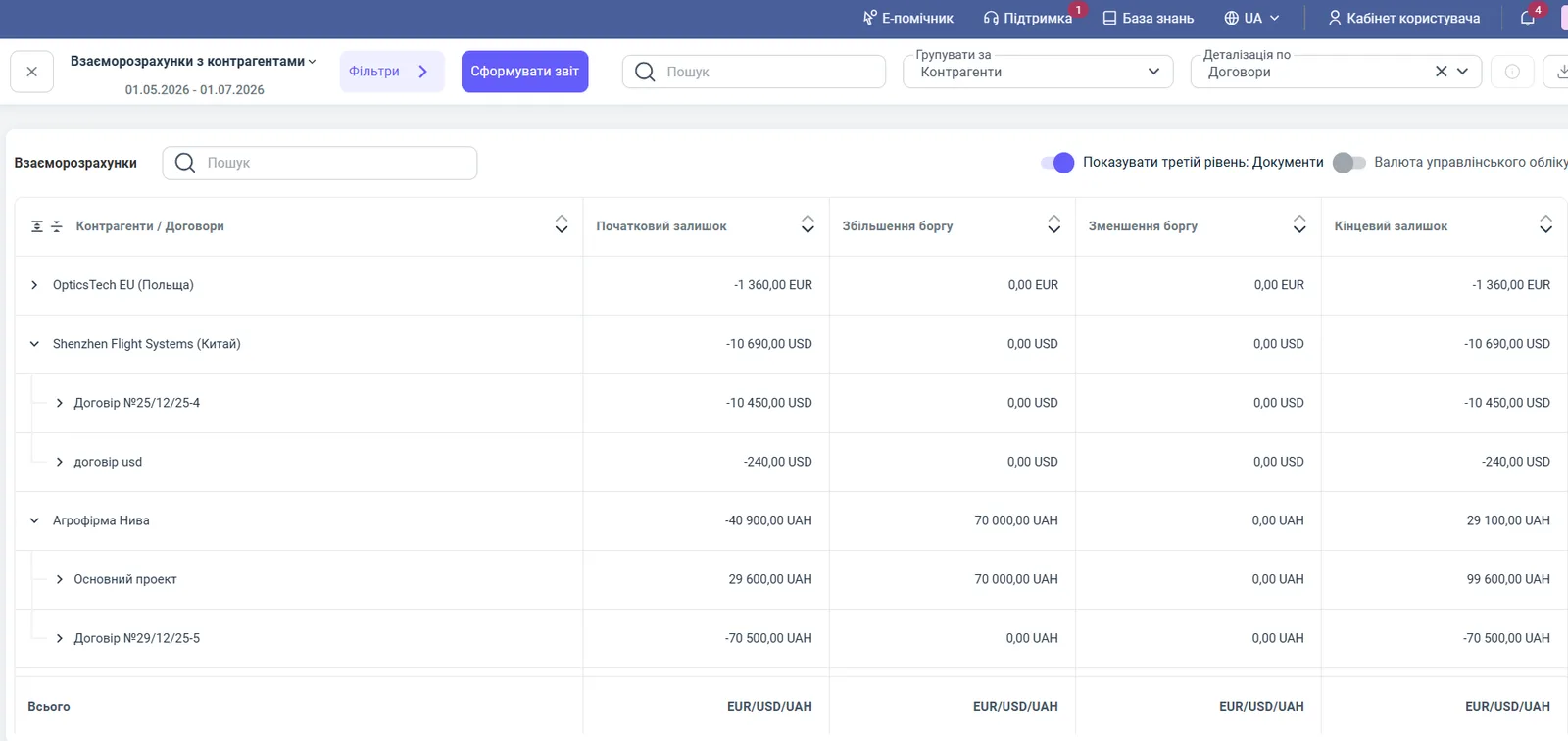
Agrofirm Nyva supplies you with grain and at the same time buys feed from you. The report for the period has two contracts:
| Row | Opening balance | Debt increase | Debt decrease | Closing balance |
|---|---|---|---|---|
| Contract “Main project” | 29,600.00 UAH | 70,000.00 UAH | 0.00 UAH | 99,600.00 UAH |
| Contract No. 29/12/25-5 | −70,500.00 UAH | 0.00 UAH | 0.00 UAH | −70,500.00 UAH |
| Agrofirm Nyva, total | −40,900.00 UAH | 70,000.00 UAH | 0.00 UAH | 29,100.00 UAH |
Under the first contract the counterparty owes you 99,600 UAH, and under the second you owe them 70,500 UAH. The net balance is 29,100 UAH in your favor. You can close this amount with netting.
Another scenario is foreign trade partners. For OpticsTech EU (EUR) and Shenzhen Flight Systems (USD), the report shows amounts in the contract currencies, so you see the total volume of advances abroad without losing the exchange rate difference.
Why the numbers do not match
The amount for a counterparty in this report differs from the supplier report. The reports have different signs: in the supplier report a positive balance means your debt, in the combined report it is the opposite. Check which report you are looking at the figure in.
The counterparty is not in the table. By default the report shows only current debts. If the debt is closed, turn on “Show closed debts”.
The amount for a parent counterparty does not match. If “Group by” is set to “Parent counterparties”, the amounts of subsidiaries are combined. Check the grouping, see Counterparties with subsidiaries.
The report did not change after selecting another counterparty. Click Generate report.
FAQ
Why do I need the Settlements with Counterparties report if there are separate reports for customers and suppliers?
The combined report shows both sides of the relationship in one place. This is convenient for counterparties that both buy from you and sell to you: you see the total balance for netting.
Why is there no single amount in the “Total” row?
The report does not add different currencies, so the “Total” row shows amounts separately for UAH, USD and EUR. To see a total in one currency, turn on “Management accounting currency”.
How do I see closed debts?
By default the report shows only the current debt. Turn on the “Show closed debts” checkbox at the bottom of the filters panel to see all movements.