
Debt adjustments: write-off, assignment, advance offset
On this page
The "Debt adjustment" document brings settlements with counterparties to their real state without moving money. Open "Finance → Debt adjustment → Create", select the type (customer or supplier debt write-off, assignment, advance offset), add the contract, document and order, and save. Netting is described separately.
What is the “Debt adjustment” document
“Debt adjustment” is a universal Bimp document that brings settlements with counterparties to their real state without moving money on accounts or in cash desks. You create it in Finance → Debt adjustment → Create, and select the operation type in the “Type” field.
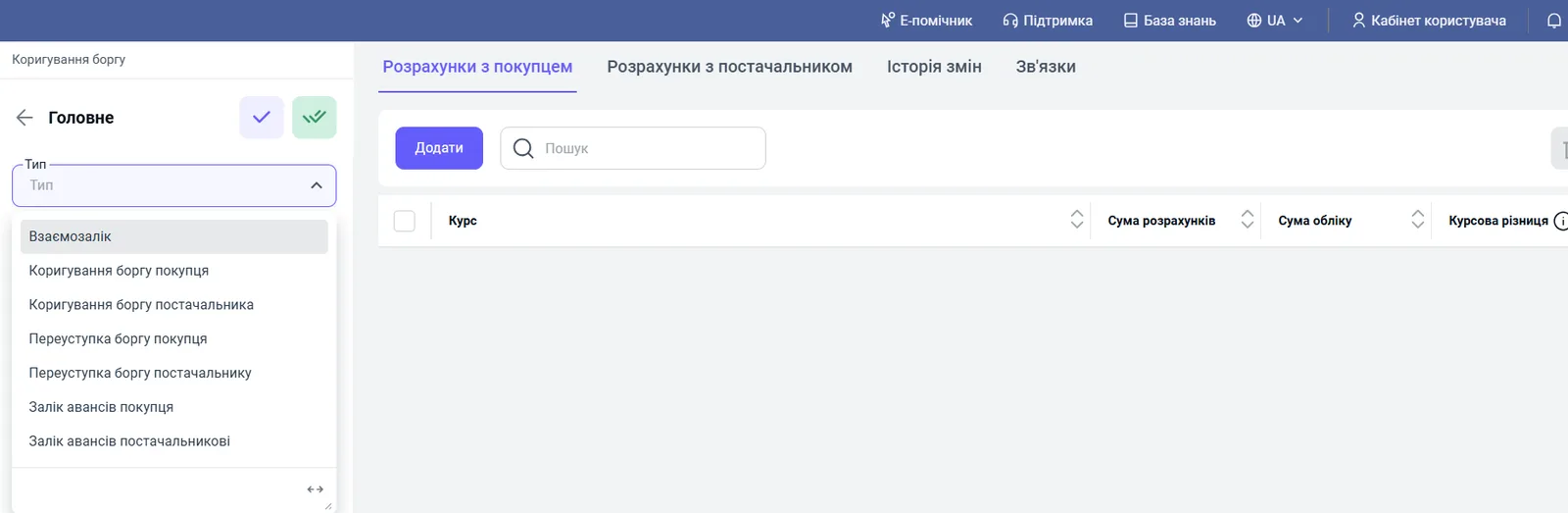
| Type | Purpose |
|---|---|
| Netting | close mutual debts with a counterparty who is both a customer and a supplier: separate article |
| Customer debt adjustment | write off bad receivables to expenses |
| Supplier debt adjustment | write off your debt to a supplier and recognize income |
| Customer debt assignment | transfer a customer’s debt to another customer |
| Supplier debt assignment | transfer your debt to another supplier |
| Customer advance offset | offset a prepayment received against a shipment |
| Supplier advance offset | offset your prepayment against goods received |
Every type follows the same logic: select the type, fill in the header fields, add rows on the tabs with Add, check the amounts and currency, and save. Rows require a contract, a document and an order.
How to write off a customer’s debt
The “Customer debt adjustment” type reduces or cancels the amount a customer owes, without receiving money.
- Create a “Debt adjustment” document and select the type Customer debt adjustment.
- Fill in the “Customer” and “Expense item” fields.
- On the “Settlements with customer” tab, click Add and select the contract, document and order.
- Specify the write-off amount and save.
Example. A customer has owed 500 UAH for over a year and does not respond. You write the debt off to expenses so that it does not distort assets.
Effect: the customer’s debt disappears, and the amount goes to “Other expenses” in the P&L report and reduces net profit.
How to write off a debt to a supplier
The “Supplier debt adjustment” type reduces your debt without paying money: the supplier has been liquidated, gave a discount after the fact, or forgave part of the amount.
- Select the type Supplier debt adjustment.
- Fill in “Supplier” and “Income/expense item” (an income item; create one if the needed item does not exist).
- On the “Settlements with supplier” tab, click Add and specify the contract, document (for example, a goods receipt), order and amount.
- Save.
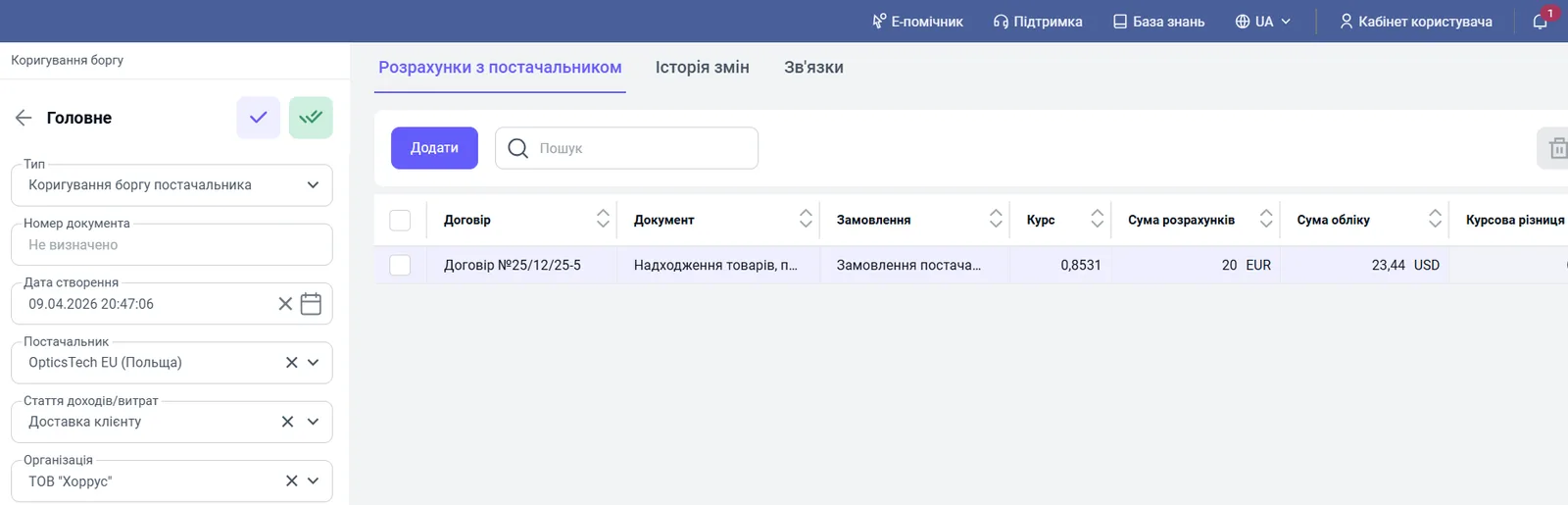
Example. You owed a supplier 2,000 UAH, but they gave a volume discount and allowed you not to pay. The write-off is recorded as income.
Effect: payables decrease, and the amount goes to “Other income” in the P&L and increases retained earnings.
How to assign a customer’s debt
An assignment transfers the right to claim a debt from one counterparty to another without moving money.
- Select the type Customer debt assignment.
- Fill in “Customer” (who you are transferring from) and “Recipient customer” (who you are transferring to).
- On the “Settlements with customer” tab, add the contract, document and order under which the customer owes you.
- On the “Recipient details” tab, specify the recipient’s contract, document and order to which the debt is credited.
- Make sure the amounts and currency match, and save.
Example. “Alpha” LLC owes you 10,000 UAH. Under an assignment agreement, “Beta” LLC will now pay the debt. You transfer the debt from “Alpha” to “Beta”.
Effect: the sending customer’s debt disappears and appears for the recipient; the total receivables on the balance sheet do not change.
How to assign your debt to a supplier
The “Supplier debt assignment” type transfers your debt to one supplier onto another.
- Select the type Supplier debt assignment.
- Fill in “Supplier” and “Recipient supplier”.
- On the “Settlements with supplier” tab, add the contract, document and order under which you owe.
- On the “Recipient details” tab, specify the contract, document and order the debt is transferred to.
- Check that the amounts and currency match, and save.
Example. You owe “Alpha” LLC 10,000 UAH; under an assignment agreement, the debt passes to “Beta” LLC.
Effect: the debt to supplier “Alpha” disappears and appears for “Beta”; total payables do not change.
How to offset a customer’s or supplier’s advance
An advance offset manually links a prepayment already received or paid with a shipment or receipt when they were not linked automatically, for example when the advance came under one contract and the shipment under another. Without an offset, reports look as if the customer owes you for the goods while you owe them an advance at the same time.
- Select the type Customer advance offset or Supplier advance offset.
- Fill in “Customer” or “Supplier” and click Add.
- On the “Advances” tab, add the contract, payment document and order under which the advance was made.
- On the “Debts” tab, add the contract, shipment document (for a customer, a sales document; for a supplier, a goods receipt) and order.
- Check that the amounts and currency match, and save.
Example (customer). “Sigma” LLC paid 10,000 UAH under contract No. 1, but the shipment was made under contract No. 2. The advance offset moves the payment from contract No. 1 to contract No. 2 and closes the debt.
Example (supplier). You paid “Beta” LLC an advance of 10,000 UAH under contract No. 1, but received the goods under contract No. 2. The advance offset closes both events.
Effect: “hanging” advances and debts for the counterparty disappear; on the balance sheet, both amounts decrease at the same time.
How an adjustment affects reports
The document affects three reports:
| Report | What changes |
|---|---|
| Management balance sheet | netting reduces receivables and payables at the same time, equity does not change; a customer debt write-off reduces receivables and retained earnings; a supplier debt write-off reduces payables and increases equity |
| Income and expenses (P&L) | only when a debt becomes income or an expense: a receivables write-off is an expense, a forgiven debt to a supplier is income. See Income and expenses |
| Settlements | instantly show the new balance by counterparty and order: Settlements with counterparties |
FAQ
What is a debt adjustment for?
To bring settlements in reports to their real state without moving money: write off a bad debt, close a debt to a supplier, transfer a debt to another counterparty or offset an advance.
Which adjustment types exist in Bimp?
Netting, customer debt adjustment, supplier debt adjustment, customer debt assignment, supplier debt assignment, customer advance offset and supplier advance offset.
How does writing off a customer debt affect reports?
The customer's debt disappears, and the amount goes to other expenses and reduces profit and retained earnings on the balance sheet.
How does writing off a debt to a supplier affect reports?
Your payables decrease, and the amount is recognized as other income.
More about this in Bimp: Finance in Bimp