
Currency exchange and exchange rate difference
On this page
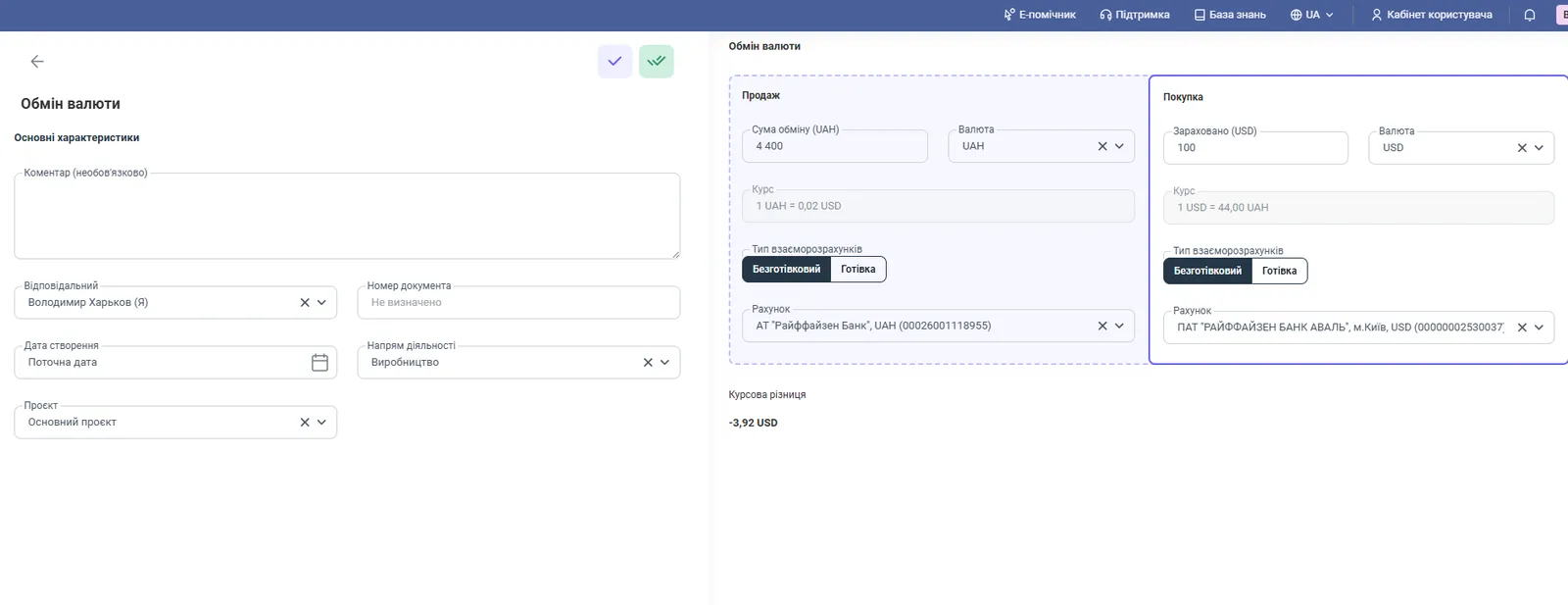
The "Currency exchange" document moves funds between accounts in different currencies and automatically calculates the cross rate and the exchange rate difference. Open "Finance → Other cash operations → Create → Currency exchange", fill in the "Sale" and "Purchase" sections using the amounts from the [bank statement](kb:finance/bank-statement-import) and save.
When you need the “Currency exchange” document
You need the “Currency exchange” document when the company buys or sells currency: for example, buys 1,000 USD for hryvnia to pay a supplier invoice. If you simply transfer money between accounts, Bimp will not account for the exchange rate difference, and balances and profit in reports will diverge. An exchange records the actual rate and calculates the financial result.
How to process a currency exchange
You create an exchange in the “Other cash operations” section using the amounts from the bank statement.
- Open Finance → Other cash operations, click Create and select Currency exchange.
- Fill in the left part: “Comment” (optional), “Responsible”, “Creation date” (current; you can change it), “Document number” (automatic or your own), “Line of business”, “Project”.
- In the Sale section, specify “Exchange amount” and “Currency” (what is debited), the settlement type (Non-cash or Cash) and the account or cash desk the money is taken from.
- In the Purchase section, specify “Credited” and “Currency” (what is received), the settlement type and the account or cash desk the money is credited to.
- Check the “Rate” fields in the sections and the “Exchange rate difference” below them.
- Click Save.
Bimp calculates the cross rate itself from the amounts you enter: you do not need to enter it, just specify the amounts from the statement.
How the exchange rate difference works
Bimp compares the actual rate of the transaction with the internal currency rate from the reference list on the transaction date. If they differ, an exchange rate difference is accrued in the accounting currency.
| Result | When it occurs |
|---|---|
| Expense from exchange | the currency was bought at a higher price or sold at a lower price than it is recorded in the system |
| Income from exchange | more base currency was received than was recorded before |
Rates are set up in the reference list: see Currencies, rates and multi-currency accounting.
Exchange between two foreign currencies
Bimp lets you exchange foreign currencies directly, for example EUR for USD: select EUR as the debit currency and USD as the receipt currency. Bimp automatically converts the transaction to the base currency (UAH) using the internal rate on the transaction date. This is needed to show capital correctly in the Management balance sheet.
What to check after an exchange
After an exchange, check three places:
- Cash flow: a debit in one currency and a receipt in another: Cash flow.
- Account balances: whether the closing amounts match the bank’s.
- Income and expenses (P&L): the line for income and expenses from currency operations: Income and expenses.
Common problems
You cannot change the currency in the document. Cause: the needed currency is not added or is disabled. Solution: open Directories → Currencies/Rates, then add and activate the currency.
The “Save” button in the currency reference list is inactive. Cause: required fields (rate, date) are not filled in, or your role lacks the “Edit directories” permission. Solution: check the fields, and if they are filled in, contact the administrator. They will check the role in Company settings → Access roles, see Access roles.
The “Cash desk/Card” field is constantly “Loading”. Cause: access to the financial account is not enabled for your profile. Solution: an administrator checks access in Company settings → Users → Access roles. For more about cash desks, see Bank accounts and cash desks.
FAQ
Why can't I change the currency in the document, for example from UAH to USD?
The currency is not added or is disabled in the "Currencies/Rates" reference list. Add and activate it in "Directories → Currencies/Rates".
Why is the "Cash desk/Card" field constantly "Loading"?
Your role has no access to the financial account. An administrator checks this in "Company settings → Users → Access roles".
Where is the bank's exchange fee recorded?
Specify it as a separate [expense item](kb:getting-started/income-and-expense-items) so that the exchange result is not mixed with the bank's operating costs.
Can I exchange one foreign currency for another, for example EUR for USD?
Yes, directly, without converting to hryvnia first. Bimp calculates the hryvnia equivalent using the internal rate on the transaction date.
More about this in Bimp: Finance in Bimp