
Dividends: processing and reporting
On this page
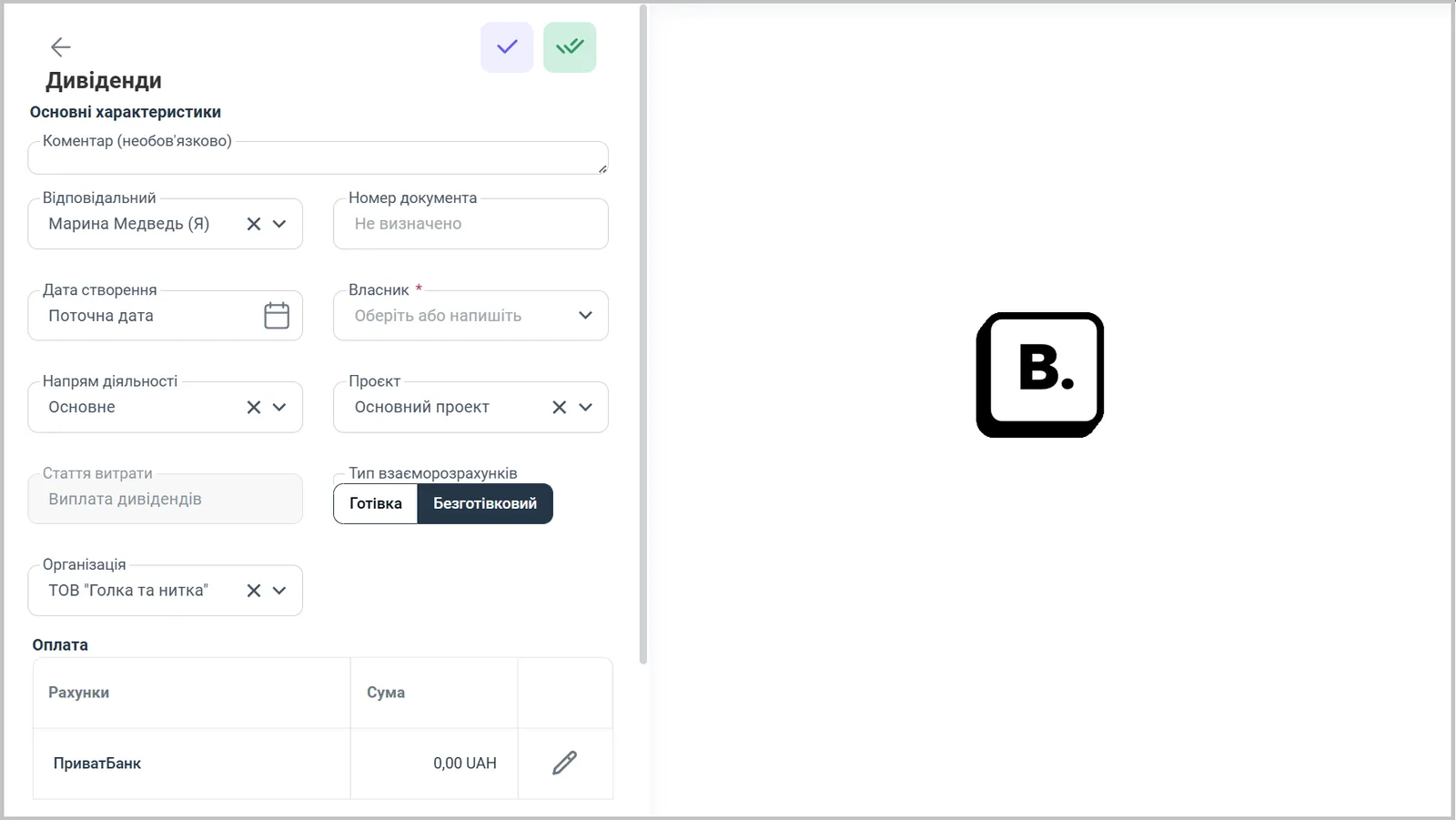
A dividend payment to an owner is processed with the "Dividends" document: "Finance → Other cash operations → Create → Dividends". Select the owner, line of business, project, settlement type, organization, and the account with the amount. The expense item is fixed: "Dividend payment". The data goes into three reports.
What is the “Dividends” document
Dividends are part of a company’s profit that it pays to its owners (members or shareholders) in proportion to their share. In Bimp, a payment is processed with the “Dividends” document: after saving, it debits the amount from the company’s account or cash desk under the expense item “Dividend payment”.
Before you start
Add the owner as a counterparty: the owner’s card must exist in the “Counterparties” reference list: see Counterparty card.
How to create a “Dividends” document
- Open Finance → Other cash operations, click Create and select Dividends.
- Fill in “Comment” (optional), “Responsible”, “Document number” and “Creation date” (they are set automatically; you can change them).
- In the “Owner” field, select the owner you are paying dividends to.
- Select the “Line of business” and “Project”.
- The “Expense item” field cannot be edited: it is always “Dividend payment”.
- In the “Settlement type” field, select Cash or Non-cash. For cash, the “Cash type” field appears: cash desk or card.
- Select the “Organization”.
- In the “Payment” block, specify the account or cash desk the dividends are paid from, and the amount.
- Save the document.
Where to see the dividends paid
The document data automatically goes into three reports:
| Report | What it shows |
|---|---|
| Cash flow | the account or cash desk, amount and payment document |
| Income and expenses | the amount of dividends paid in the “Dividend payment” line |
| “Dividends received” | the payment from retained earnings by owner, line of business and project: owner, date, amount, document |
If the payment came in a bank statement, you can allocate it with the item “Dividend payment”: see Allocating bank statement transactions.
FAQ
Can I create a "Dividends" document with a future date?
No. This protects against paying funds to an owner by mistake.
Why can't I change the expense item in a "Dividends" document?
Dividends use a single fixed item: "Dividend payment".
Where can I see who was paid dividends and how much?
In the "Dividends received" report: by owner, line of business and project, with the date, amount and payment document.
More about this in Bimp: Finance in Bimp