
Accountable funds: request, issue, return
On this page
Accountable funds are money the company gives an employee for a business trip or purchases. In Bimp you issue them with an "Issue of accountable funds" document ("Finance → Settlements with accountable persons → Create"), and the unspent balance is returned with a "Return of accountable funds" document. Issue and return are cash only: from a cash desk or a card.
How accountable funds work in Bimp
Accountable funds are money the company gives an employee (an accountable person) for specific needs: a business trip, or buying materials or household goods. The process consists of these steps:
- Funds request (optional): a request for funds.
- Issue of accountable funds: the money is handed to the employee, who now owes it to the company.
- Expense report: the employee confirms expenses with documents: Expense report.
- Return of accountable funds: the employee returns the unspent balance to the cash desk.
The state of settlements is shown in the report Settlements with accountable persons.
How to create a funds request
A funds request is an internal document used to formally ask for funds from a cash desk or account for current needs.
- Open Finance → Expenditure request and click Create.
- Fill in “Comment” (we recommend stating the purpose of the issue), “Responsible manager”, “Document number” (automatic or your own) and “Creation date”.
- Specify “Amount” and “Purpose of issue”: what exactly the funds will be used for.
- Select “Settlement type”: “Non-cash” or “Cash”. For cash, the “Cash type” field appears: “Cash desk” or “Card”.
- Specify the account or cash desk the funds will be issued from, and save.

How to issue funds to an accountable person
Issue is processed with the “Issue of accountable funds” document.
-
Open Finance → Settlements with accountable persons, click Create and select Issue of accountable funds.
You can also create the issue from purchasing: in Purchasing → Supplier orders, hover over the needed order and select “Issue of accountable funds” in the context menu, or open the order, click Create based on and select this document.
-
Fill in “Comment” (optional), “Author”, “Responsible”, “Document number” and “Creation date”.
-
In the “Accountable person” field, select the employee you are issuing funds to.
-
If needed, specify “Line of business” and “Project”. The expense item and the organization are filled in automatically; you can change them.
-
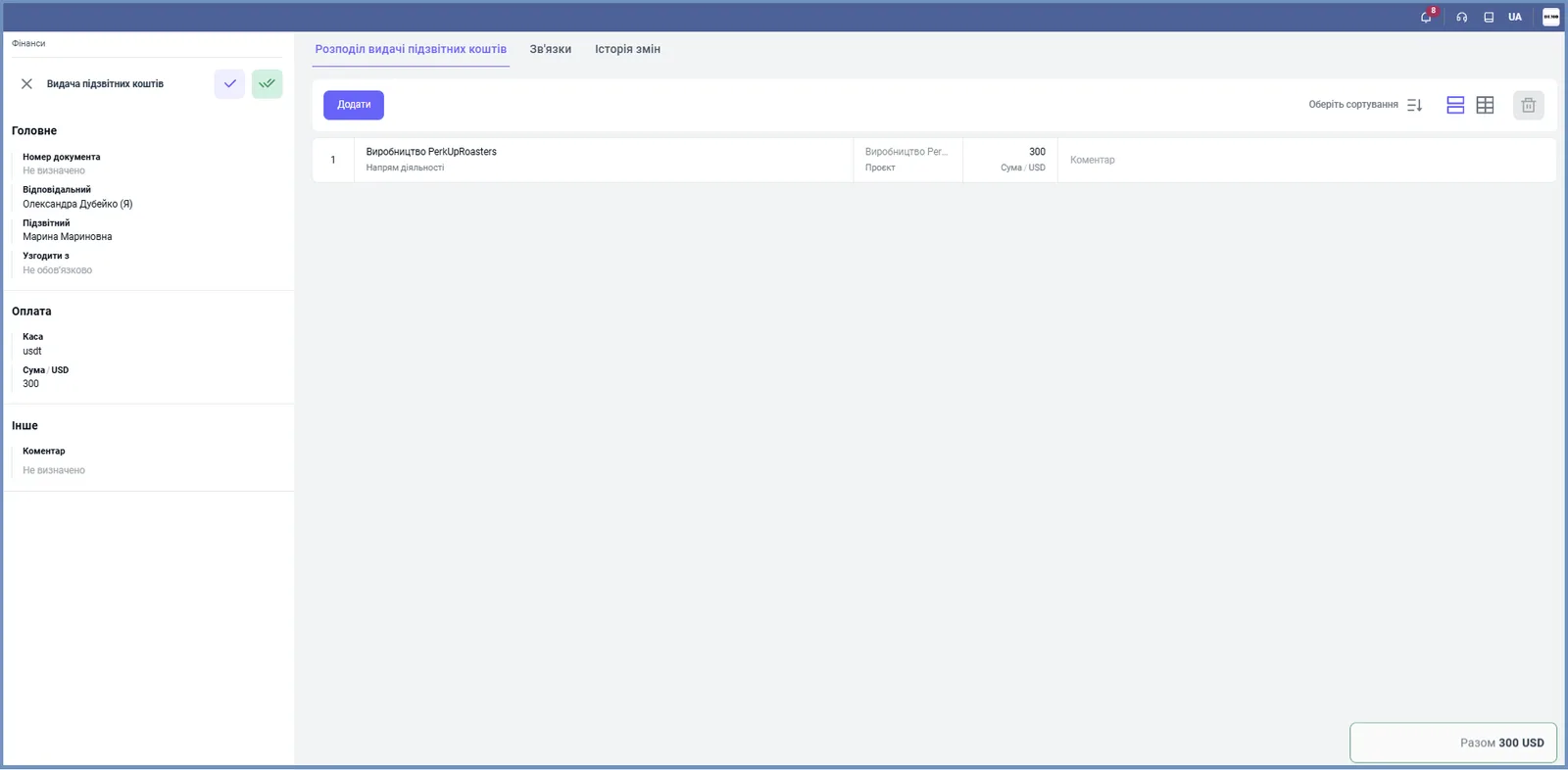
In the “Payment” block, specify “Cash type” (Cash desk or Card), the “Cash desk” or the organization’s card the money is issued from, and the “Amount”.
-
On the “Allocation of accountable funds issue” tab, click Add and enter the details: “Line of business”, “Project”, “Amount” and “Comment”.
-
Save the document.
How to process the return of accountable funds
A return is processed with the “Return of accountable funds” document when an employee hands back the unspent balance. It is created in the same place: Finance → Settlements with accountable persons → Create → Return of accountable funds. The form is almost the same as for the issue; only the title differs. In the “Payment” block, specify the cash desk or card that receives the money.
What happens after the issue
After the issue, the employee owes the company the document amount, and the cash desk balance decreases. The debt is closed by an expense report (confirmation of expenses) or by returning the money. If accountable funds were issued before you started working in Bimp, enter them as opening balances: see Opening balances: accountable persons.
FAQ
Can I issue accountable funds by non-cash payment?
No. Issue and return of accountable funds are processed only with the cash settlement type: from a cash desk or a bank card.
How do I issue funds to an accountable person from a supplier order?
In "Purchasing → Supplier orders", hover over the order and select "Issue of accountable funds", or open the order, click "Create based on" and select this document.
How can I see which employees owe money for accountable funds?
In the "Settlements with accountable persons" report: it shows the closing balance for each accountable person.
Is it mandatory to create a funds request?
No. A request is an internal document asking for funds from a [cash desk](kb:getting-started/bank-accounts-and-cash-desks) or account; you can issue accountable funds without it.
More about this in Bimp: Finance in Bimp