
Loans and investments: receipt and repayment
On this page
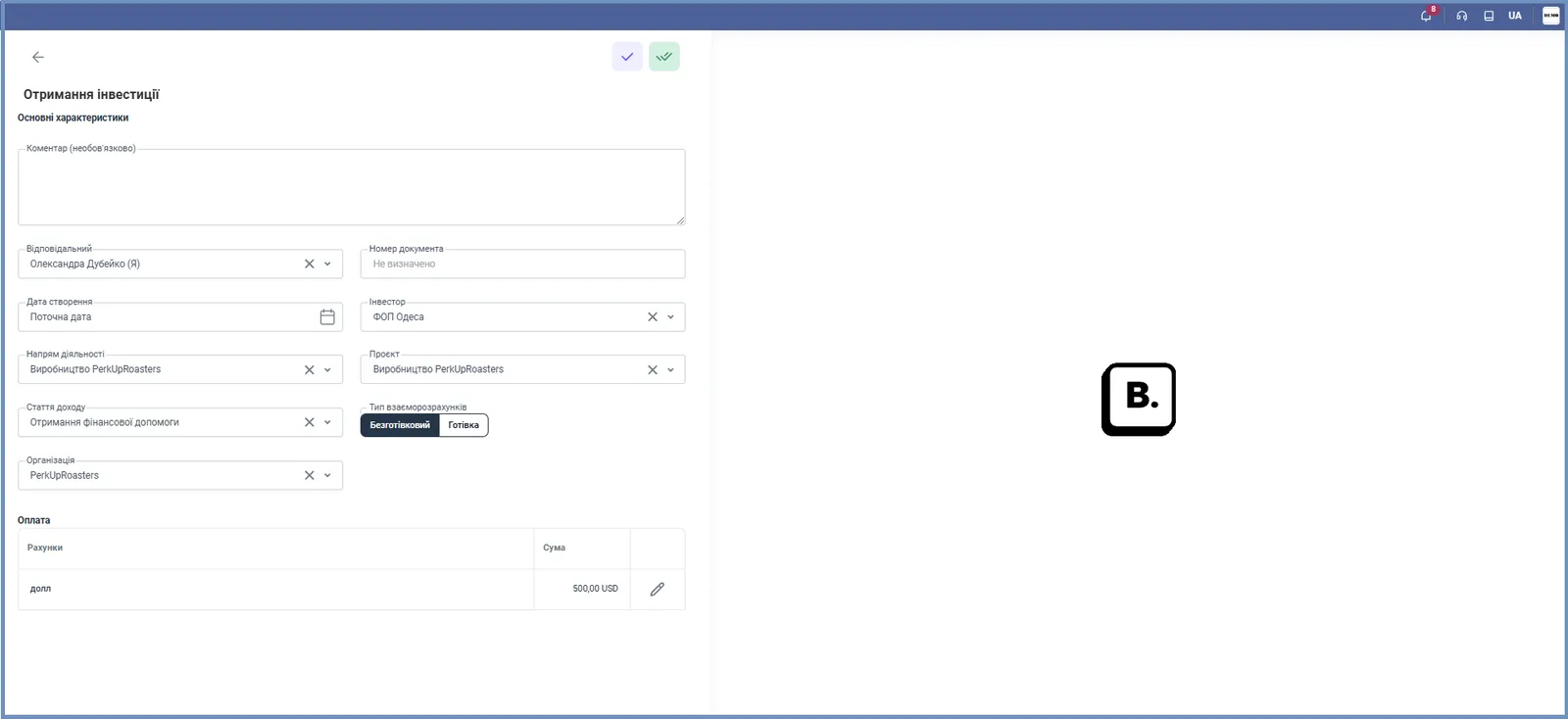
Loans and investments are recorded with documents of the "Finance → Financing" section: "Loan receipt" and "Loan repayment", "Investment receipt" and "Investment return". The forms are almost identical: counterparty (lender or investor), line of business, project, income item, organization, settlement type, account or cash desk and amount.
Which documents exist for loans and investments
Loans and investments are accounted for with documents of the “Financing” section. They record receipt of funds from a lender or investor and their repayment.
| Document | When to create it |
|---|---|
| “Loan receipt” | the lender transferred funds to the company |
| “Loan repayment” | the company repays a loan to the lender |
| “Investment receipt” | an investor contributed funds (share capital, financial assistance) |
| “Investment return” | the company returns funds to an investor |
Before you start
Add the lender or investor as a counterparty: Counterparties (directories): see Counterparty card. You cannot create the document without a counterparty card.
How to record a receipt or repayment
- Open Finance → Financing and click Create.
- Select the document: “Loan receipt”, “Loan repayment”, “Investment receipt” or “Investment return”.
- Fill in the main fields: “Comment” (optional), “Responsible”, “Document number” (automatic or your own), “Creation date”. We recommend keeping numbers and counterparty names under a single convention: it makes searching easier.
- Select the counterparty: “Lender” for loans, “Investor” for investments.
- Select the “Line of business” and “Project” the operation belongs to.
- Select the “Income item” under which the company receives the funds. For investments, the available items include “Additional paid-in capital”, “Receipt of financial assistance” and “Share capital”.
- Specify the “Organization” whose account or cash desk the operation goes through.
- In the “Payment” block, select the “Settlement type”: Non-cash or Cash (for cash, the “Cash type” field appears: cash desk or card).
- Specify the account or cash desk that receives (or is debited) the funds, and the amount. Save the document.
What happens after saving
After saving, the balance of the account or cash desk changes by the document amount. The operation appears in the Finance → Transactions list and in the “Cash flow” report. Investments have a separate report: Investment settlements. A repayment that came from a bank statement is allocated with the items “Loan repayment” or “Investment return”: see Allocating bank statement transactions.
FAQ
Which documents do I need to account for a loan?
"Loan receipt" when the money arrived from the lender, and "Loan repayment" when you repay it. They are created in "Finance → Financing".
Do I need to create the lender or investor in advance?
Yes. The card of the lender or investor counterparty must exist in the "Counterparties" section before you create the document.
How is an investment different from a loan in Bimp?
The document forms are almost the same; the difference is in the document name and the counterparty (lender or investor). Investments have a separate report: "Investment settlements".
How do I record a loan repayment that was debited in a bank statement?
In the statement allocation panel, select the item "Loan repayment" (or "Investment return"), and Bimp creates the corresponding document.
More about this in Bimp: Finance in Bimp