
Cash flow and Net cash flow reports
On this page
The Cash flow report shows the opening balance, receipts, expenses, net cash flow, and closing balance by accounts, cash desks, and items. The Net cash flow report gives receipts, expenses, and their difference with additional filters. Both are built on the actual movement of money from posted payment documents.
What these reports are for
The Cash flow and Net cash flow reports show how much real money came into accounts and cash desks, how much was spent, and on what. A company can be profitable according to P&L but have no money for salaries or supplier payments, and this is exactly what these reports show.
- Cash flow is the full picture: the opening balance, all receipts and expenses by item, the net flow, and the closing balance. It helps you avoid a cash gap and see the sources of money.
- Net cash flow focuses on the difference between receipts and expenses by accounts, items, counterparties, projects, and orders.
Both reports are built on the cash basis, unlike Income and expenses (P&L).
Which documents form the reports
Data is taken only from posted payment documents:
| Document | Where it goes |
|---|---|
| “Bank receipt”, “Cash receipt order” | The “Receipts” column |
| “Bank payment”, “Cash payment order” | The “Expenses” column |
| “Return of investments”, “Loan receipt”, “Loan repayment”, “Cash register receipt”, “Prepaid expenses” | Also affect the net cash flow (the Net cash flow report) |
So the report depends on the import and posting of bank statements, see Importing a bank statement from a file and Processing statement transactions.
How to generate the report
- Open Reports → Cash flow (or Net cash flow).
- Click Filters and set the period in the calendar.
- If needed, set the filters.
- Select “Group by” and “Detail by”. Turn on “Show third level: Documents” to see specific payment documents, and “Management accounting currency” to bring amounts to one currency.
- Click Generate report.
Report figures
Cash flow:
| Column | What it means |
|---|---|
| “Opening balance” | Money in accounts and cash desks at the start of the period |
| “Receipts” | All receipts by item (for example, “Customer payment”) |
| “Expenses” | All payments by item |
| “Net cash flow” | Receipts minus expenses |
| “Closing balance” | The opening balance plus the net flow; money at the end of the period |
Net cash flow: the columns “Receipts”, “Expenses”, and “Net cash flow”; the overall total is in the “Total” row.
Filters and grouping
| Report | Filters | “Group by” |
|---|---|---|
| “Cash flow” | “Bank account”, “Cash desk”, “Bank card”, “Currency”, “Cash flow item” | Bank accounts/cash desks, Currencies, Cash flow item group |
| “Net cash flow” | “Counterparty”, “Lines of business”, “Project”, “Invoice order”, “Bank account”, “Cash desk”, “Currency”, “Cash flow item” | Bank accounts/cash desks, Lines of business/projects, Cash flow items, Currencies, Cash flow item group |
Detail is by cash flow items, item groups, documents, lines of business/projects, or currencies, depending on the report. Items are configured in the directory, see Income and expense items.
How to read the figures: an example
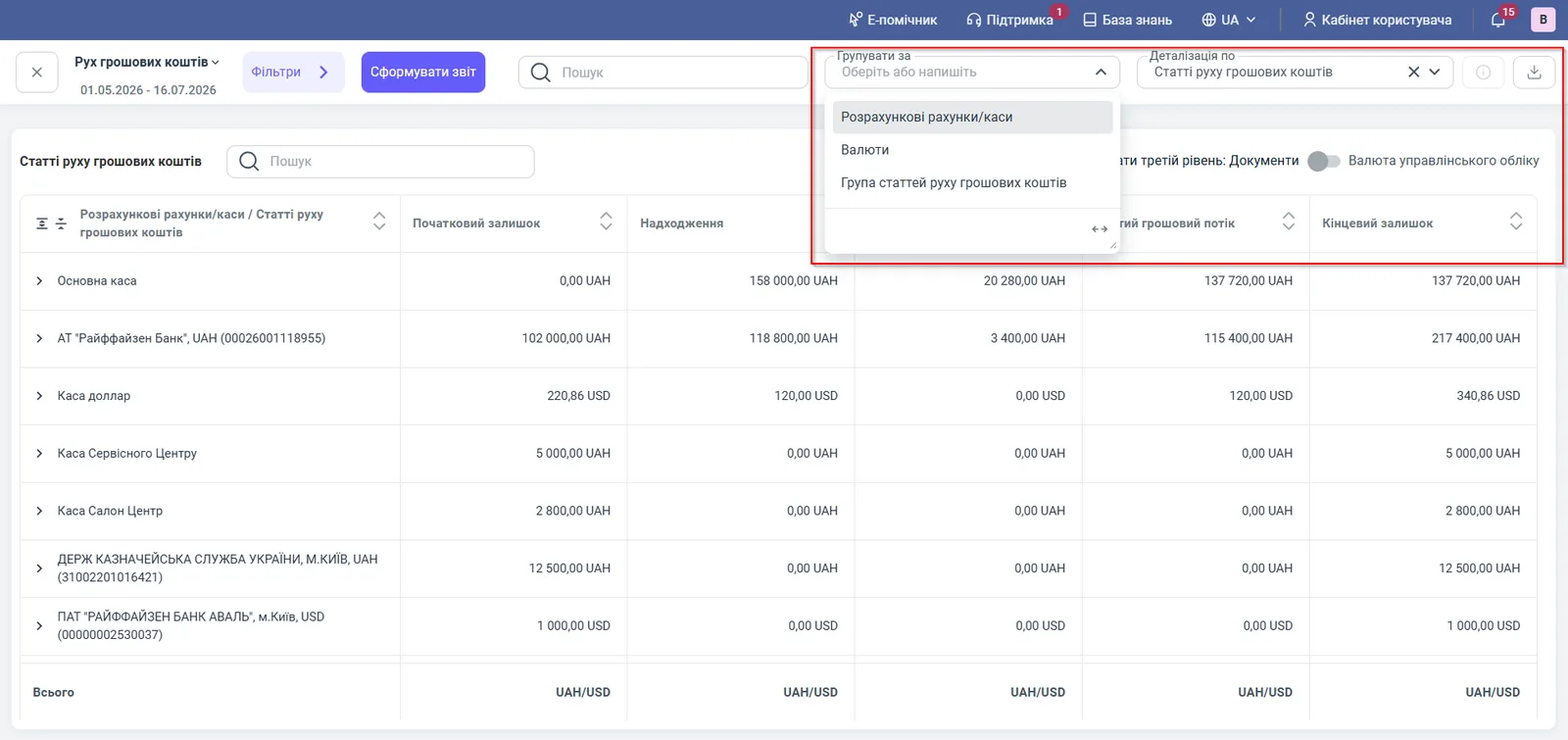
The Cash flow report for 01.05.2026 – 16.07.2026, grouped by accounts and cash desks (see the screenshot above). For the “Main cash desk”: opening balance 0.00 UAH, receipts 158,000.00, expenses 20,280.00, net flow and closing balance 137,720.00 UAH.
For the Raiffeisen Bank account: opening balance 102,000.00 UAH + receipts 118,800.00 - expenses 3,400.00 = net flow 115,400.00 UAH, closing balance 217,400.00 UAH. The dollar cash desk clearly shows that amounts in different currencies do not add up: the “Total” row shows “UAH/USD” until “Management accounting currency” is turned on.
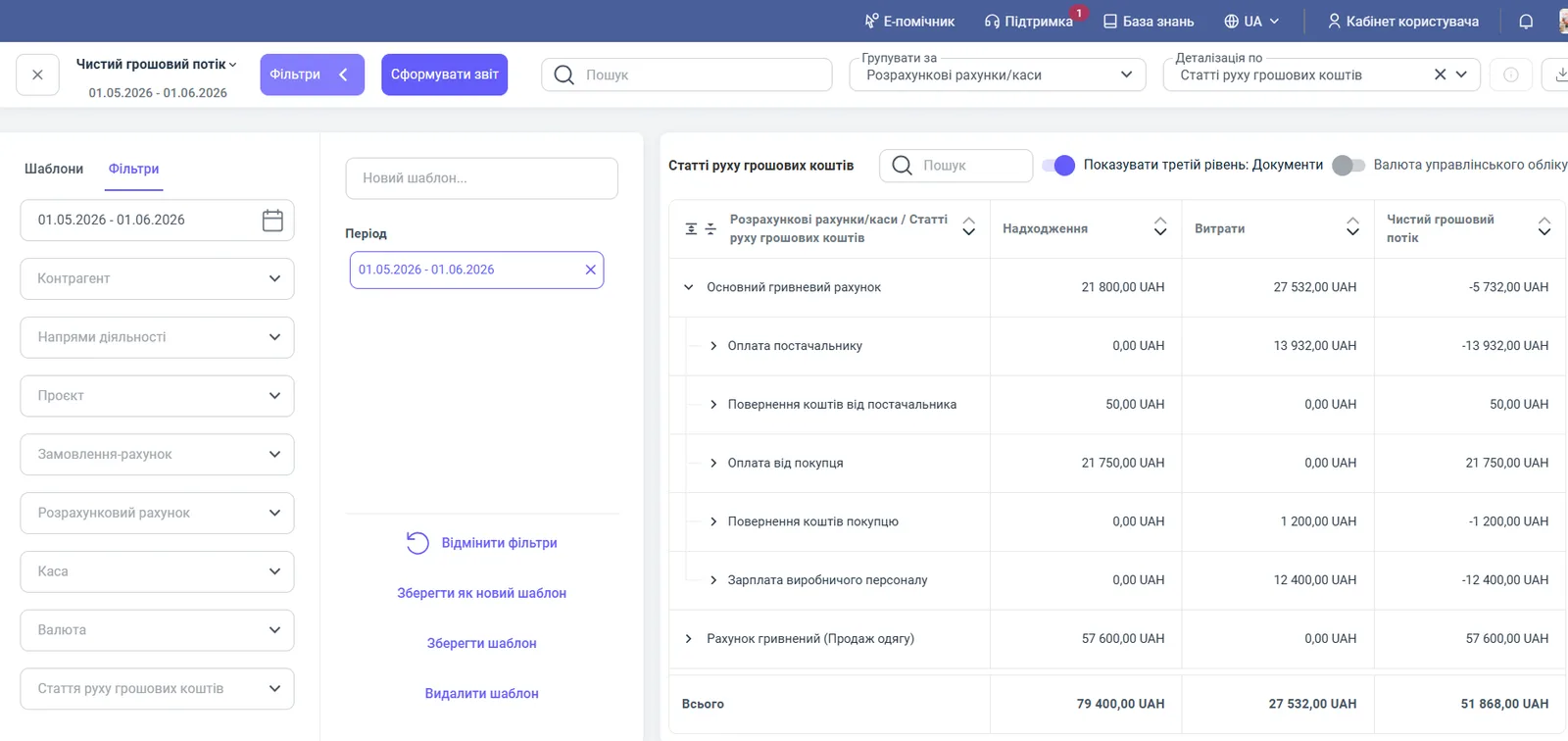
An example of the Net cash flow report for 01.05.2026 – 01.06.2026: on the “Main UAH account”, receipts of 21,800.00 UAH and expenses of 27,532.00 UAH give a flow of -5,732.00 UAH. Expanding it shows that “Customer payment” brought 21,750.00 UAH, while “Supplier payment” (13,932.00 UAH) and “Production staff salary” (12,400.00 UAH) exceeded the receipts. This is a signal to review the payment schedule.
Why the figures do not match
The payment is in the bank but not in the report. The statement is not imported or the transactions are not posted. Unposted payments do not appear in the report.
The closing balance does not match the bank. Check the entered opening balances and that all transactions for the period are entered, see Cash balance in accounts and cash desks.
There is profit in P&L, but the net cash flow is negative. This is the difference between the methods: P&L is on the accrual basis, while money is counted when payment is made.
Different amounts in the two money reports. “Net cash flow” also takes into account loans, return of investments, cash register receipts, and prepaid expenses. Compare them with the same filters.
FAQ
How does Cash flow differ from Net cash flow?
Cash flow also shows the opening and closing balances and has bank card filters. Net cash flow has no balance columns, but it can be filtered by counterparty, line of business, project, and invoice order.
Why is a payment I saw in the bank missing from the report?
The reports include only posted documents. Check that the bank statement is imported and all transactions are posted, see "Processing bank statement transactions".
Why is the net cash flow negative?
Expenses for the period exceeded receipts. For a short time this is normal, for example with a large purchase, but a long-term negative means an outflow of working capital.
How does the report differ from P&L?
Cash flow works on the cash basis: it counts only the actual movement of money. P&L counts income and expenses on the accrual basis, even without payment.