
Bank accounts and cash desks: how to add and set up
On this page
Bank accounts and cash desks in Bimp are the places where the company's money is kept: payments are received on them and suppliers are paid from them. A bank account is added in the organization card or in the "Banks/Bank accounts" directory, a cash desk in the "Cash desks" directory. An account or cash desk with the type "Main" is filled into documents automatically.
How a bank account differs from a cash desk
A bank account is the company’s non-cash money in a bank (including a card); a cash desk is cash. Both directories are needed so that customer payments and supplier payments are tied to a specific place where money is kept, and so that reports show balances and turnovers for each of them.
Accounts and cash desks are used by payment documents, transfers between accounts, the bank statement, and the payment calendar.
How to add a bank account
A bank account can be added in two ways: from the organization card or manually in the directory.
Method 1. From the organization card. Open Directories → Organizations, choose the organization, and in the “Accounts” block click Add. After the card is saved, the accounts automatically appear in the “Banks/Bank accounts” directory. See Organizations.
Method 2. Manually.
- Open Directories → Banks/Bank accounts and click Create.
- In the “Account number” field, enter the IBAN; Bimp automatically determines the bank and fills in the “Bank” field.
- In the “Organization” field, choose the company that owns the account.
- Specify the “Currency” of the account.
- In the “Accounting account” field, choose an accounting account from the list (for example, “Bank account”).
- If it is a card of an individual (FOP), enter its number in the “Card number” field.
- In the “Type” field, choose Main or Non-main.
- Click Save.
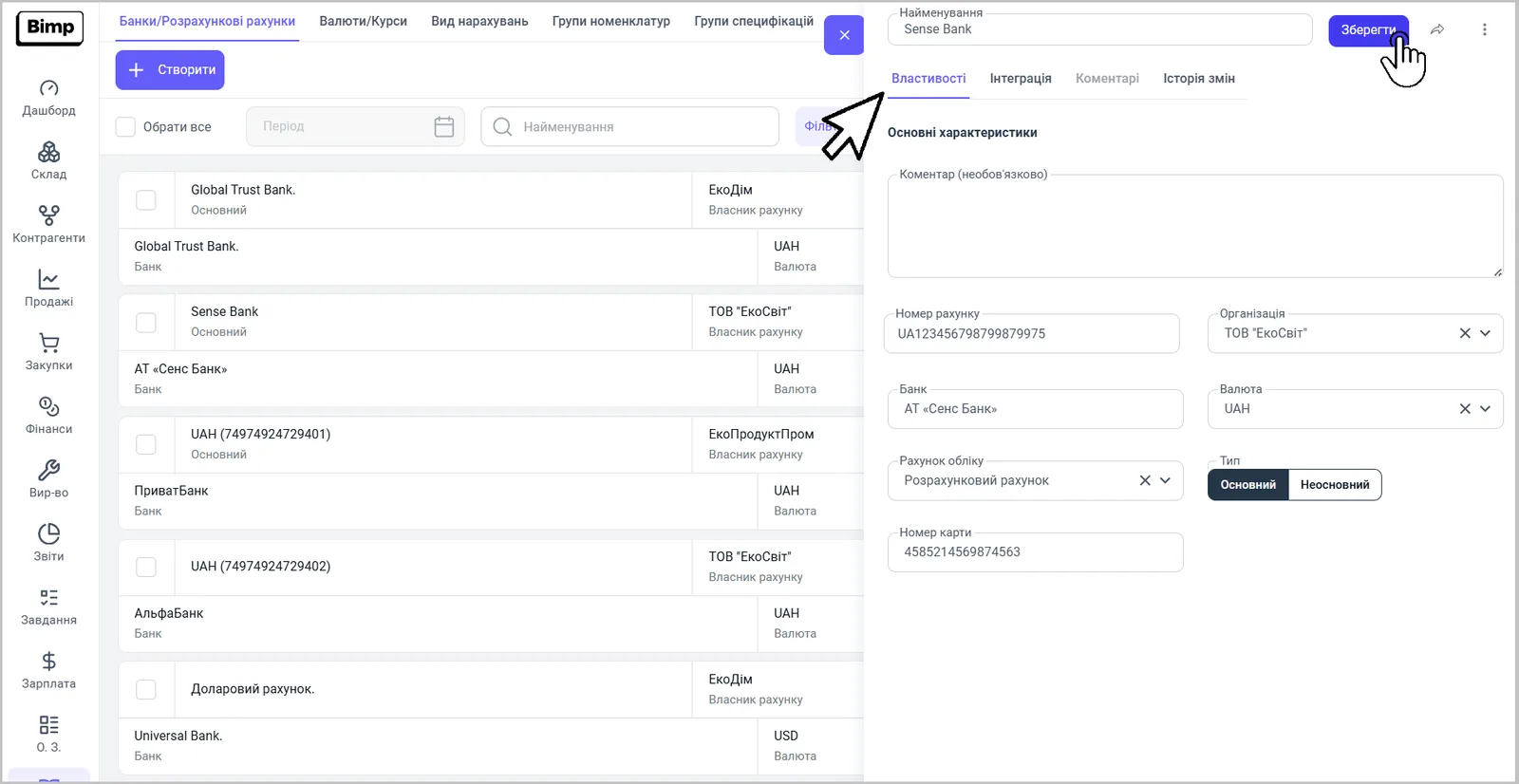
An account with the type “Main” is filled into all documents automatically; in a specific document it can be replaced with another one. The card has an “Integration” tab, through which automatic exchange with the bank is connected; see Automatic exchange with banks.
How to create a cash desk
A cash desk is created in the “Cash desks” directory; the “Main cash desk” is already there.
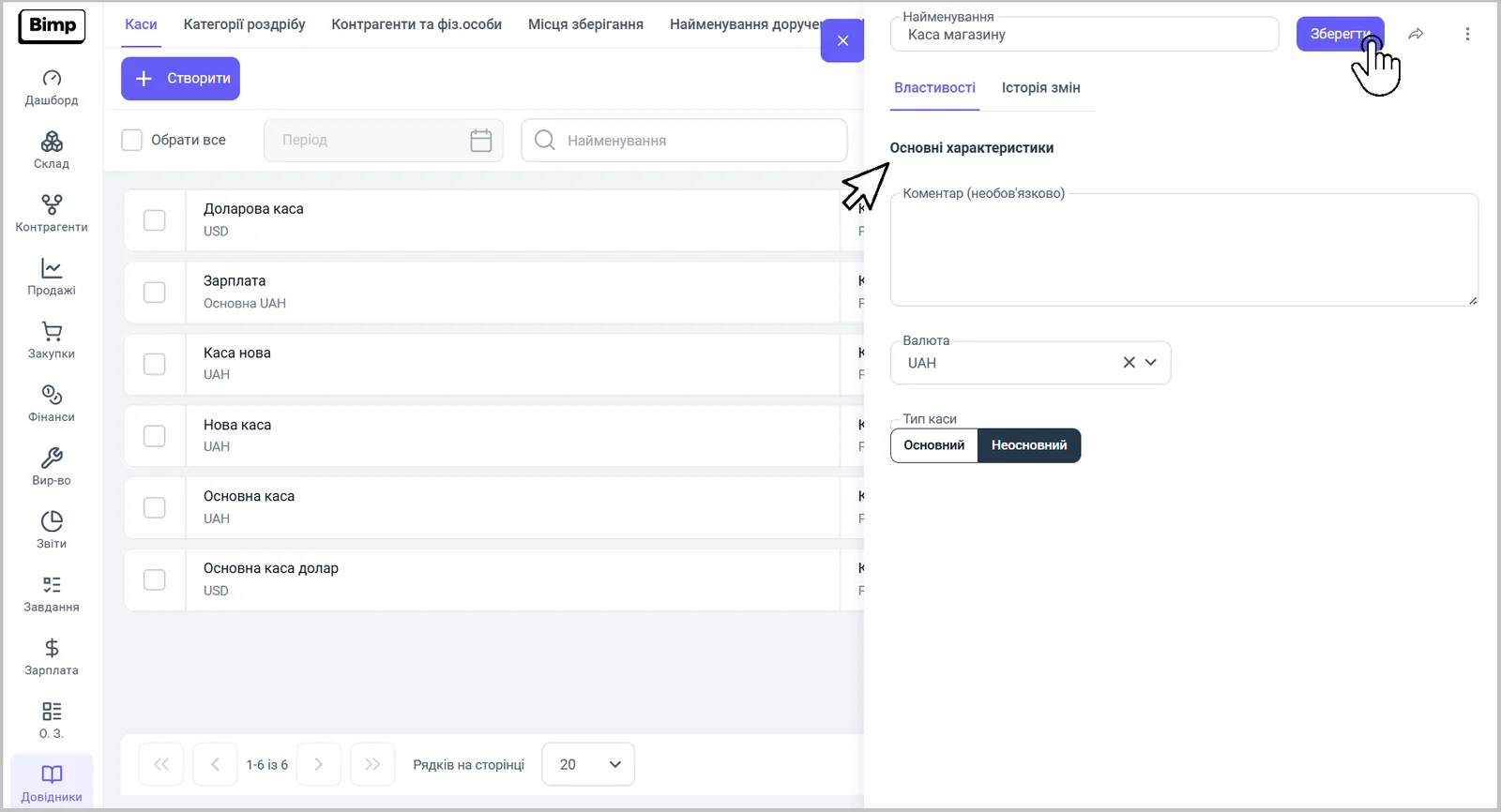
- Open Directories → Cash desks and click Create.
- In the top row, enter the name of the cash desk, for example “Store cash desk”.
- Choose the “Currency” of the cash desk.
- If needed, fill in “Accounting account” and “Comment”.
- In the “Cash desk type” field, choose Main or Non-main. A cash desk with the type “Main” is filled into all documents; in a document it can be changed.
- Click Save.
What accounts and cash desks give you in accounting
The directory lets you keep several accounts in different banks and currencies and see:
- cash flow: receipts, payments to suppliers, tax payments, internal transfers;
- balances and turnovers for each account and cash desk; see Cash balance on accounts and in cash desks;
- the link of payments to documents: a customer payment closes an order, a supplier payment closes a debt, and prepayments are counted as advances;
- cash withdrawal and deposit between an account and a cash desk.
Common problems
The account or cash desk is missing from the drop-down list of a document. The document list shows only accounts and cash desks from the directories. Add the account or cash desk you need following the instructions above and return to the document.
In a document you cannot choose a cash desk or change the currency. The document currency depends on the currency of the account or cash desk. Create a cash desk or account in the currency you need; see Currencies, rates, and multi-currency accounting.
FAQ
What is the difference between a bank account and a cash desk in Bimp?
A bank account is non-cash money in a bank; a cash desk is cash. In payment documents you choose an account or a cash desk depending on the type of settlements.
Is there a cash desk by default?
Yes. The "Main cash desk" is created automatically in the "Cash desks" directory.
How does Bimp determine the bank from the account number?
Enter the account number in the bank account card and the system automatically determines and fills in the bank.
Can I have accounts and cash desks in several currencies?
Yes. The currency is set in the account or cash desk card, so create a separate account or cash desk for each currency.