
Investment settlements report: attracted capital and debt to investors
On this page
The Investment settlements report shows, for each investor, the opening balance, the amount of funds contributed, the amount of returns, and the closing balance of the company's debt. Open "Reports → Investment settlements", set the period, and click "Generate report". The data comes from investment receipt and return documents.
What the report is for
The Investment settlements report shows the current state and history of the company’s settlements with investors and founders: how much funding was attracted, how much was returned, and what debt remains. It separates attracted investments from your own working capital, helps you plan payments on liabilities, and shows the balance for each investor at any moment.
Data gets into the report from investment receipt and return documents, see Loans and investments. General report mechanics are described in the article Reports in Bimp.
How to generate the report
To get the report, set the period and, if needed, the investor.
- Open Reports → Investment settlements.
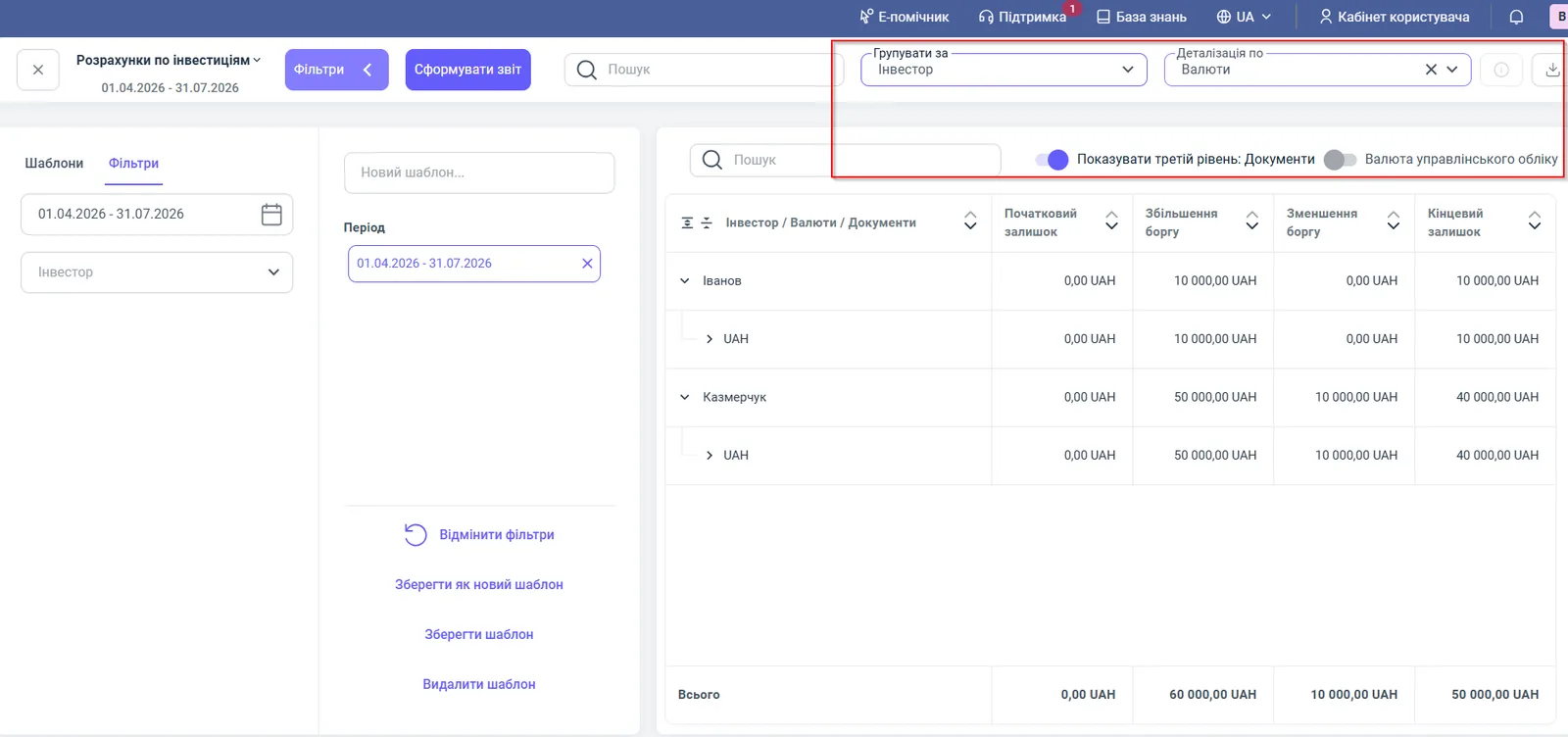
- Open the left Filters panel and set “Period”, for example 01.04.2026 – 31.07.2026.
- If needed, select a specific investor in the “Investor” field.
- Set “Group by” and “Detail by”.
- Click Generate report.
Report figures
The table is hierarchical: investor, currency, documents.
| Column | What it means |
|---|---|
| “Investor / Currencies / Documents” | The investor’s name, the currency of operations, and, when expanded, the documents of receipt or return of funds |
| “Opening balance” | The state of settlements with the investor at the start of the period |
| “Debt increase” | New contributions from the investor: the company owes more |
| “Debt decrease” | Funds returned to the investor: the liability decreased |
| “Closing balance” | The company’s debt to the investor at the end of the period |
The closing balance equals the opening balance plus the debt increase minus the debt decrease. The “Total” row sums the columns.
Filters and grouping
Filters and switches determine for whom and in what form the settlements are shown.
| Element | What it does |
|---|---|
| “Period” | The time range of the analysis |
| “Investor” | Only the selected investor |
| “Group by” | “Investor” by default |
| “Detail by” | The second level: “Currencies” or “Documents” |
| “Show third level: Documents” | Expands to bank or cash documents |
| “Management accounting currency” | Converts amounts from a foreign currency to the base currency at the system rate |
| “Search” field above the table | Quick search for an investor by last name |
Save frequently used settings with the Save as new template button.
Usage example
The company attracted investments to buy equipment: Ivanov contributed 10,000 UAH, Kazmerchuk 50,000 UAH. Later, Kazmerchuk was returned 10,000 UAH.
| Investor | Opening balance | Debt increase | Debt decrease | Closing balance |
|---|---|---|---|---|
| Ivanov | 0.00 | 10,000.00 | 0.00 | 10,000.00 |
| Kazmerchuk | 0.00 | 50,000.00 | 10,000.00 | 40,000.00 |
| Total | 0.00 | 60,000.00 | 10,000.00 | 50,000.00 |
The company has to return 50,000 UAH to investors: 10,000 UAH to Ivanov and 40,000 UAH to Kazmerchuk.
Why the figures do not match
The investor or amount is missing from the report. Check that the investment receipt document is posted and its date falls within the period. Also check the “Investor” filter.
A profit payment to the investor did not reduce the debt. Paying dividends and returning the principal of an investment are different operations. Dividends are recorded separately, see Dividends.
Amounts in different currencies are not added up. In the “Total” row, each currency is counted separately. Turn on “Management accounting currency” to get a single total.
FAQ
What does "Debt increase" mean in the investment report?
It is the receipt of new investment funds from an investor into the company's accounts or cash desks. The company's liability to the investor grows by this amount.
How is a return of funds to an investor shown in the report?
A return is shown in the "Debt decrease" column. The closing balance shows how much the company still has to return to the investor.
How do I convert investments in dollars or euros to hryvnia?
Turn on the "Management accounting currency" switch. Amounts in a foreign currency are converted to the base accounting currency at the system rate.