
Accountable persons settlements report: funds issued and expense reports
On this page
The Accountable persons settlements report shows, for each employee, how much money was issued to them, how much is confirmed by expense reports, and what the balance is. A positive balance is the employee's debt to the company, a negative one is the company's debt. Open "Reports → Accountable persons settlements" and set the period.
What the report is for
The Accountable persons settlements report shows how much money was issued to employees for business needs, business trips, or purchases, how much of it is confirmed by documents, and who still owes the company. It helps you make sure money does not “hang” with accountable persons without receipts, and remind them in time about expense reports.
How to issue funds and submit reports is described in the articles Accountable funds and Expense report. General report mechanics are described in the article Reports in Bimp.
How to generate the report
To get the report, set the period and, if needed, the employees.
- Open Reports → Accountable persons settlements.
- Open the left Filters panel and set “Period”, for example 01.01.2026 – 15.07.2026.
- In the “Accountable person” field, select one or several employees if you do not need the whole list.
- In the top panel, set “Group by” and “Detail by”.
- Click Generate report.
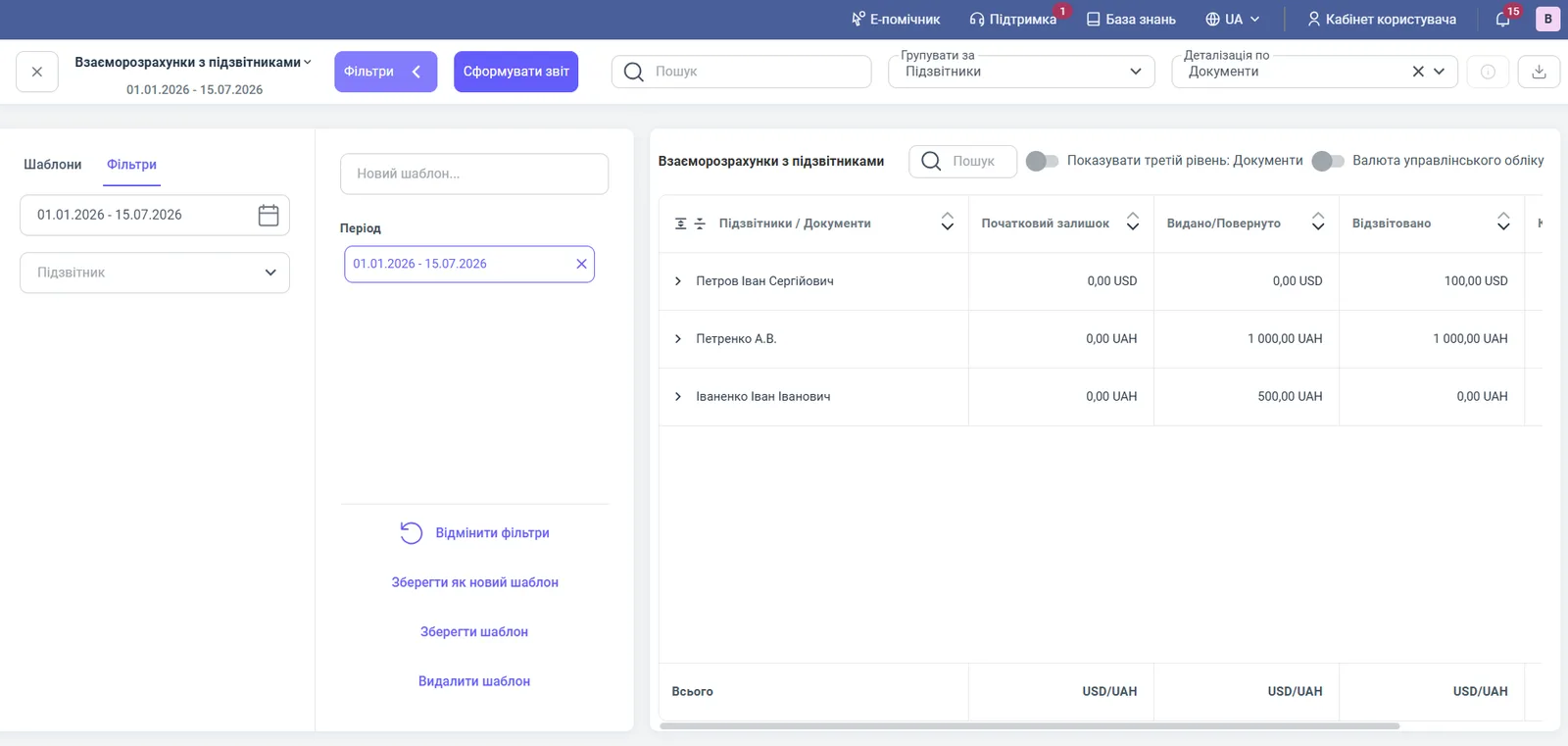
Report figures
The table shows the movement of funds for each accountable person.
| Column | What it means |
|---|---|
| “Accountable persons / Documents” | The employee and, when expanded, the documents: funds issued, returns, expense reports |
| “Opening balance” | The debt at the start of the period: positive means the employee owes, negative means the company owes |
| “Issued/Returned” | The funds the employee received in hand, and the unused remainder they returned to the cash desk |
| “Accounted for” | The amounts of posted expense reports |
| “Closing balance” | The state of settlements at the end of the period, with the same sign convention as the opening balance |
The “Total” row shows amounts separately by currency (USD/UAH).
Filters and grouping
The report has a period and accountable person filter and several view switches.
| Element | What it does |
|---|---|
| “Period” | The time range of the analysis |
| “Accountable person” | One or several employees |
| “Group by” | “Accountable persons” or “Currency” |
| “Detail by” | “Documents” or “Currency” |
| “Show third level: Documents” | Shows the names and dates of documents: expense reports, issue orders |
| “Management accounting currency” | Shows amounts in the system’s base currency |
| “Search” above the table | Finds an employee by last name |
Usage example
An accountant checks settlements for 01.01.2026 – 15.07.2026.
- Ivanenko Ivan Ivanovych received 500.00 UAH on account for stationery (“Accountable funds issue No. 2 dated 13.03.2026”). There are no receipts, “Accounted for” is 0, the closing balance is 500.00 UAH: the employee owes the company, so you need to remind them about the expense report.
- Petrenko A.V. received 1,000.00 UAH and accounted for 1,000.00 UAH: the balance is 0.
- Petrov Ivan Serhiyovych went on a business trip at their own expense and submitted “Expense report No. 1 dated 07.01.2026” for 100.00 USD. The “Accounted for” column shows 100.00 USD, the closing balance is -100.00 USD: the company owes the employee this amount.
You can close a balance as follows: if the employee owes, they return the money to the cash desk; if the company owes, it pays the employee the amount.
Why the figures do not match
Issued funds are not visible in the report. The issue document (cash payment order or payment order) must be posted and must specify the accountable person. Check the document date and the “Period” filter.
The expense report did not reduce the debt. The expense report must be posted. An unposted report does not appear in the table.
The opening balance does not match the previous period. If accountable funds were issued before you switched to Bimp, enter them as opening balances: Opening balances: accountable persons.
Amounts in different currencies are not added up. Enable “Management accounting currency” to see one amount in the base currency.
FAQ
How can I see in the report which employees have not accounted for the funds issued to them?
Open the report for the period you need and find the accountable persons with a positive closing balance: this is the amount issued but not confirmed by an expense report or by a return to the cash desk.
What does a negative closing balance mean in the accountable persons report?
It is the company's debt to the employee. For example, an employee spent 100 USD of their own money on a business trip and submitted an expense report, but received no funds in advance: the balance will be -100 USD.
When does data get into the report?
Automatically, after you post the cash or bank documents that issue funds to an accountable person (cash payment order, payment order) and the expense reports.