
Opening balances: accountable persons, advances and overspending
On this page
The "Settlements with accountable persons" tab of the "Opening balances" document records money issued to employees for expenses or business trips without a report. Choose the employee, the "Overspending" checkbox and the amounts: without the checkmark the employee owes the company, with it the company owes the employee.
What you enter on the accountable persons tab
The “Settlements with accountable persons” tab records money already issued to employees for business expenses or business trips, for which they have not yet reported. Without it these amounts would “disappear” from accounting: they are not in the cash desk, and there has been no expense report yet.
Example. A purchasing manager received 5,000 UAH for fittings and has not yet submitted the receipts. This amount is entered as a balance for them.
Before you start
Create the Opening balances document, see Opening balances, and add employees to the directory. How to work with accountable funds afterwards: Accountable funds and Expense report.
How to fill in the tab
Open the document, go to the “Settlements with accountable persons” tab and click Add.
- “Employee”: choose the person who has the debt or overspending.
- “Overspending”: do not set the checkmark if the employee owes money to the company (they were given an advance). Set the checkmark if the company owes the employee: they spent their own money on the business.
- “Currency”: the currency the funds were issued in (UAH, USD and so on).
- “Settlement amount”: the amount in the chosen currency.
- “Accounting amount”: the amount in the company’s accounting currency.
- “Comment”: the purpose of the funds, for example “Fuel advance dated 20.03”; this helps with reconciliation.
- Save the document.
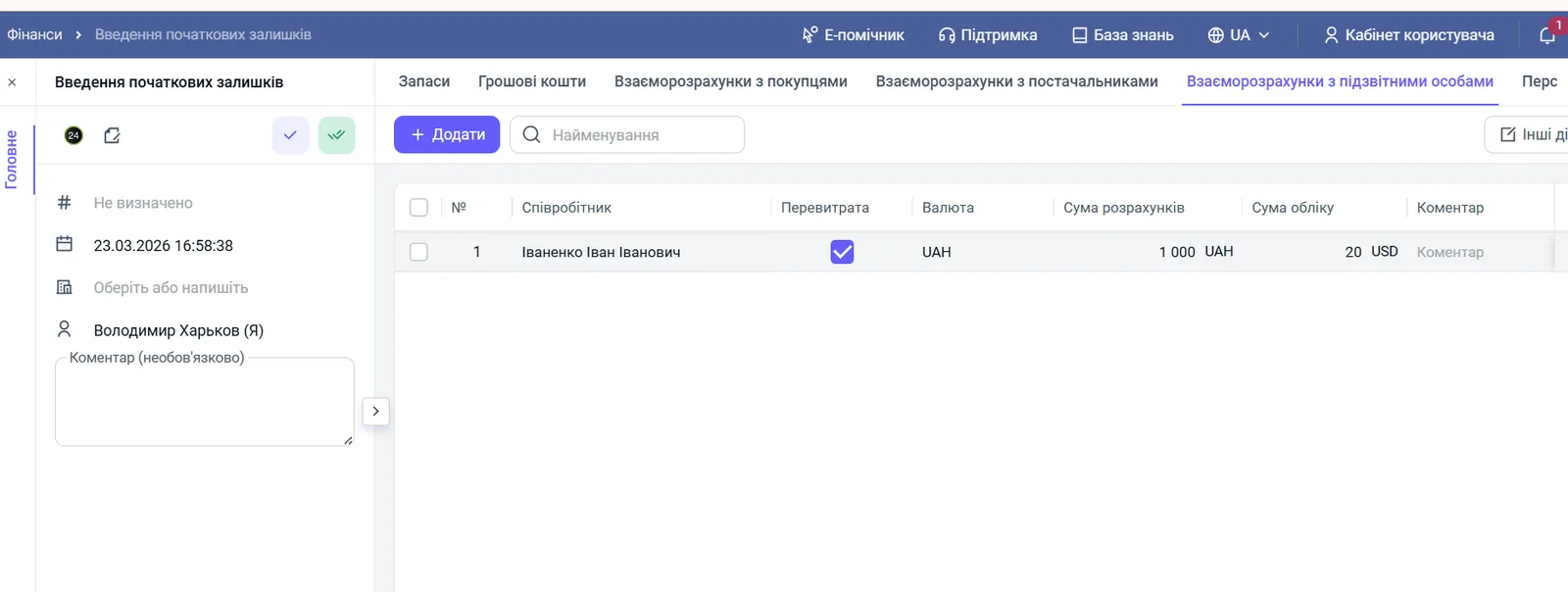
The data is entered as of the date of the Opening balances document.
How to check the result
Open the Settlements with accountable persons report: it should show every employee with the correct amount and direction of the debt.
FAQ
What does the Overspending checkbox mean?
Without the checkmark, the employee owes money to the company: they were given an advance and there is no report yet. With the checkmark, the company owes the employee: they spent their own money on business needs, and it must be reimbursed.
Where do these balances go next?
Bimp takes them into account when the employee's expense reports are created: the amount is closed by a report or a refund.
What if the employee is not in the list?
Add them to the employees directory and return to the document.