
Purchasing services: rent, fuel and costs for cost price
On this page
A purchase of services in Bimp is recorded with a supplier order and a goods receipt. Where the expense goes is defined by the expense item in the service card: the group of administrative, selling or production expenses is written off to period expenses, and the "Cost price" group accumulates until it is allocated to a specific sale.
Where a service expense goes
The expense for a purchased service goes where the “Expense account” field (expense item) in the service card points. Depending on the item group, there are two scenarios:
| Expense item group | Where the expense goes | Examples |
|---|---|---|
| Administrative, selling, general production | to the financial result (profit and loss report) in the month of the goods receipt | office rent, communication, security, advertising, fuel |
| “Cost price” (including “Work in progress”) | accumulates separately and does not reduce profit until it is allocated to a specific sale, order or output | subcontractor services, tender participation |
For both scenarios, the chain of documents is the same: supplier order → goods receipt (a certificate that records the expense) → supplier payment. Payment and recognition of expenses are separate events: payment changes the movement of money, and the goods receipt changes the financial result. The full purchasing process from order to payment is covered in one article.
How to set up a service for period expenses
You set up a service for rent, utilities, communication or fuel in the products directory.
- Open the products directory and create or open a service card, for example “Office rent” (type “Service”).
- On the “Accounting accounts” tab, in the “Expense item” field (the interface also calls it “Expense account”), select an item from one of the groups:
- “Administrative expenses”: office rent, communication, security;
- “Selling expenses”: advertising, showroom rent;
- “General production expenses”: workshop rent, production utilities.
- Save the card.
How to record rent or utilities
You record rent with a supplier order with a service, a payment and a goods receipt, which can fall in different months.
Example. The company “IT-Soft” rents an office for 20,000 UAH a month. The accountant pays on December 28 for January. If the expense is written off immediately, December’s profit is understated and January’s is overstated. So the payment is made in December, and the expense is recognized in January.
- Open Purchases → Supplier orders and click Create.
- Select the supplier (the landlord or provider), the contract and the dates.
- On the “Products, services” tab, add the service: “Quantity” 1, “Price” 20,000 UAH. Check the “Expense item” in the row; it is usually pulled in from the card.
- Save the order.
- To pay, create a supplier payment based on the order (December 28). The money leaves the account, but December’s profit does not change.
- When the expense period comes (for example, the last day of the rental month) or the certificate arrives, create a “Goods receipt” based on the order. It writes the expense to the financial result of the month of its posting date.
For other ways to record period expenses, see Period expenses, taxes and other expenses.
How to account for fuel
You account for fuel as a service (recommended) or as goods.
| Method | When it suits | What happens |
|---|---|---|
| As a service | you need the expense to appear in reports immediately | after the goods receipt, the amount goes to expenses; there are no additional write-offs |
| As goods | you need to see the balance of liters or coupons on the balance sheet before use | after the goods receipt, the fuel is in the warehouse; a separate “Write-off” document is needed for expenses |
Example. A courier company with 5 cars used to post gasoline as goods, and drivers did not report usage. Tons of fuel “hung” in the warehouse, and profit was overstated. After switching to accounting “as a service”, the expense appears on the day of refueling.
To set up the “As a service” method:
-
Create a product with the type “Service” and a name, for example, “Diesel fuel”.
-
In the “Expense account” field, select an item from an expense group depending on the purpose of the vehicle: administrative, marketing or production. For example: group “Administrative expenses” → item “Transport expenses” → sub-item “Fuel”.
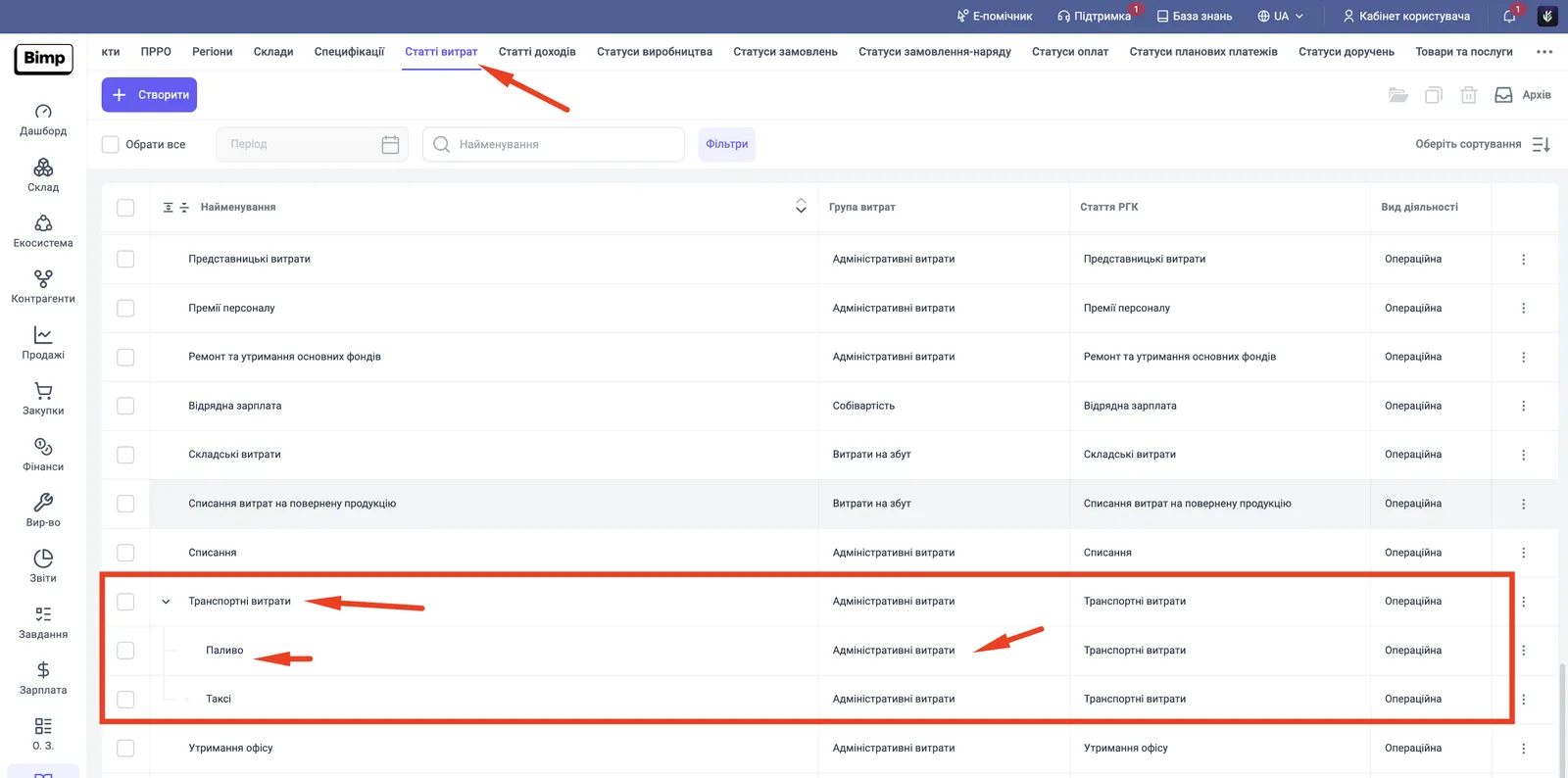
-
When the driver refuels or coupons are bought, create a “Supplier order”, and based on it a “Goods receipt”. At the moment of posting, the amount goes into the “Expenses” and “Income and expenses” reports, and the debt to the gas station increases in the “Settlements with suppliers” report.
-
When you settle up, create a supplier payment.
How to buy a service for cost price
Expenses for the cost price of a future sale are accumulated separately so as not to distort the current month’s profit. This is useful when you pay now but receive revenue months later.
Example. The agency “CreativePro” takes part in a tender for an event. A contractor makes a 3D visualization of the stage for 10,000 UAH. The event itself takes place in two months. The expenses must be recorded now but assigned to the event’s cost price only after the sale.
- In the service card (“Contractor services”, “Tender participation”), in the “Expense account” field, select an item from the Cost price group. This is usually the system item “Work in progress” or an item of the “Cost price” type you created.
- Create a supplier order: Purchases → Supplier orders → Create, select the subcontractor, and add the service and its cost. Check that the row has the item from the “Cost price” group. If administrative expenses are there, no accumulation takes place and the expenses are written off immediately.
- Based on the order, create a “Goods receipt” (a certificate of completed work from the supplier). After posting:
- a debt to the supplier appears;
- the current month’s profit does not decrease;
- the amount goes into the “Accumulated expenses” report and waits for allocation to a specific object.
- To check what has accumulated, open Reports and the “Accumulated expenses” report: it shows services that have been purchased but not yet included in the cost price.
- To assign the amount to a specific product, service, customer order or production output, create an “Expense allocation” document. See Allocating indirect expenses to cost price and Expense accumulation.
FAQ
How do I record rent paid in advance so that it does not reduce the current month's profit?
Create a supplier order with the "Rent" service and pay it: this changes only the movement of money. The expenses go to the financial result when you post the goods receipt (certificate) for the month they belong to.
Why did the service expenses not appear in the profit and loss report?
Most likely, an item from the "Cost price" or "Work in progress" group is selected in the service card. Such expenses accumulate and wait for allocation. For period expenses, you need an item from the administrative, selling or general production expenses group.
How should I account for fuel: as goods or as a service?
As a service is recommended: the expense appears in reports right after the goods receipt, with no write-offs. Accounting as goods is needed only if you must see the balance of fuel or fuel coupons in the warehouse.
Where can I see accumulated expenses?
In the "Reports" section, the "Accumulated expenses" report. It lists the services that have already been purchased but not yet included in the cost price of sales.
More about this in Bimp: Procurement in Bimp