
Opening balances: other accounts (the Other expenses tab)
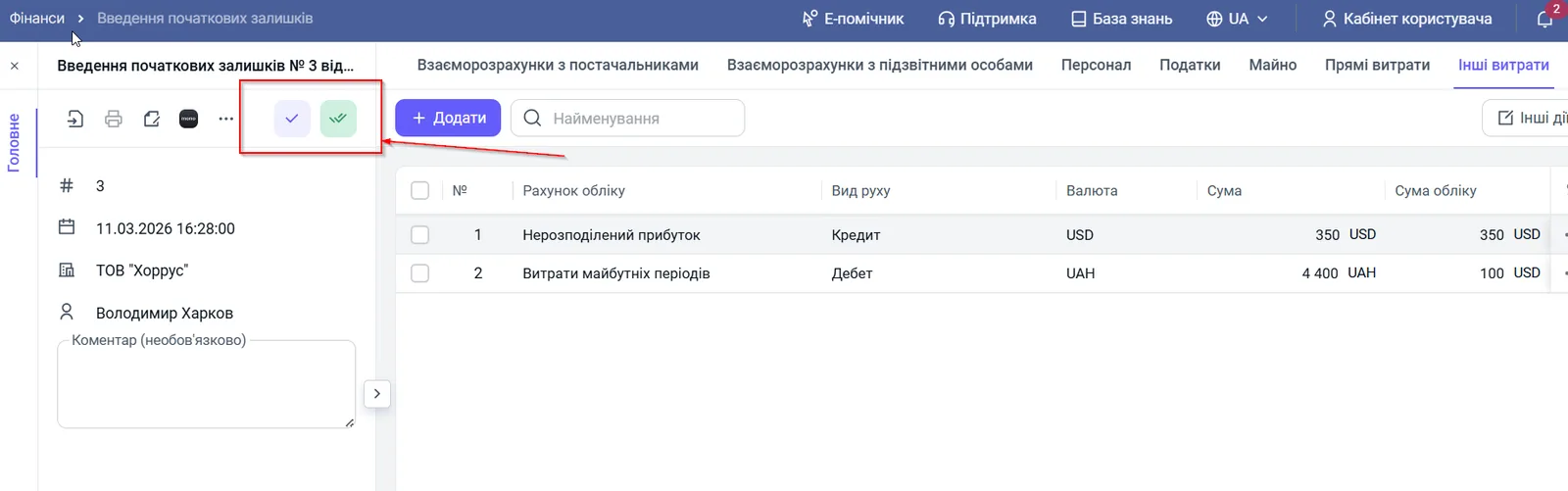
The "Other expenses" tab of the "Opening balances" document is for balances on accounts that have no separate tabs: prepaid expenses, settlements with other creditors and so on. Specify the accounting account, movement type (debit or credit), currency and amounts.
What you enter on the “Other expenses” tab
The “Other expenses” tab of the “Opening balances” document collects balances on accounts that have no tabs of their own (goods, money, settlements, taxes, assets). It shows, for example, rent debt, accrued loan interest or prepaid expenses.
Example. “Agro-Pro” rents an office and on the transition day has a prepayment for rent for two months ahead, 40,000 UAH. This is neither goods nor a debt to a supplier of goods, so the accountant enters the amount on “Other expenses” as “Prepaid expenses”.
Before you start
Prepare the trial balance from your previous program or Excel. Choose the accounts that have not yet been transferred on other tabs of the Opening balances document, see Opening balances.
How to add a line
Open the “Other expenses” tab and click Add. Fill in the columns.
- “Accounting account”: choose an account from the Bimp chart of accounts, for example “Prepaid expenses” or “Settlements with other creditors”.
- “Movement type”: “Debit” if it is your asset or you are owed money, or “Credit” if it is your liability or you owe money.
- “Currency”: the currency the balance is recorded in.
- “Amount”: the amount in the chosen currency.
- “Accounting amount”: the amount in the accounting currency so that it matches the balance sheet.
- Click Save.
If you are unsure which account to choose, consult a financial advisor or use the standard Bimp chart of accounts, where every account has a hint.
FAQ
Which side of the balance should I choose: debit or credit?
Debit if it is your asset or you are owed money. Credit if it is your liability or you owe money.
What is this tab for?
For balances on chart of accounts accounts that have no tab of their own in the document: for example, rent, loan interest, prepaid expenses. The tab helps to even out a difference in the balance sheet.
Why is the tab called Other expenses if it holds arbitrary accounts?
That is the name in the interface. The content of the tab is broader: any account from the Bimp chart of accounts that did not fit on the other tabs.