
Opening balances: taxes, debts and overpayments to the budget
On this page
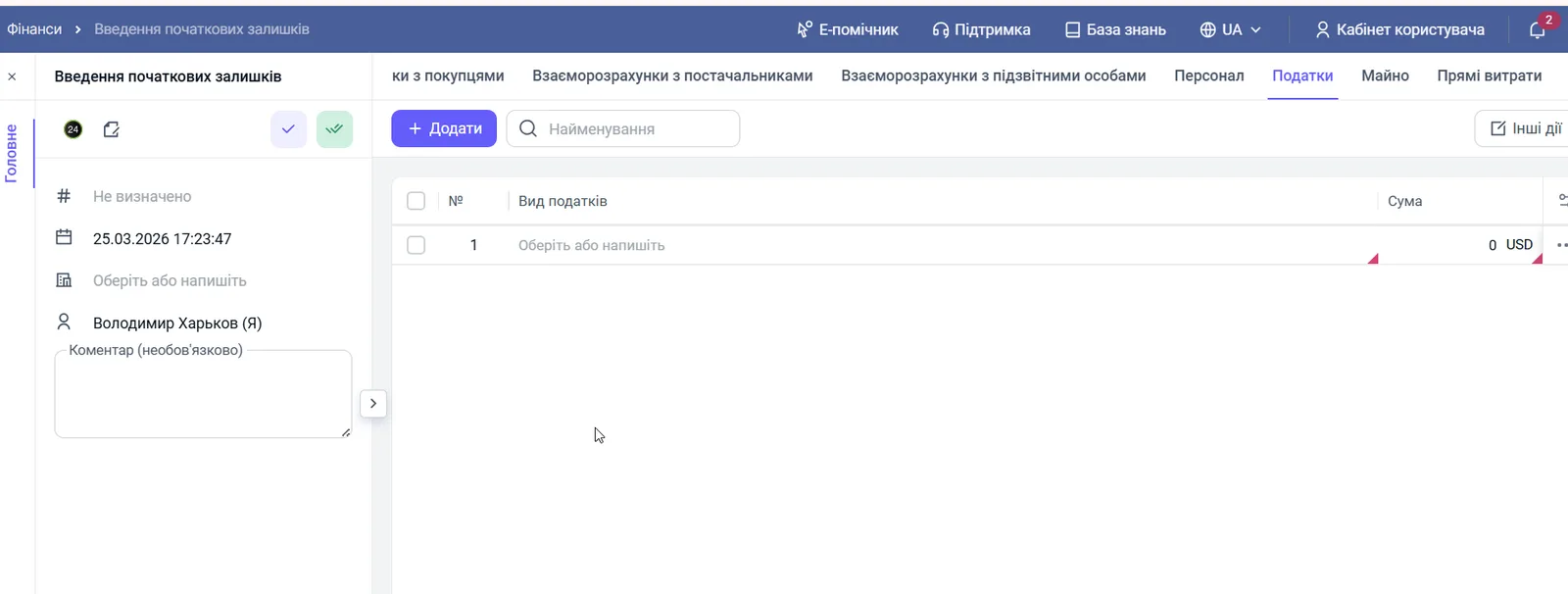
The "Taxes" tab of the "Opening balances" document records the state of settlements with the budget on the start date. Click "Add", choose the tax type from the "Taxes" directory and enter the amount in the accounting currency.
What you enter on the “Taxes” tab
The “Taxes” tab records whether the company owes the state taxes or has an overpayment that will be credited in future periods. Without it, the first tax payment in Bimp will create a “minus” that does not actually exist, or the balance sheet will be overstated.
Example. “Mebli-Trade” moves to Bimp from the 1st. Its debt for the unified social contribution (USC) for the last quarter is 15,000 UAH. It is entered on the “Taxes” tab.
Before you start
Fill in the “Taxes” directory and the chart of accounts so that the tab has something to choose from: Accounting settings. Create the Opening balances document, see Opening balances.
How to fill in the tab
Open the document, go to the “Taxes” tab and click Add.
- In the “Tax type” column, open the list and choose a tax: USC, military levy or another tax from the “Taxes” directory.
- In the “Amount” column, enter the amount of the debt or overpayment in the company’s accounting currency.
- Add other lines if needed and click Save.
How to check the result
After saving, the tax balances are taken into account in settlements with the budget and in later payments: see Period expenses, taxes and other expenses and Payment calendar.
FAQ
How do I tell a debt from an overpayment on a tax?
The old documentation does not describe the rules: the tab has only the columns "Tax type" and "Amount". Ask support how an overpayment is marked before entering one.
In which currency should I enter the amount?
In the accounting currency set for the company.
Which taxes can I choose?
The unified social contribution (USC), the military levy and other taxes set up in your company's "Taxes" directory.