
Opening balances: salary debt (the Staff tab)
On this page
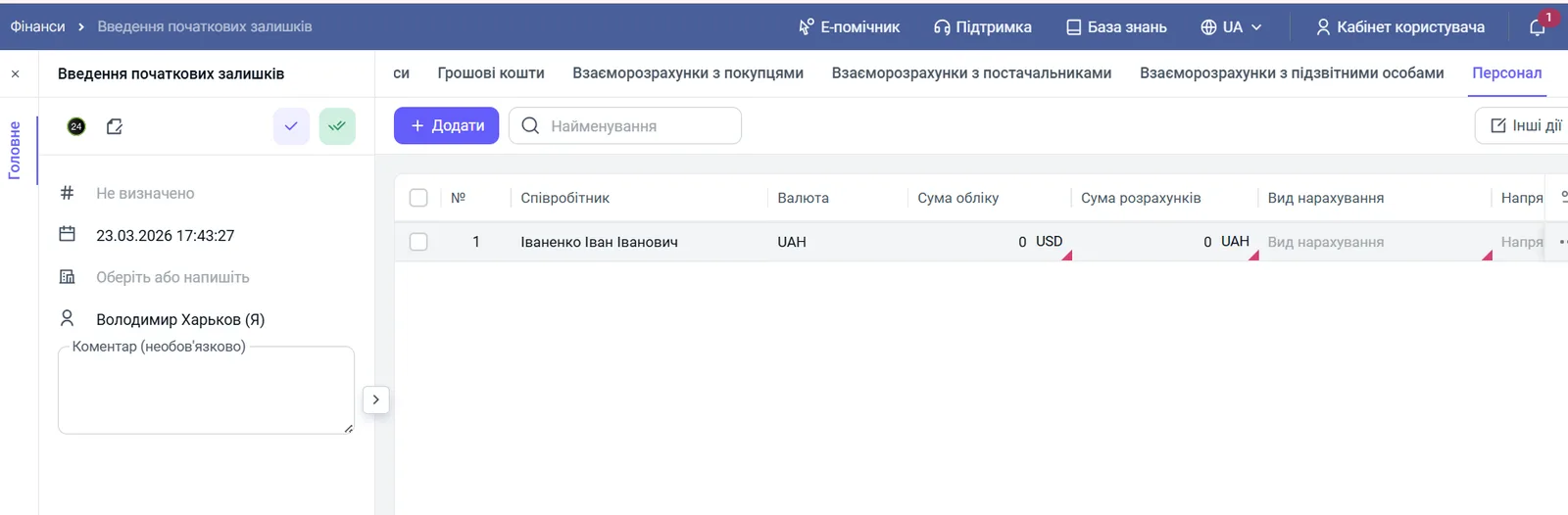
The "Staff" tab of the "Opening balances" document records unpaid salary or advances that arose before the start in Bimp. For each employee specify the currency, amount, accrual type, line of business, project and accrual month; Bimp takes the debt into account at the first payment.
What you enter on the “Staff” tab
The “Staff” tab records unpaid salary or advances to employees that arose before the move to Bimp. The system takes these amounts into account at the first payout from the cash desk or bank and does not allow the debt to be paid twice.
Example. The company “Mebli-Top” started working in Bimp on 1 March. For February there is a debt of 10,000 UAH to the installer Oleksii. It is entered on the “Staff” tab so that in March Bimp sees the debt and lets you pay it off.
Before you start
- Create the Opening balances document: Opening balances.
- Add employees to the directory.
- Set up accrual types and lines of business and projects.
How to fill in the “Staff” tab
Open the document, go to the “Staff” tab and click Add.
- “Employee”: choose the full name from the directory.
- “Currency”: the currency the debt was accrued in.
- “Settlement amount”: the actual amount of the debt in the settlement currency.
- “Accounting amount”: the amount in the accounting currency; specify it if the settlement currency differs from the main one.
- “Accrual type”: what the company owes for, for example “Salary”, “Bonus”, “Piecework”.
- “Line of business” and “Project”: link the amount to a line of business or project.
- “Accrual document”: the internal document the debt arose from. If there is no document, Bimp will create it automatically.
- “Accrual month”: the month and year the balance was formed for. Specify it exactly: profit and loss reports by period depend on it.
- Click Save.
How to check the result
The debt is visible in the Salary accrued and paid report. Accruals and payments are then managed as described in the article Salary accrual.
FAQ
Why specify the Accrual month?
The accrual month ties the debt to the period it arose in. This lets you build profit and loss reports for specific months, even if the payment is made later.
What if there is no accrual document?
Leave the "Accrual document" field empty: Bimp will create the document automatically.
Can I enter an overpayment or advance to an employee?
The tab is meant for the company's debt and for advances to employees that arose before the transition. Check the interface for the exact way to mark an overpayment.