
Automatic warehouse selection by line of business
On this page
If your company has lines of business (wholesale, retail, service) with separate warehouses, Bimp can fill in the warehouse in a Customer order automatically. Turn on the switch "Automatically fill in the warehouse assigned to the line of business" in the accounting settings and specify the "Warehouse" in the card of each line of business in the reference list.
What automatic warehouse selection does
Automatic warehouse selection lets you assign a separate warehouse to each line of business, and Bimp fills it in a Customer order by itself. This prevents mistakes when a manager does not remember which warehouse wholesale ships from and which one retail ships from.
Examples.
- A wholesale department manager chooses a contract with the line of business “Wholesale”, and Bimp immediately fills in “Warehouse No. 2” with wholesale batches.
- A manager chose “Wholesale” by mistake and then changed the line of business to “Retail”: the warehouse changes automatically to “Main”.
- No warehouse has been assigned yet to the new line of business “Service”: the “Main warehouse” is filled in.
- A particular order needs warehouse No. 3: the manager changes the warehouse manually, and the line of business does not change.
How to turn on automatic warehouse selection
Automatic selection is turned on with one switch in the company settings.
- Open Company settings and the “Accounting settings” tab.
- Turn on the switch “Automatically fill in the warehouse assigned to the line of business”.
- Save the changes.
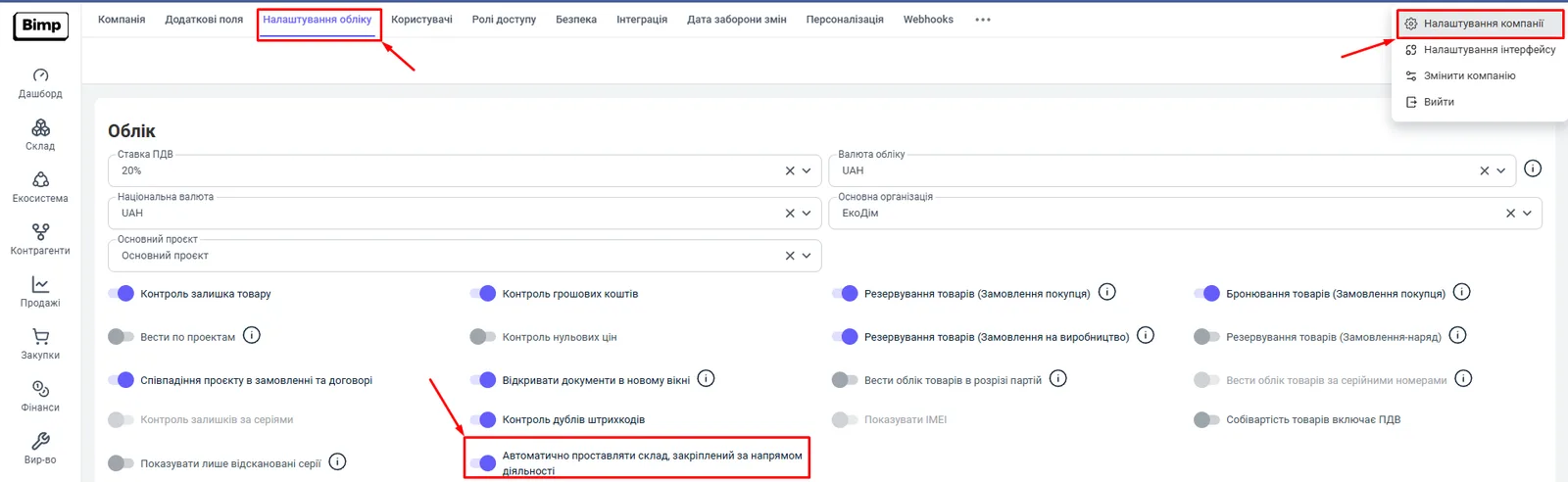
The other parameters on this tab are described in the article Accounting settings.
How to assign a warehouse to a line of business
You assign a warehouse in the line of business card in the reference list.
- Open Directories and the “Lines of business” tab.
- Open the card of the line of business you need, for example “Wholesale”.
- In the “Warehouse” field, choose the warehouse that should be filled in automatically.
- Click Save.
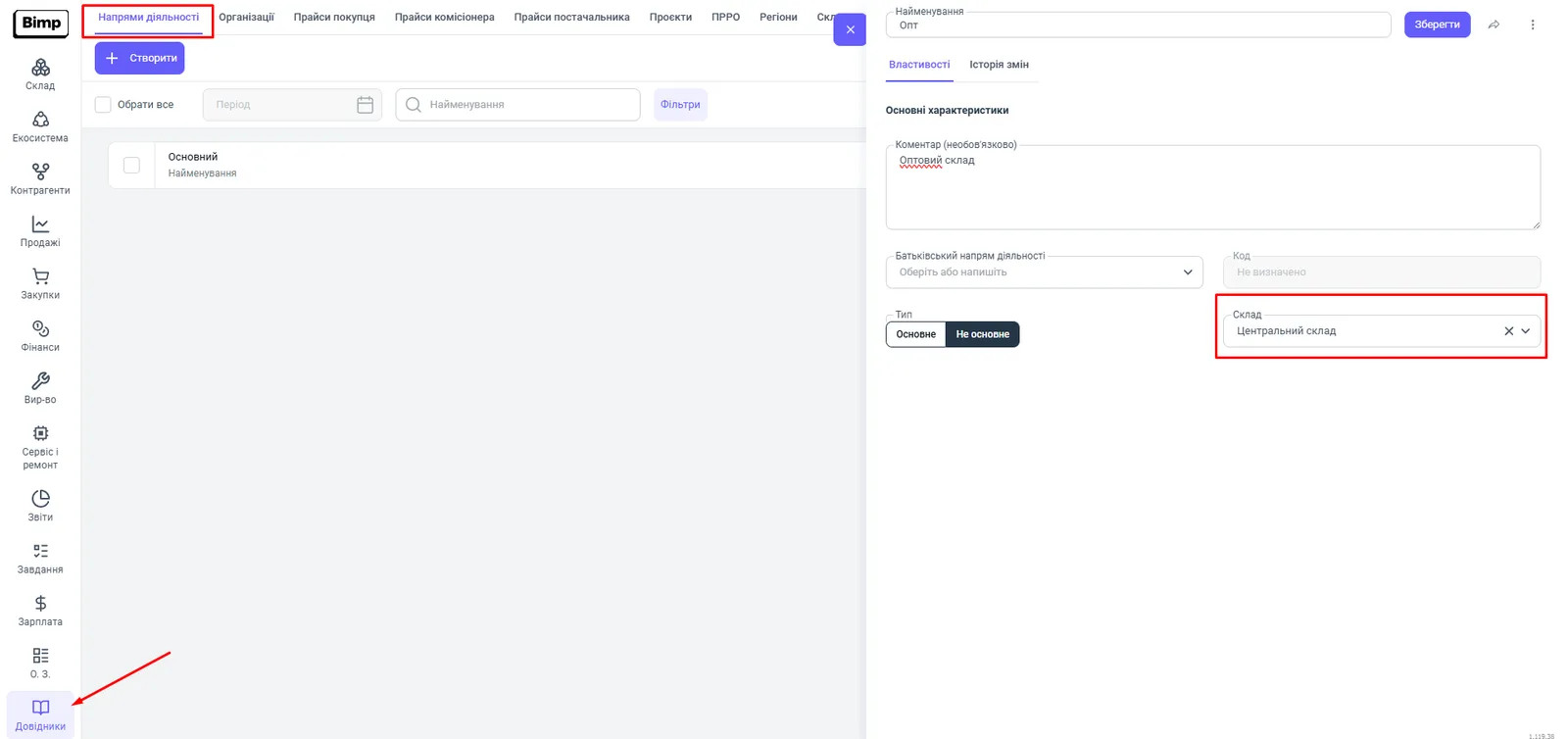
If the “Warehouse” field is empty, Bimp uses the “Main warehouse”. For how to create lines of business, see Projects and lines of business; for warehouses, see Warehouses and stores.
How it works in a Customer order
When the switch is on, the warehouse in a Customer order changes automatically.
| Action in the order | Result |
|---|---|
| A “Contract” is chosen | the warehouse is pulled in by the line of business of the contract |
| The “Line of business” is changed | the warehouse changes according to the settings of the line of business |
| The warehouse is changed manually | the line of business does not change |
If the switch is off, Bimp works with the standard algorithm and does not change the warehouse when you choose a line of business. The warehouse in the order determines where the goods are reserved: see Reserving goods.
FAQ
Which warehouse is filled in if no warehouse is specified for the line of business?
The "Main warehouse": the system uses it by default, so the document is never left without a shipping source.
Does the line of business change if I change the warehouse in the order manually?
No. Changing the warehouse manually does not change the line of business, and the system remembers the warehouse you chose manually.
What happens if the switch in the settings is off?
Bimp works with the standard algorithm and does not change the warehouse automatically when you choose a contract or a line of business.
More about this in Bimp: Sales in Bimp