
One payment for several orders in different currencies
On this page
To close one counterparty's orders in different currencies with a single payment, create a separate contract for each currency. Then, in the Customer payment document, choose all the contracts you need, allocate the amount and, if needed, change the "Settlement rate". The remainder after allocation automatically becomes an advance on the contract.
When you need to allocate between currencies
Allocation between currencies is needed when a counterparty has Customer orders in different currencies (for example, UAH and USD) but pays with one transfer. In Bimp, the currency is tied to the contract, so one payment serves several contracts.
Before you start: a separate contract for each currency
For each currency, the counterparty card must have a separate contract, and the orders must be issued under the corresponding contract.
- Open the counterparty card and go to the “Contracts” tab.
- Choose a project and click Add to create a contract.
- Create separate contracts for each currency, for example “Contract UAH” and “Contract USD”.

For how to set up a contract and the settlement rate, see Customer contract and Individual currency rate in a contract.
How to allocate a payment between contracts
- Create a Customer payment document for the total amount you received: see Customer payment.
- Choose the customer.
- In the “Contract” field, choose both contracts. The orders of these contracts appear in the table automatically.
- Click Allocate payment amount or enter the amount manually for each row. Specify which part of the payment goes to each contract and order.
- Save the document.
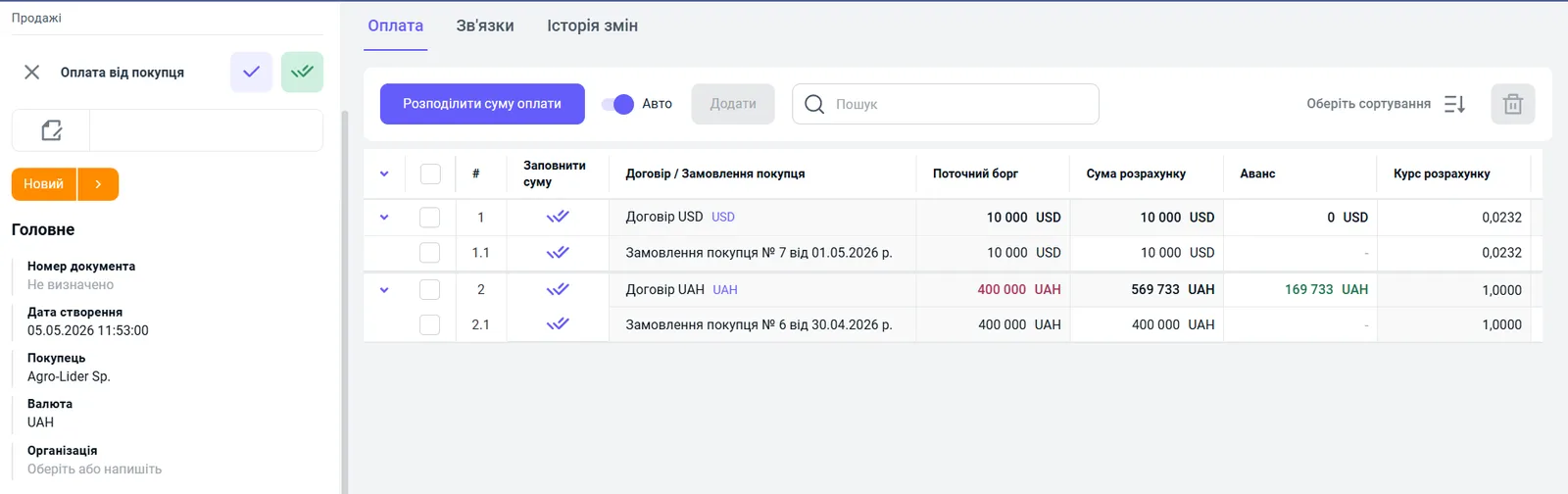
If the payment amount is larger than the total of the orders you allocate it to, the difference automatically becomes an advance on the balance of the chosen contract. In the screenshot above, the advance of 169,733 UAH is recorded on the hryvnia contract.

How to change the settlement rate
The rate at which the payment closes an order in another currency can be changed manually in the “Settlement rate” column of the payment table. This applies to orders in USD, EUR and other currencies that differ from the document currency.
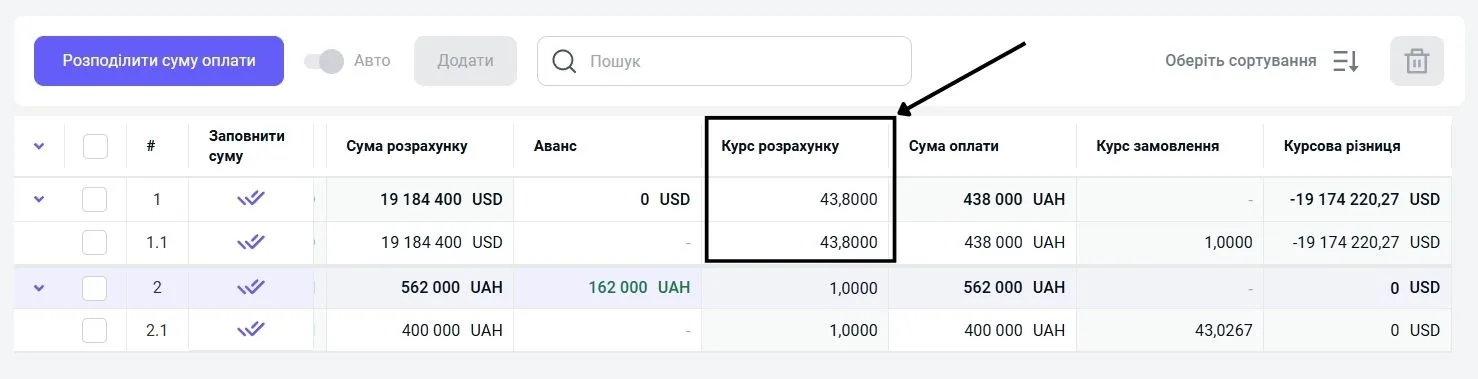
Bimp shows the difference between the order rate and the settlement rate in the “Exchange rate difference” column.
What happens after saving
After saving, the payment is applied to the corresponding orders within their currencies. The remainder goes to the contract’s advance, and the exchange rate difference is recorded in the document. Debts and advances are visible in the Settlements with customers report.
FAQ
How do I close orders in hryvnias and in dollars with one payment?
Create separate contracts for UAH and USD, choose both contracts in the Customer payment, click "Allocate payment amount" and specify which part of the amount goes to each order.
Where does the remainder go if the payment is larger than the total of the orders?
The difference is automatically counted as an advance on the balance of the chosen contract.
Can I change the rate at which a payment in another currency is closed?
Yes. In the table part of the payment, you can change the rate manually in the "Settlement rate" column.
More about this in Bimp: Sales in Bimp