
Production Progress report: ordered, produced, shipped
On this page
The Production Progress report shows, for each Production order, how much was ordered, produced, still has to be made and shipped to the customer, in units and in amounts. To run it, open "Reports → Production Progress", select a period and click "Generate report".
What the Production Progress report is for
The Production Progress report shows how Production orders are being fulfilled in one table: what was ordered, what has already been produced, how much is left and what has been handed over to the customer. Use it to:
- Inform the customer. Of 10 ordered tables, 8 are produced, so the manager can give a realistic shipment date.
- Set priorities. A large “Remaining” value on urgent orders is a signal to move people to those areas.
- Keep the workshop and sales in sync. The sales department sees what is already ready to ship and what is still at the assembly stage.
General report features are described in Reports in Bimp.
Which documents feed the report
| Document | What it gives the report |
|---|---|
| Production order | the plan: the “Ordered” columns |
| Assembly | the fact of production: the “Produced” column |
| Sales of goods and services (sale) | handing the product over to the customer: the “Shipped” column |
See Production order, Assembly and Production in Bimp: overview.
How to run the report
To see the production progress, open the report, select a period and click the generate button.
- Open Reports → Production Progress.
- Select a period in the calendar, for example 01.07.2026 – 04.08.2026.
- If needed, set filters in the left panel.
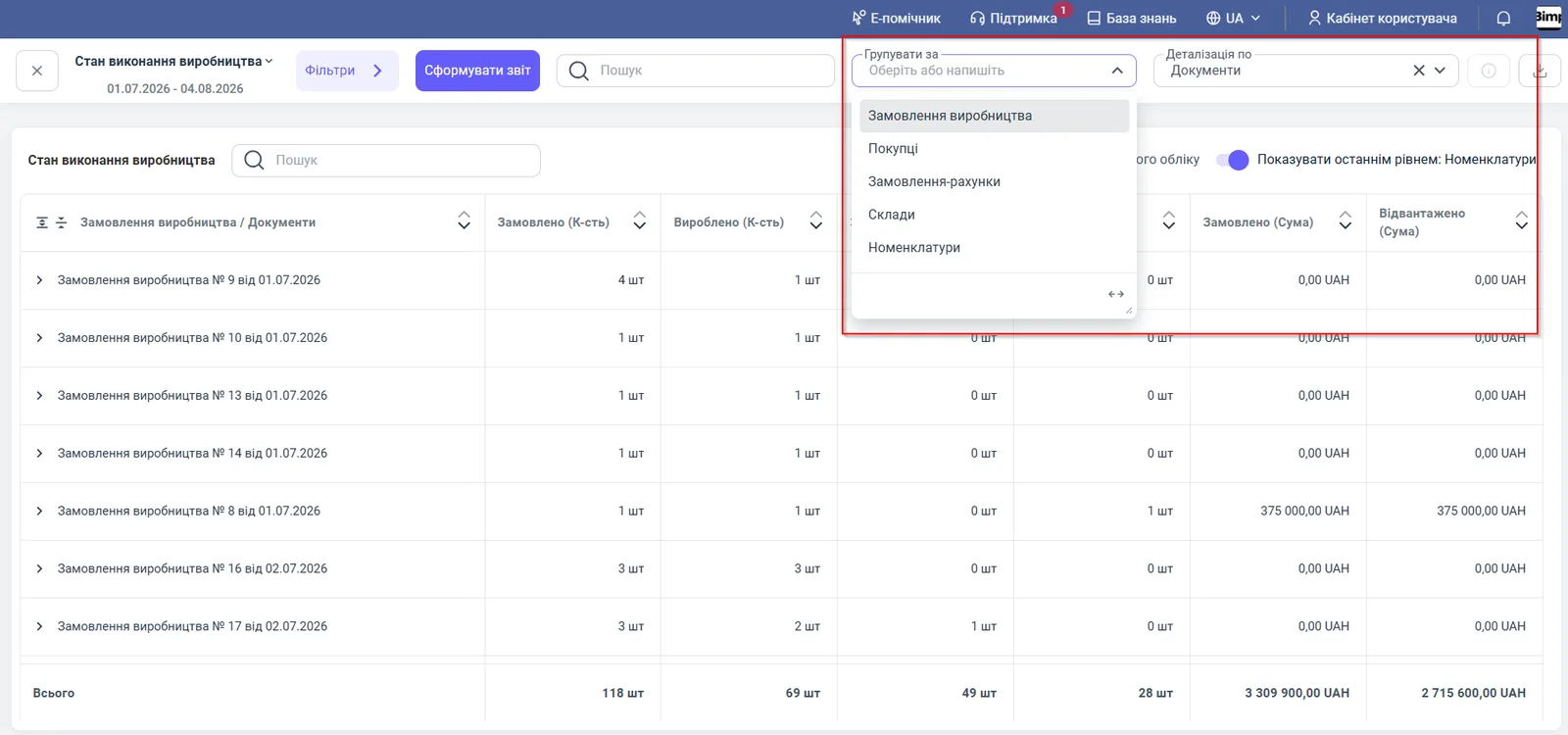
- Select “Group by” and “Detail by”.
- Click Generate report. The table does not refresh automatically after any change of parameters.
You can save your regular settings: enter a name in the “New template…” field and click Save as new template.
Indicators
| Column | What it means |
|---|---|
| “Production orders” / “Documents” | Production orders and related documents (assembly, sale) |
| “Ordered (Qty)” | the quantity to be produced under the order |
| “Produced (Qty)” | the quantity actually produced by posted assembly documents |
| “Remaining (Qty)” | “Ordered” minus “Produced”: what still has to be made |
| “Shipped (Qty)” | how much of the produced goods has been handed over to the customer |
| “Ordered (Amount)” | the value of what was ordered, in the accounting currency |
| “Shipped (Amount)” | the value of what was shipped, in the accounting currency |
The “Total” row sums all columns for the period.
Filters and grouping
| Parameter | Value |
|---|---|
| “Customer”, “Lines of business”, “Project”, “Contract” filters | selection by customer, line of business, project or contract |
| “Order invoice” filter | fulfillment of items from a specific Customer order |
| “Production orders”, “Assembly” filters | one or several production tasks, or a production document |
| “Only Production orders based on Customer orders” switch | only production for customer orders (MTO) |
| “Group by” | Production orders (default), customers, order invoices, warehouses, products |
| “Detail by” | documents, order invoices, warehouses, products, customers |
| “Show as last level: Products” switch | expands an order to finished products and semi-finished goods |
| “Management accounting currency” switch | converts amounts to the base currency |
How to read the numbers: an example
Based on the report data for July 2026:
| Production order | Ordered | Produced | Remaining | Shipped |
|---|---|---|---|---|
| No. 17 dated 02.07.2026 | 3 pcs | 2 pcs | 1 pc | 0 pcs |
| No. 8 dated 01.07.2026 | 1 pc | 1 pc | 0 pcs | 1 pc |
| No. 14 dated 01.07.2026 | 1 pc | 1 pc | 0 pcs | 0 pcs |
In order No. 17, 1 pc is left to make, so the workshop gets an exact task. Order No. 8, worth 375,000 UAH, is fully closed: produced and shipped. Order No. 14 is produced but waiting for shipment. The report totals: ordered 118 pcs, produced 69, remaining 49.
Why the numbers do not match
The product is made, but “Produced” is zero. The column is filled only by posted Assembly documents. Check that the assembly is posted and linked to the Production order.
“Shipped” is less than “Produced”. The finished goods have not been shipped yet. Create a sale based on the Customer order.
The report does not show the order you need. Check the period and filters. If the “Only Production orders based on Customer orders” switch is on, internal Production orders are not shown.
Amounts do not match the Customer order. The report shows amounts in the accounting currency. Turn the “Management accounting currency” switch on or off and compare in the same currency.
FAQ
Where does the “Produced” column in the Production Progress report come from?
From posted Assembly documents. Until an assembly is posted, the produced goods do not appear in the report.
How can I see only production for customer orders?
Turn on the “Only Production orders based on Customer orders” switch in the filters. Internal production needs are filtered out.
Why did the table not change after I changed the filters?
The report does not refresh automatically. After changing the period or filters, click “Generate report”.
How do I find a specific Production order in a large report?
Type its number, for example “No. 17”, or the product name in the “Search” field above the table.