
Cash balance report: money in accounts and cash desks on a date
On this page
The Cash balance report shows the actual amounts in the company's bank accounts, cash desks, and bank cards on the selected date. Open **Reports → Cash balance**, set the date, and click "Generate report". To see the overall total in a single currency, turn on the "Management accounting currency" switch.
What the report is for
The Cash balance report shows how much money the company has on a specific date, broken down by each bank account, cash desk, and bank card. You need it to check whether there is enough money for salaries, taxes, and rent, without collecting data from bank clients and cashiers manually.
The report reflects actual (posted) balances. It does not take into account money reserved for payments or planned payments from the payment calendar. For the movement of funds over a period, see the Cash flow report. General report mechanics are described in the article Reports in Bimp.
How to generate the report
To get the balances, select a date and generate the report.
- Open Reports → Cash balance.
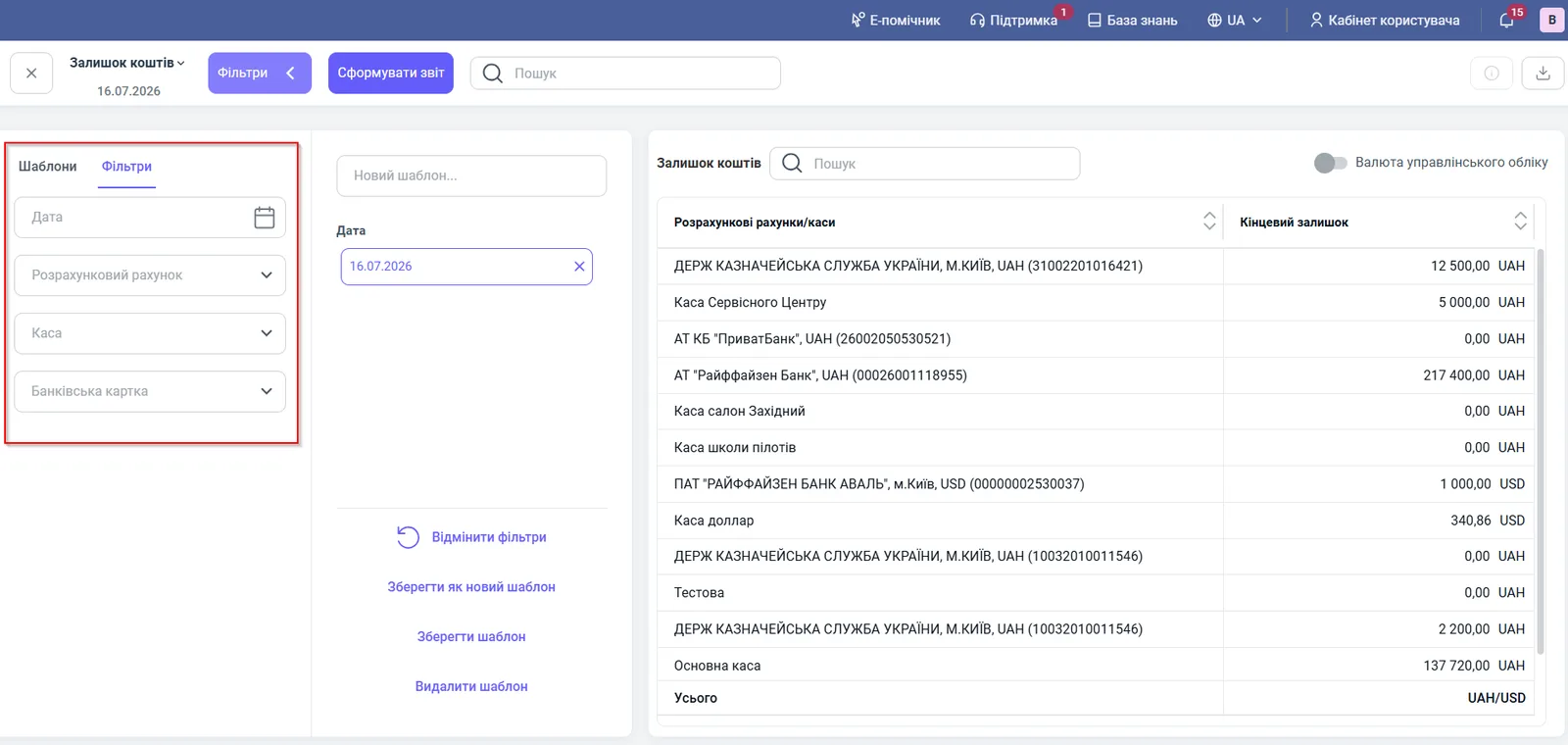
- Open the left Filters panel and in the “Date” field select a day, for example 16.07.2026.
- If needed, select “Bank account”, “Cash desk”, or “Bank card”.
- Click Generate report.
Report figures
The table has one column with the amount, and several when the currency switch is on.
| Column | What it means |
|---|---|
| “Bank accounts/cash desks” | All the company’s accounts, cash desks, and cards, each in a separate row |
| “Closing balance” | The actual amount on the selected date in the currency of the account or cash desk |
| “Closing balance at internal rate” | Appears when “Management accounting currency” is on: the balance in the base currency at the internal rate |
| “Closing balance at the rate on the document creation date” | Appears when “Management accounting currency” is on: the balance in the base currency at the rate on the document dates |
| “Total” | The overall total |
Filters and grouping
The report has one date filter and three filters for fund sources.
| Filter | What it does |
|---|---|
| “Date” | The day for which you need the balance |
| “Bank account” | Shows only the selected bank account |
| “Cash desk” | Shows only the selected cash desk |
| “Bank card” | Shows individual cards |
The “Management accounting currency” switch in the top right corner of the table works as follows:
- off (default): balances are in the currency of each account or cash desk, and the “Total” row does not calculate an amount because the currencies differ;
- on: all amounts are converted to the base accounting currency, and the “Total” row contains the overall amount.
You can save the configured filters with the Save as new template button, so that every morning you open the accounts you need in one click.
Usage example
On 16.07.2026, a manager checks whether there is enough money to pay salaries.
- They open the report, set the date 16.07.2026, and click Generate report.
- They see the balances: “Main cash desk” 137,720.00 UAH, Raiffeisen Bank (UAH) 217,400.00 UAH, “Dollar cash desk” 340.86 USD.
- They turn on “Management accounting currency” to get the overall amount in hryvnia in the “Total” row.
Why the figures do not match
The balance does not match the bank statement. The report uses only posted documents. Check that all bank transactions are imported and matched: see Processing bank statement transactions.
The “Total” row does not show an amount. Turn on “Management accounting currency” and click Generate report.
The balance on a date does not match the current one. Check the “Date” field in the filter: the report shows the state on exactly that date, not today.
The balance differs from the Cash flow report. That report shows turnovers for a period, not the balance on a date, so they cannot be compared directly.
FAQ
Why is there no "Total" row with an amount in the Cash balance report?
The total is calculated only when the "Management accounting currency" switch is on and all balances are converted to one currency. If the switch is off, accounts in different currencies are not added up.
Does the report take into account money reserved for future payments?
No. The report shows only actual balances in accounts and cash desks. Planned payments from the payment calendar are not included.
How can I quickly find the cash desk or account I need in the report?
Use the "Search" field above the table or the filters "Bank account", "Cash desk", "Bank card". For regular checks, save the filters as a template.