
Trial Balance: balances and turnovers by accounting accounts
On this page
The Trial Balance in Bimp summarizes, for a period, the opening balance, debit and credit turnovers and the closing balance for each accounting account. Open "Reports → Trial Balance", enter a period and click "Generate report". Correct figures require opening balances on the organization's accounts.
What the report is for
The Trial Balance shows the balances and turnovers on all accounting accounts and sub-accounts for a selected period in one window. The report is needed to check that double entry is correct, to reconcile goods, money and settlements with customers and suppliers, and to find a discrepancy in a specific account.
Example. At the end of the month, the finance director opens the Trial Balance and looks at accounts 30 “Cash”, 31 “Bank” and 28 “Goods and products”: the debit turnover of account 28 shows how much goods were purchased for, and the credit turnover of that account together with the debit of account 90 “Cost of sales” shows what part was written off to cost price. General report mechanics are described in Reports in Bimp.
Before you start
The Trial Balance is correct only if there are opening balances on the organization’s accounting accounts. Fill in the balances file for the date you need and repost the documents from that date. The file template is provided by Bimp technical support. The general procedure is described in Entering opening balances.
How to run it
To run the Trial Balance, enter a period and, if needed, the organization and account.
- Open Reports → Trial Balance.
- Open the left Filters panel and enter the “Period”, for example 01.07.2026 – 31.07.2026.
- If needed, select “Organization” and “Account”.
- In the top panel, set “Group by” and “Detail by”.
- Click Generate report.
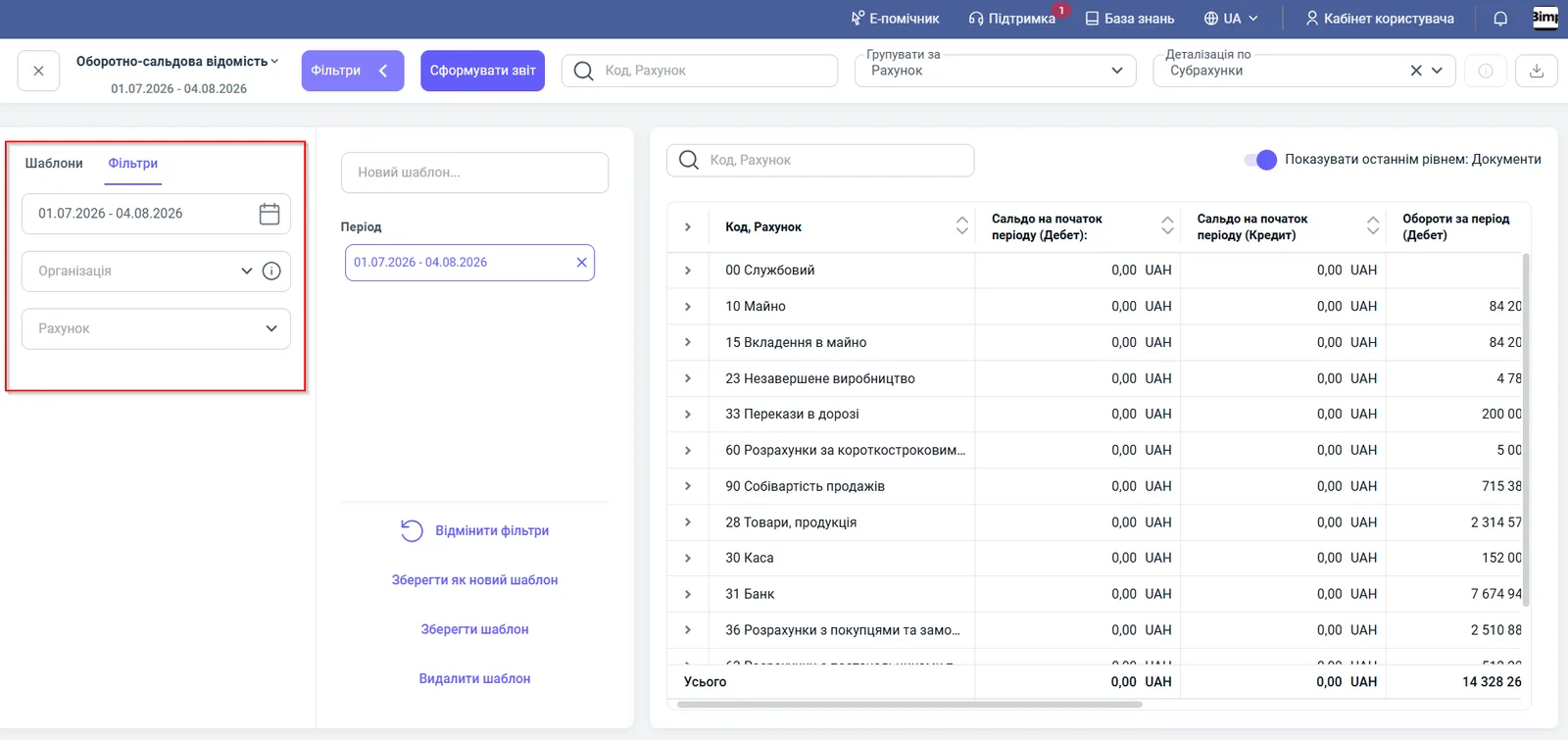
After you change filters, the data refreshes only when you click Generate report.
Indicators
The table has seven columns.
| Column | What it means |
|---|---|
| “Code, Account” | The number and name of the accounting account, for example 31 “Bank”, 90 “Cost of sales” |
| “Opening balance (Debit)” | The balance of assets or receivables at the start of the period |
| “Opening balance (Credit)” | The balance of liabilities, sources of funds or payables at the start of the period |
| “Turnovers for the period (Debit)” | The sum of operations on the debit of the account for the period |
| “Turnovers for the period (Credit)” | The sum of operations on the credit of the account for the period |
| “Closing balance (Debit)” | The active balance at the end of the period |
| “Closing balance (Credit)” | The passive balance at the end of the period |
The “Total” row sums all accounts. Total debit turnovers must equal credit turnovers.
Filters and grouping
Filters and grouping determine which accounts you see and how deeply.
| Element | What it does |
|---|---|
| “Period” | The time range of the analysis |
| “Organization” | Only the selected organization (a legal entity or a sole proprietor (FOP)) |
| “Account” | Only the selected account or group of accounts |
| “Group by” | “Account” by default |
| “Detail by” | The drill-down level, for example “Sub-accounts” |
| “Show as last level: Documents” | Expands an account to the posted documents |
| The “Code, Account” field above the table | Quick search: enter 31 or 28 and only the account you need remains |
Save frequently used filters with the Save as new template button.
Example of use
An accountant reconciles settlements with customers.
- They open the Trial Balance for the period and enter 36 in the “Code, Account” field.
- In the row of account 36 “Settlements with customers and clients”, in the “Closing balance (Credit)” column, they see 4,029,300.00 UAH: these are advances received from customers.
- They turn on “Show as last level: Documents” and in a few seconds find the deals that produced this balance.
Why the numbers do not match
The opening balance is zero or wrong. Opening balances on the organization’s accounts were not entered, or documents were not reposted after they were entered. See the “Before you start” section.
Debit and credit turnovers in the “Total” row are not equal. There is a discrepancy in the accounting. Limit the report to one account, expand to documents and find the operation with a one-sided entry. If the cause is not obvious, contact support.
The data did not change after selecting a new period. Click Generate report: filters alone do not refresh the table.
An account balance does not match the Cash Balance or Settlements reports. Check that the same organization and the same date are selected. The Cash Balance and Settlements with Counterparties reports have their own filters.
FAQ
Why are opening balances needed for the Trial Balance?
The Trial Balance calculates the opening balance for the period from the opening balances on the organization's accounting accounts. Without them the opening balance will be zero and the closing balances wrong. Fill in the balances for the date you need and repost the documents from that date.
What does equality of debit and credit turnovers in the Trial Balance mean?
In the “Total” row, total debit turnovers must equal credit turnovers. If they are equal, double entry is balanced correctly; if not, there is a discrepancy in the accounting.
How do I see the documents that make up a turnover in the report?
Turn on the “Show as last level: Documents” switch. Each account or sub-account expands to the posted documents.